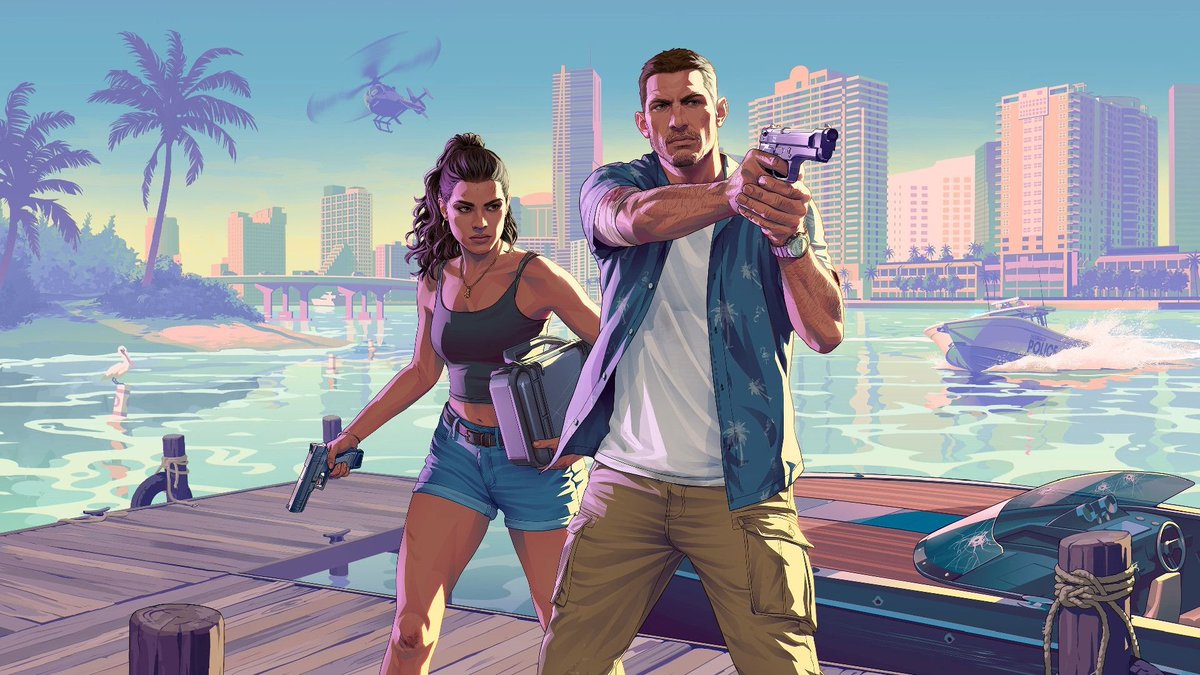
Marina'daki Neon Suç Oyunu Kapağı
Bu komut, pastel tonlardaki tropikal bir şehir silüeti önünde bir iskelede iki silahlı kahramanın yer aldığı stilize bir aksiyon oyunu posteri sahnesi oluşturur; GTA'dan ilham alan ana görseller veya sinematik tanıtım görüntüleri için idealdir.
Bu Anime ve Oyun için bir GPT Image 2 örnek senaryosudur. Benzer görseller oluşturmak için aşağıdaki hazır metni kullanın ve yeniden kullanmadan önce Awesome GPT Image 2 Prompts atıfını ve ticari kullanım haklarını inceleyin.
Tüm komut istemi setine mi ihtiyacınız var? Şunu kullanın: Anime ve Oyun Daha fazla ilgili örnek için konu merkezini ziyaret edin veya açın. GPT Image 2 istem kataloğu Tam örnek dizin, yeniden kullanılabilir yapılar ve kaynak atfı için.
Free 1K preview
Generate one preview image instantly, no sign-up required.
1635/4000
İpucu
Kopyalamaya hazır istemi
A stylized cinematic illustration inspired by a neon-soaked Florida crime-game cover scene at sunset, showing two armed protagonists standing heroically on a wooden marina dock in the foreground, facing the viewer. The scene has a polished modern video game key-art look with pastel vaporwave colors, warm pink and peach highlights, turquoise water, and a clear blue sky. On the right, a tall athletic young man in a white t-shirt, open short-sleeve blue tropical print shirt, tan cargo pants, and a wristwatch stands in a dominant forward pose with both hands aiming a silver semi-automatic pistol toward the camera. On the left, a curvy young woman with long dark curly hair tied half-up wears a black crop top, denim shorts, layered gold necklaces, and a crossbody bag at her hip, holding a handgun pointed downward in a relaxed but ready pose. Both characters are centered and framed like iconic action-game cover art. Behind them is a bright waterfront city skyline with high-rise hotels and apartment towers, a low bridge crossing the water, several palm trees on the left, and glossy reflections across the bay. Include 1 helicopter in the upper left sky, 1 police speedboat racing across the water on the right with a white wake, 1 sleek black speedboat docked in the lower right foreground with visible bullet cracks in the windshield, and 1 white seabird standing in the shallow water near the left side. Strong late-afternoon sunlight, long shadows, saturated retro Miami palette, crisp cel-shaded digital painting style, dramatic action-poster composition, ultra-clean lines, highly detailed environment, wide 16:9 framing.
Best for
- - Anime ve Oyun visual exploration
- - Image generation and reference-image edits
- - Reusable briefs that keep source attribution visible
Change these parts
- - Subject, product, character, or scene
- - Aspect ratio, camera, lighting, and background
- - Brand, text, color, and output constraints
Recommended model and settings
- - Model: gpt-image-2
- - Input mode: Metinden görsele
- - Aspect ratio: source
- - Commercial status: review original source
How to use this prompt
- 1. Copy the prompt and preserve its structure for the first test.
- 2. Replace the subject, context, and publishing channel.
- 3. Change one camera, lighting, or style variable per iteration.
- 4. Inspect the output, source, text, and rights before reuse.
Limitations, source, and reuse cautions
- - Generated output is an editable draft, not factual, legal, or rights evidence.
- - Review the linked source, people, brands, logos, text, and third-party media before commercial use.
Awesome GPT Image 2 Prompts kaynağından içe aktarılmıştır. Kaynak belirtilmesi zorunludur. Ticari kullanım durumu allowed şeklindedir; ücretli kullanım öncesinde kaynak haklarını inceleyin.
Bu kategoride daha fazla vaka
Kategoriye, giriş modu uyumluluğuna, kaliteye ve düşük riske göre önceliklendirilmiştir.

Manga Desert Radio Telescope Road Trip
Metinden görsele

Grumpy Rhino Storybook Illustration
Metinden görsele

Female Clown Cyborg Portrait
Metinden görsele

Imperial Research Bunker on Volcanic Planet
Metinden görsele

Android Quantum Lab Workstation
Metinden görsele

Martial Arts Legend Character Bible Sheet
Metinden görsele
Yeniden kullanım ve kaynak notları
Vaka önizlemesini yaptıktan sonra bu istemi güvenle kullanın.
- 1.Komut istemini kopyalayın veya oluşturma düğmesini kullanarak doğrudan Dovoo'da açın.
- 2.Değişkenleri, en boy oranını ve referans görselleri kendi kullanım durumunuza göre ayarlayın.
- 3.Yayınlamadan veya ücretli kullanımdan önce, kaynak haklarını, atıf gerekliliklerini ve marka veya benzerlik risklerini doğrulayın.