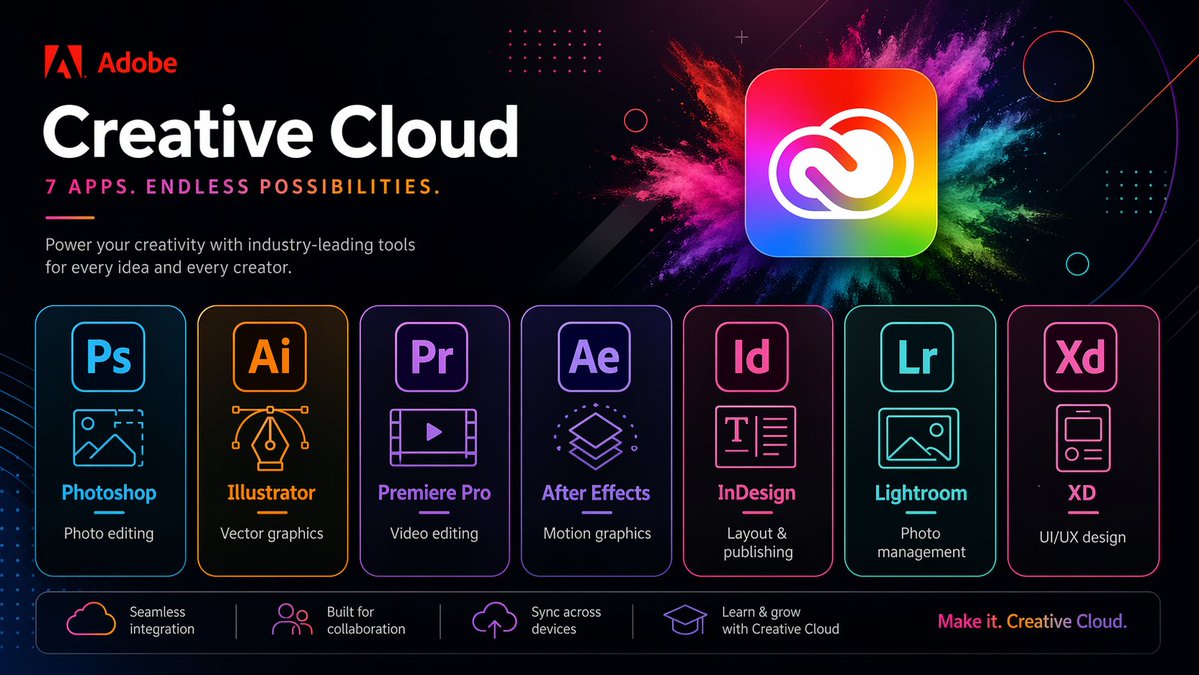
Neon Yaratıcı Bulut Tanıtım Posteri
Fütüristik neon bir tasarımla yedi Creative Cloud uygulamasını sergileyen şık, Adobe tarzı bir pazarlama posteri; markalı teknoloji reklamları veya uygulama paketi tanıtımları oluşturmak için idealdir.
Bu Ürün ve Ticari için bir GPT Image 2 örnek senaryosudur. Benzer görseller oluşturmak için aşağıdaki hazır metni kullanın ve yeniden kullanmadan önce Awesome GPT Image 2 Prompts atıfını ve ticari kullanım haklarını inceleyin.
Tüm komut istemi setine mi ihtiyacınız var? Şunu kullanın: Ürün ve Ticari Daha fazla ilgili örnek için konu merkezini ziyaret edin veya açın. GPT Image 2 istem kataloğu Tam örnek dizin, yeniden kullanılabilir yapılar ve kaynak atfı için.
Free 1K preview
Generate one preview image instantly, no sign-up required.
Free text preview doesn’t preserve reference-image consistency.
4000/4000
İpucu
Kopyalamaya hazır istemi
{
  "type": "neon promotional tech poster",
  "brand": {
    "name": "Adobe",
    "logoPosition": "top left"
  },
  "scene": {
    "style": "Fashionable futuristic tech ad, dark mode, glossy neon UI, high contrast, high-end marketing visuals",
    "background": "Deep black to deep navy blue gradient, with subtle diagonals, subtle glows, dot matrix grid embellishments, thin circular outlines, tiny spark particles and abstract geometric overlays",
    "accentEffect": "Large multi-colored powder explosion effect behind the main app icon, blending magenta, pink, purple, blue, cyan, green and yellow"
  },
  "text": {
    "headline": "Creative Cloud",
    "subheadline": "Premiere Pro",
    "body": "Empower every idea and creator with industry-leading tools.",
    "footerTagline": "Create endlessly. Creative Cloud."
  },
  "layout": {
    "sections": [
      {
        "title": "app cards",
        "position": "top left",
        "count": 3,
        "labels": [
          "Photoshop",
          "Creative Cloud",
          "Premiere Pro"
        ]
      },
      {
        "title": "feature strip",
        "position": "bottom bar",
        "count": 1,
        "labels": [
          "Seamless integration"
        ]
      },
      {
        "title": "Application card",
        "position": "Middle row",
        "count": 7,
        "labels": [
          "Photoshop",
          "Illustrator",
          "Premiere Pro",
          "After Effects",
          "InDesign",
          "Lightroom",
          "XD"
        ]
      },
      {
        "title": "Function bar",
        "position": "Bottom",
        "count": 4,
        "labels": [
          "Seamless integration",
          "Built for collaboration",
          "Cross-device sync",
          "Learn and grow with Creative Cloud"
        ]
      }
    ],
    "appCardArrangement": "Seven evenly distributed rounded rectangle cards, arranged horizontally in the lower center",
    "footerTaglinePosition": "Bottom right corner"
  },
  "objects": {
    "mainIcon": {
      "shape": "Rounded square app icon",
      "colors": "Rainbow gradient fill with a white Creative Cloud logo",
      "position": "Top right corner",
      "glow": "Soft outer glow"
    },
    "appCards": [
      {
        "code": "Ps",
        "name": "Photoshop",
        "borderColor": "Electric blue",
        "icon": "Image frame with mountains and dashed crop corners",
        "description": "Photo editing"
      },
      {
        "code": "Ai",
        "name": "Illustrator",
        "borderColor": "orange",
        "icon": "Vector pen tip with Bezier curve handles",
        "description": "Vector graphics"
      },
      {
        "code": "Pr",
        "name": "Premiere Pro",
        "borderColor": "Violet",
        "icon": "Video frame with a play button",
        "description": "Video editing"
      },
      {
        "code": "Ae",
        "name": "After Effects",
        "borderColor": "Purple",
        "icon": "Stacked motion graphics layers",
        "description": "Motion graphics"
      },
      {
        "code": "Id",
        "name": "InDesign",
        "borderColor": "Bright pink",
        "icon": "Text layout page",
        "description": "Typesetting and Publishing"
      },
      {
        "code": "Lr",
        "name": "Lightroom",
        "borderColor": "Cyan",
        "icon": "Photo Landscape Frames",
        "description": "Photo Management"
      },
      {
        "code": "Xd",
        "name": "XD",
        "borderColor": "Pink",
        "icon": "Mobile App Wireframe Cards",
        "description": "UI/UX Design"
      }
    ],
    "featureBar": [
      {
        "icon": "Cloud outline",
        "text": "Seamless integration"
      },
      {
        "icon": "People icon",
        "text": "Built for collaboration"
      },
      {
        "icon": "Upload to the cloud",
        "text": "Cross-device sync"
      },
      {
        "icon": "Graduation cap",
        "text": "Learn and grow with Creative Cloud"
      }
    ]
  },
  "rendering": {
    "camera": "Front view of a poster",
    "composition": "Concise and centered business layout",
    "lighting": "Neon edge lighting and soft glow",
    "finish": "Clear vector text blending effects, exquisite advertising aesthetics, ultra-sharp typography"
  }
}
Best for
- - Ürün ve Ticari visual exploration
- - Image generation and reference-image edits
- - Reusable briefs that keep source attribution visible
Change these parts
- - Subject, product, character, or scene
- - Aspect ratio, camera, lighting, and background
- - Brand, text, color, and output constraints
Recommended model and settings
- - Model: gpt-image-2
- - Input mode: Görselden görsele
- - Aspect ratio: source
- - Commercial status: review original source
How to use this prompt
- 1. Copy the prompt and preserve its structure for the first test.
- 2. Replace the subject, context, and publishing channel.
- 3. Change one camera, lighting, or style variable per iteration.
- 4. Inspect the output, source, text, and rights before reuse.
Limitations, source, and reuse cautions
- - Generated output is an editable draft, not factual, legal, or rights evidence.
- - Review the linked source, people, brands, logos, text, and third-party media before commercial use.
Awesome GPT Image 2 Prompts kaynağından içe aktarılmıştır. Kaynak belirtilmesi zorunludur. Ticari kullanım durumu allowed şeklindedir; ücretli kullanım öncesinde kaynak haklarını inceleyin.
Bu kategoride daha fazla vaka
Kategoriye, giriş modu uyumluluğuna, kaliteye ve düşük riske göre önceliklendirilmiştir.






Yeniden kullanım ve kaynak notları
Vaka önizlemesini yaptıktan sonra bu istemi güvenle kullanın.
- 1.Komut istemini kopyalayın veya oluşturma düğmesini kullanarak doğrudan Dovoo'da açın.
- 2.Değişkenleri, en boy oranını ve referans görselleri kendi kullanım durumunuza göre ayarlayın.
- 3.Yayınlamadan veya ücretli kullanımdan önce, kaynak haklarını, atıf gerekliliklerini ve marka veya benzerlik risklerini doğrulayın.