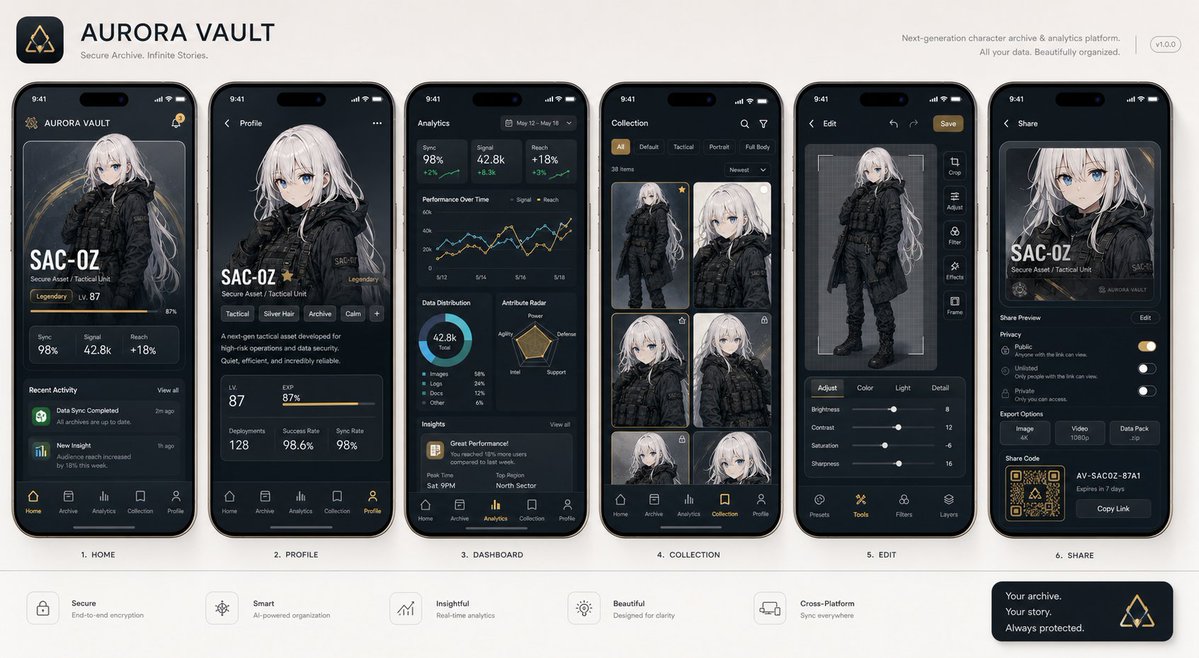
Yeni Nesil Mobil Uygulama Arayüzü Vitrini
Profesyonel mobil uygulama arayüzü ekran görüntüleri oluşturmak için tasarlanmış, görselden görsele geçiş sağlayan bir komut dosyası. Çeşitli ekranlarda tutarlı bir konu içeren bu ekran görüntüleri, Product Hunt veya Apple sunumlarına benzer bir tarzda tasarlanmıştır.
Bu Ürün ve Ticari için bir GPT Image 2 örnek senaryosudur. Benzer görseller oluşturmak için aşağıdaki hazır metni kullanın ve yeniden kullanmadan önce Awesome GPT Image 2 Prompts atıfını ve ticari kullanım haklarını inceleyin.
Free 1K preview
Generate one preview image instantly, no sign-up required.
Free text preview doesn’t preserve reference-image consistency.
İpucu
Kopyalamaya hazır istemi
With the attached subject as the protagonist, please summarize "{argument name="app type" default="a collection of screenshots for a realistic next-generation mobile app"}" into a single image. This is not an advertising poster. It is a high-quality visual such as an App Store introduction image, product design announcement, or UI case study. Accurately maintain the features, color, shape, face, clothing, and impression of the subject in the reference image. Treat the subject as the main content within the app. Do not change it to another character or product. Arrange {argument name="number of screens" default="4 to 6"} vertical smartphone screens. Make each screen different. Included screens: Home screen, detailed profile screen, analysis dashboard, collection screen, editing screen, sharing screen. UI elements: Fictional app name, tab bar, card UI, buttons, graphs, tags, short descriptions, numeric displays, icons, small notification displays. The design is a sophisticated 2026 mobile UI. Clean, practical, and with clear information design. Do not overuse glassmorphism. Text should be easy to read, primarily in English and short. Do not use real company names, app names, or logos. The background is a simple studio background. The overall look is professional like app introduction images on Dribbble, Product Hunt, or Apple. However, make it look natural as a fictional product. Priorities: UI that looks real, retention of reference image features, persuasiveness as a screenshot, and information density worthy of being saved on social media.İstem değişkenleri
Komut isteminde bulunan, düzenlenebilir argüman yer tutucuları ve varsayılan değerleri.
Best for
- - Ürün ve Ticari visual exploration
- - Image generation and reference-image edits
- - Reusable briefs that keep source attribution visible
Change these parts
- - Subject, product, character, or scene
- - Aspect ratio, camera, lighting, and background
- - Brand, text, color, and output constraints
Recommended model and settings
- - Model: gpt-image-2
- - Input mode: Görselden görsele
- - Aspect ratio: source
- - Commercial status: review original source
How to use this prompt
- 1. Copy the prompt and preserve its structure for the first test.
- 2. Replace the subject, context, and publishing channel.
- 3. Change one camera, lighting, or style variable per iteration.
- 4. Inspect the output, source, text, and rights before reuse.
Limitations, source, and reuse cautions
- - Generated output is an editable draft, not factual, legal, or rights evidence.
- - Review the linked source, people, brands, logos, text, and third-party media before commercial use.
Related prompt packs
Bu kategoride daha fazla vaka
Kategoriye, giriş modu uyumluluğuna, kaliteye ve düşük riske göre önceliklendirilmiştir.






Yeniden kullanım ve kaynak notları
Vaka önizlemesini yaptıktan sonra bu istemi güvenle kullanın.
- 1.Komut istemini kopyalayın veya oluşturma düğmesini kullanarak doğrudan Dovoo'da açın.
- 2.Değişkenleri, en boy oranını ve referans görselleri kendi kullanım durumunuza göre ayarlayın.
- 3.Yayınlamadan veya ücretli kullanımdan önce, kaynak haklarını, atıf gerekliliklerini ve marka veya benzerlik risklerini doğrulayın.