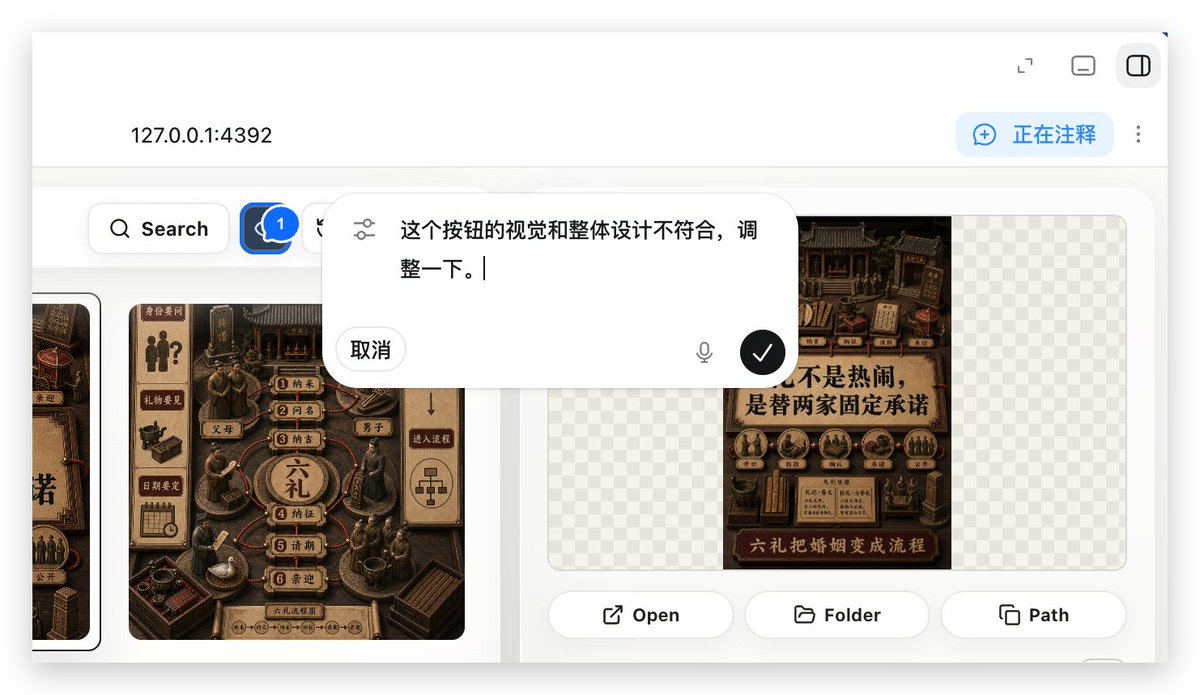
Yerel Web Uygulaması Açıklama Demosu
Web Uygulamaları Oluşturma iş akışında kullanıcı arayüzü ayarlamaları istemek için kullanılan bir açıklama katmanını gösteren gerçekçi bir yerel sunucu web uygulaması önizlemesi oluşturur.
Bu Diğer İlham Kaynakları için bir GPT Image 2 örnek senaryosudur. Benzer görseller oluşturmak için aşağıdaki hazır metni kullanın ve yeniden kullanmadan önce Awesome GPT Image 2 Prompts atıfını ve ticari kullanım haklarını inceleyin.
Tüm komut istemi setine mi ihtiyacınız var? Şunu kullanın: Diğer İlham Kaynakları Daha fazla ilgili örnek için konu merkezini ziyaret edin veya açın. GPT Image 2 istem kataloğu Tam örnek dizin, yeniden kullanılabilir yapılar ve kaynak atfı için.
Free 1K preview
Generate one preview image instantly, no sign-up required.
1900/4000
İpucu
Kopyalamaya hazır istemi
With REFERENCE_0 as context, create a follow-up screenshot demonstrating the “Build Web Apps” tool running as a local web app preview. Replace the plugin list view with a browser-style localhost workspace for {argument name="local address" default="127.0.0.1:4392"}, employing a clean white UI, soft shadows, and rounded corner panels.

Key Changes: Showcase an app building/annotation interface instead of the original plugin directory. Add a top bar with the local address displayed on the left and 3 small window/control icons on the right. Include a blue annotation status capsule in the upper right corner with the text {argument name="annotation status" default="Commenting"}, accompanied by a vertical three-dot menu.

Content Area: Create a gallery-style UI showcasing Chinese poster/card designs within rounded white panels. Include a left-side toolbar row with a search button and a blue comment/annotation button marked with “1”. Display at least two visible poster/card thumbnails in a dark brown, traditional Chinese visual style, while maintaining some grid-pattern transparent placeholder areas on the right panel.

Overlay: Position a large, floating, rounded corner annotation input bubble centered in the upper-middle of the content area. It should resemble an embedded AI comment editor, with slider/settings icons on the left, containing Chinese instruction text {argument name="comment text" default="The visual and overall design of this button doesn't align, please adjust it."}, a “Cancel” button, a microphone icon, and a black circular confirmation button with a white checkmark.

Bottom of the right preview panel: Add 3 operation buttons labeled “Open”, “Folder”, and “Path”, each accompanied by a simple line icon. Maintain the realism of the screenshot, as if it were a product demo requesting UI optimization using Build Web Apps combined with built-in HTML annotation.
İstem değişkenleri
Komut isteminde bulunan, düzenlenebilir argüman yer tutucuları ve varsayılan değerleri.
Değişken
local address
Varsayılan
127.0.0.1:4392
Değişken
annotation status
Varsayılan
Commenting
Değişken
comment text
Varsayılan
The visual and overall design of this button doesn't align, please adjust it.
Best for
- - Diğer İlham Kaynakları visual exploration
- - Image generation and reference-image edits
- - Reusable briefs that keep source attribution visible
Change these parts
- - Subject, product, character, or scene
- - Aspect ratio, camera, lighting, and background
- - Brand, text, color, and output constraints
Recommended model and settings
- - Model: gpt-image-2
- - Input mode: Metinden görsele
- - Aspect ratio: source
- - Commercial status: review original source
How to use this prompt
- 1. Copy the prompt and preserve its structure for the first test.
- 2. Replace the subject, context, and publishing channel.
- 3. Change one camera, lighting, or style variable per iteration.
- 4. Inspect the output, source, text, and rights before reuse.
Limitations, source, and reuse cautions
- - Generated output is an editable draft, not factual, legal, or rights evidence.
- - Review the linked source, people, brands, logos, text, and third-party media before commercial use.
Awesome GPT Image 2 Prompts kaynağından içe aktarılmıştır. Kaynak belirtilmesi zorunludur. Ticari kullanım durumu allowed şeklindedir; ücretli kullanım öncesinde kaynak haklarını inceleyin.
Related prompt packs
Bu kategoride daha fazla vaka
Kategoriye, giriş modu uyumluluğuna, kaliteye ve düşük riske göre önceliklendirilmiştir.






Yeniden kullanım ve kaynak notları
Vaka önizlemesini yaptıktan sonra bu istemi güvenle kullanın.
- 1.Komut istemini kopyalayın veya oluşturma düğmesini kullanarak doğrudan Dovoo'da açın.
- 2.Değişkenleri, en boy oranını ve referans görselleri kendi kullanım durumunuza göre ayarlayın.
- 3.Yayınlamadan veya ücretli kullanımdan önce, kaynak haklarını, atıf gerekliliklerini ve marka veya benzerlik risklerini doğrulayın.