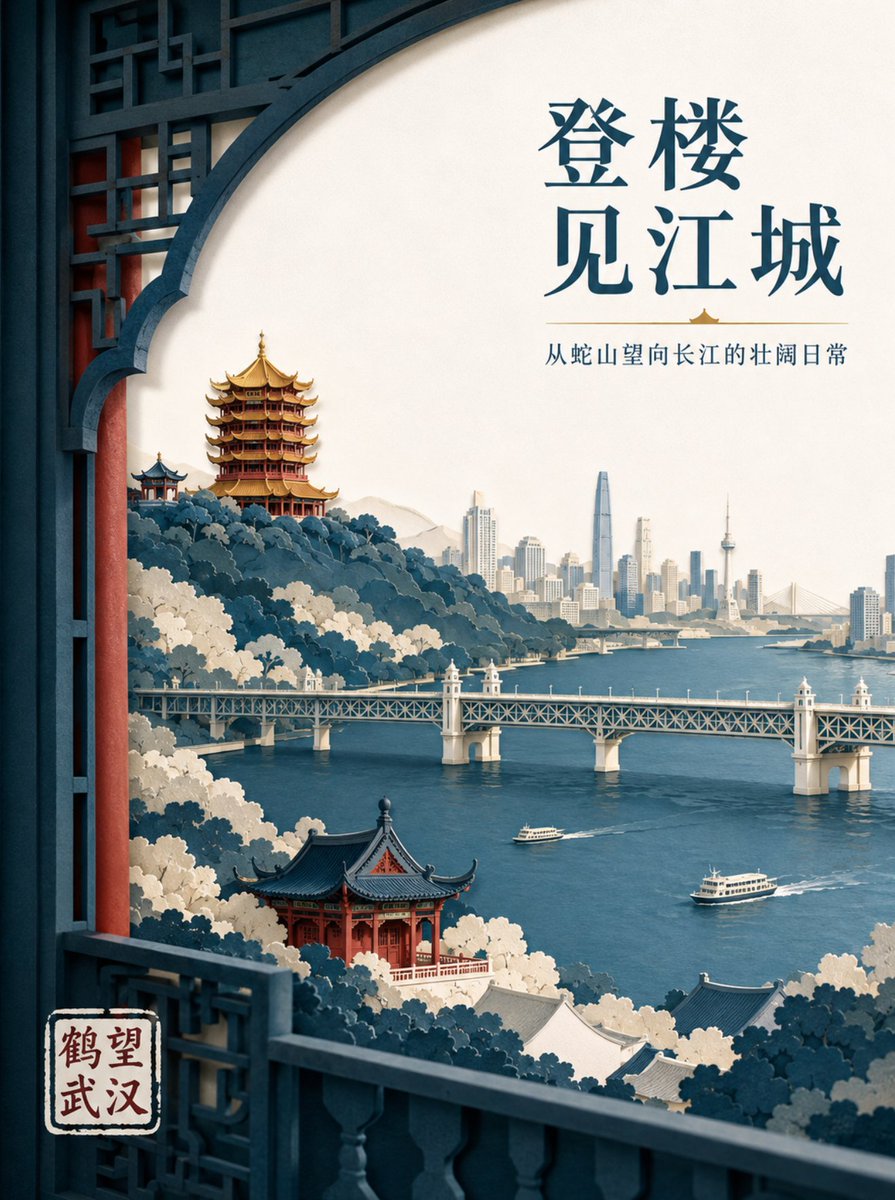
Wuhan Paper Cut Illustration Poster
A sophisticated prompt for creating layered paper-cut style posters featuring Wuhan's iconic landmarks with professional layout and lighting.
Bu Grafik ve Poster için bir GPT Image 2 örnek senaryosudur. Benzer görseller oluşturmak için aşağıdaki hazır metni kullanın ve yeniden kullanmadan önce Awesome GPT Image 2 Prompts atıfını ve ticari kullanım haklarını inceleyin.
Tüm komut istemi setine mi ihtiyacınız var? Şunu kullanın: Grafik ve Poster Daha fazla ilgili örnek için konu merkezini ziyaret edin veya açın. GPT Image 2 istem kataloğu Tam örnek dizin, yeniden kullanılabilir yapılar ve kaynak atfı için.
Free 1K preview
Generate one preview image instantly, no sign-up required.
1346/4000
İpucu
Kopyalamaya hazır istemi
Create a high-end layered paper-cut illustration poster for the tourism brand "{argument name="brand name" default="He Wang Wuhan"}" with the theme "{argument name="theme" default="Looking at the river from the tower, seeing the landscape skeleton of Wuhan at a glance"}" in 3:4 vertical format. The composition uses a foreground window framing, with five to seven layers of thick textured paper forming Snake Hill, the Yellow Crane Tower, the Yangtze River, the Wuhan Yangtze River Bridge, and the city skyline on the opposite bank. The Yellow Crane Tower is located on the ridge in the background, with accurate relationships between layered eaves, golden glazed tiles, and vermilion pillars. The Yangtze River Bridge extends horizontally in the middle ground, with two small ferries on the river in controlled scale. The paper edges are sharp, with uniform soft lighting from the top left and realistic shadows between layers. Colors are indigo, warm off-white, cinnabar red, and a small amount of gilded gold for visual focus. The main title "{argument name="main title" default="Seeing the River City from the Tower"}" is placed in the large white space at the top right in two lines of modern Song typeface. The brand name "He Wang Wuhan" is placed at the bottom left in a paper seal format, keeping it modern rather than imitation antique.İstem değişkenleri
Komut isteminde bulunan, düzenlenebilir argüman yer tutucuları ve varsayılan değerleri.
Değişken
brand name
Varsayılan
He Wang Wuhan
Değişken
theme
Varsayılan
Looking at the river from the tower, seeing the landscape skeleton of Wuhan at a glance
Değişken
main title
Varsayılan
Seeing the River City from the Tower
Best for
- - Grafik ve Poster visual exploration
- - Image generation and reference-image edits
- - Reusable briefs that keep source attribution visible
Change these parts
- - Subject, product, character, or scene
- - Aspect ratio, camera, lighting, and background
- - Brand, text, color, and output constraints
Recommended model and settings
- - Model: gpt-image-2
- - Input mode: Metinden görsele
- - Aspect ratio: source
- - Commercial status: review original source
How to use this prompt
- 1. Copy the prompt and preserve its structure for the first test.
- 2. Replace the subject, context, and publishing channel.
- 3. Change one camera, lighting, or style variable per iteration.
- 4. Inspect the output, source, text, and rights before reuse.
Limitations, source, and reuse cautions
- - Generated output is an editable draft, not factual, legal, or rights evidence.
- - Review the linked source, people, brands, logos, text, and third-party media before commercial use.
Awesome GPT Image 2 Prompts kaynağından içe aktarılmıştır. Kaynak belirtilmesi zorunludur. Ticari kullanım durumu allowed şeklindedir; ücretli kullanım öncesinde kaynak haklarını inceleyin.
Bu kategoride daha fazla vaka
Kategoriye, giriş modu uyumluluğuna, kaliteye ve düşük riske göre önceliklendirilmiştir.

Luxury Brand Campaign Prompt Template
Metinden görsele

Cross-armed toast interaction prompt
Metinden görsele

Martial Arts Legend Character Bible Sheet
Metinden görsele

Pink Hijab Mirror Selfie Portrait
Metinden görsele

Fashion Studio Portrait with Blue Rim Lighting
Metinden görsele

Spring Editorial Fashion Collage
Metinden görsele
Yeniden kullanım ve kaynak notları
Vaka önizlemesini yaptıktan sonra bu istemi güvenle kullanın.
- 1.Komut istemini kopyalayın veya oluşturma düğmesini kullanarak doğrudan Dovoo'da açın.
- 2.Değişkenleri, en boy oranını ve referans görselleri kendi kullanım durumunuza göre ayarlayın.
- 3.Yayınlamadan veya ücretli kullanımdan önce, kaynak haklarını, atıf gerekliliklerini ve marka veya benzerlik risklerini doğrulayın.