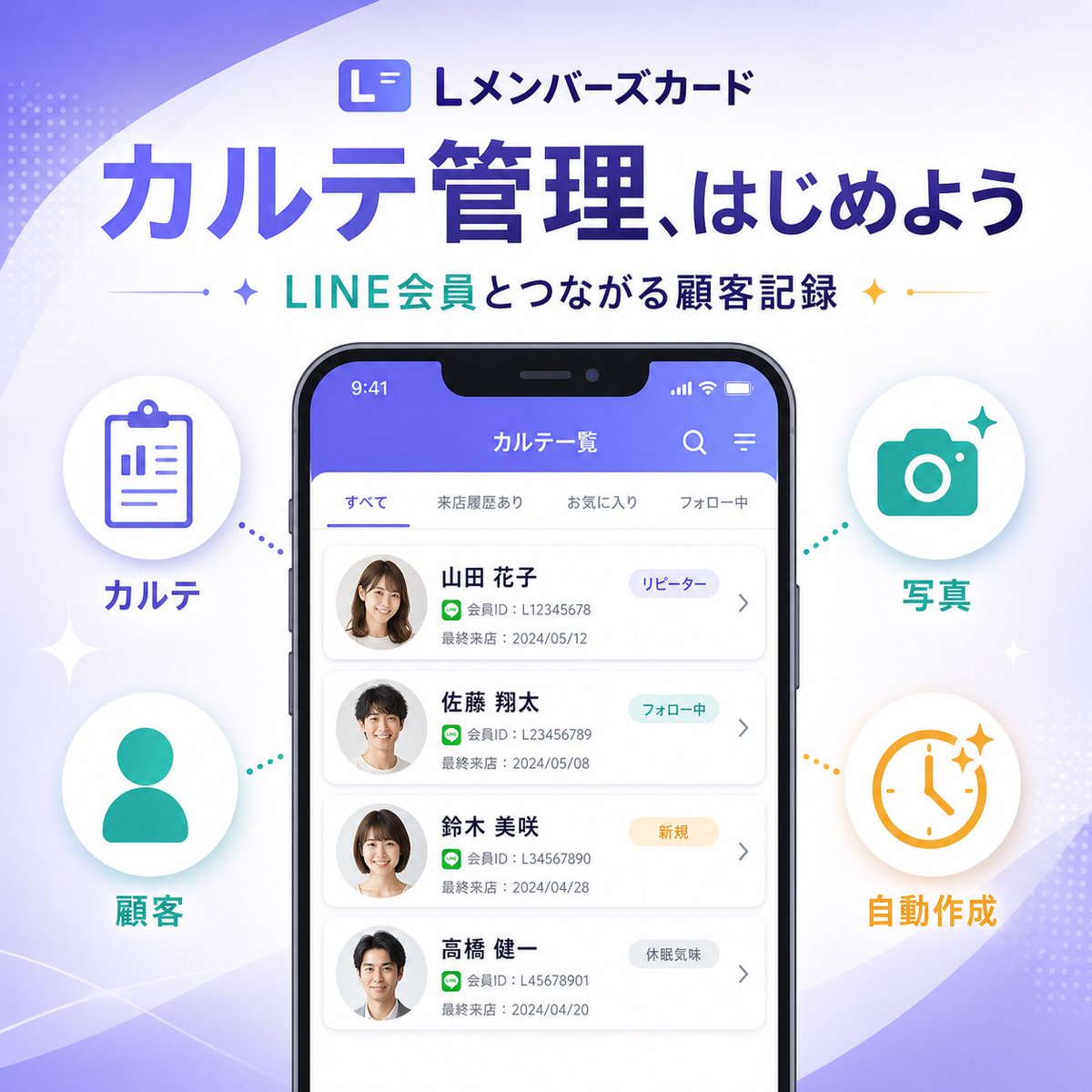
Japon SaaS Tanıtım Afişi
Akıllı telefon arayüzü maketini ve dört bilgi grafiği özelliğini gösteren simgeyi içeren, şık ve kare şeklinde tasarlanmış Japon SaaS pazarlama afişi; sosyal medyada veya açılış sayfalarında yeni bir ürün özelliğini duyurmak için idealdir.
Bu Grafik ve Poster için bir GPT Image 2 örnek senaryosudur. Benzer görseller oluşturmak için aşağıdaki hazır metni kullanın ve yeniden kullanmadan önce Awesome GPT Image 2 Prompts atıfını ve ticari kullanım haklarını inceleyin.
Tüm komut istemi setine mi ihtiyacınız var? Şunu kullanın: Grafik ve Poster Daha fazla ilgili örnek için konu merkezini ziyaret edin veya açın. GPT Image 2 istem kataloğu Tam örnek dizin, yeniden kullanılabilir yapılar ve kaynak atfı için.
Free 1K preview
Generate one preview image instantly, no sign-up required.
4000/4000
İpucu
Kopyalamaya hazır istemi
{
  "type": "SaaS feature update promotional infographic banner",
  "style": "clean modern Japanese tech marketing, high-quality infographic, soft gradient background, polished UI mockup, minimal and trustworthy",
  "canvas": {
    "aspect_ratio": "1:1",
    "background": "white base with flowing lavender and pale purple abstract wave shapes in the corners, faint dotted halftone textures, subtle sparkle accents"
  },
  "branding": {
    "top_logo": {
      "icon": "rounded square app icon with a stylized white L on a purple gradient background",
      "text": "Lメンバーズカード"
    },
    "headline": "{argument name=\"headline text\" default=\"カルテ管理、はじめよう\"}",
    "subheadline": "{argument name=\"subheadline text\" default=\"LINE会員とつながる顧客記録\"}",
    "headline_style": "large bold Japanese sans-serif in deep purple",
    "subheadline_style": "medium bold Japanese sans-serif with teal and dark navy emphasis, small star icons and thin divider lines on both sides"
  },
  "layout": {
    "centerpiece": "large front-facing smartphone mockup centered vertically, slightly lower than the headline",
    "sections": [
      {
        "title": "left features",
        "position": "left side of phone",
        "count": 2,
        "labels": [
          "カルテ",
          "Customer"
        ],
        "items": [
          {
            "shape": "white circular badge with soft shadow",
            "icon": "purple clipboard line icon",
            "label": "カルテ",
            "accent": "purple dotted connector pointing toward phone"
          },
          {
            "shape": "white circular badge with soft shadow",
            "icon": "teal person silhouette icon",
            "label": "Customer",
            "accent": "teal dotted connector pointing toward phone"
          }
        ]
      },
      {
        "title": "right features",
        "position": "right side of phone",
        "count": 2,
        "labels": [
          "Photo",
          "Automatically generated"
        ],
        "items": [
          {
            "shape": "white circular badge with soft shadow",
            "icon": "teal camera icon",
            "label": "Photo",
            "accent": "teal dotted connector pointing toward phone"
          },
          {
            "shape": "white circular badge with soft shadow",
            "icon": "orange clock icon with sparkles",
            "label": "Automatically generated",
            "accent": "orange dotted connector pointing toward phone"
          }
        ]
      }
    ],
    "decorations_count": 6
  },
  "app_screen": {
    "screen_title": "カルテ一覧",
    "status_bar": {
      "time": "9:41",
      "battery": true,
      "signal": true
    },
    "top_icons_count": 2,
    "top_icons": [
      "search",
      "menu"
    ],
    "tabs": {
      "count": 4,
      "labels": [
        "すべて",
        "来店履歴あり",
        "お気に入り",
        "フォロー中"
      ],
      "active": "すべて"
    },
    "customer_cards": {
      "count": 4,
      "items": [
        {
          "name": "{argument name=\"customer name 1\" default=\"Yamada Hanako\"}",
          "member_id": "L12345678",
          "last_visit": "2024/05/12",
          "tag": "リピーター",
          "avatar": "blurred female headshot"
        },
        {
          "name": "Sato Shota",
          "member_id": "L123456789",
          "last_visit": "2024/05/08",
          "tag": "フォロー中",
          "avatar": "blurred male headshot"
        },
        {
          "name": "Suzuki Misaki",
          "member_id": "L34567890",
          "last_visit": "2024/04/28",
          "tag": "New User",
          "avatar": "blurred female headshot"
        },
        {
          "name": "Takahashi Kenichi",
          "member_id": "L45678901",
          "last_visit": "2024/04/20",
          "tag": "Inactive User",
          "avatar": "blurred male headshot"
        }
      ]
    },
    "ui_style": "rounded white list cards on a very light gray background, purple app header, subtle shadows, Japanese sans-serif typography"
  },
  "color_palette": {
    "primary": "#5B5CEB to #6C63FF",
    "secondary": "#22C7B8",
    "accent": "#F4B23A",
    "text_dark": "#2B2E5B",
    "white": "#FFFFFF"
  },
  "rendering": "crisp vector-like marketing graphic with realistic smartphone frame, centered balanced composition, premium SaaS launch banner aesthetic"
}
İstem değişkenleri
Komut isteminde bulunan, düzenlenebilir argüman yer tutucuları ve varsayılan değerleri.
Değişken
headline text
Varsayılan
カルテ管理、はじめよう
Değişken
subheadline text
Varsayılan
LINE会員とつながる顧客記録
Değişken
customer name 1
Varsayılan
Yamada Hanako
Best for
- - Grafik ve Poster visual exploration
- - Image generation and reference-image edits
- - Reusable briefs that keep source attribution visible
Change these parts
- - Subject, product, character, or scene
- - Aspect ratio, camera, lighting, and background
- - Brand, text, color, and output constraints
Recommended model and settings
- - Model: gpt-image-2
- - Input mode: Metinden görsele
- - Aspect ratio: source
- - Commercial status: review original source
How to use this prompt
- 1. Copy the prompt and preserve its structure for the first test.
- 2. Replace the subject, context, and publishing channel.
- 3. Change one camera, lighting, or style variable per iteration.
- 4. Inspect the output, source, text, and rights before reuse.
Limitations, source, and reuse cautions
- - Generated output is an editable draft, not factual, legal, or rights evidence.
- - Review the linked source, people, brands, logos, text, and third-party media before commercial use.
Awesome GPT Image 2 Prompts kaynağından içe aktarılmıştır. Kaynak belirtilmesi zorunludur. Ticari kullanım durumu allowed şeklindedir; ücretli kullanım öncesinde kaynak haklarını inceleyin.
Bu kategoride daha fazla vaka
Kategoriye, giriş modu uyumluluğuna, kaliteye ve düşük riske göre önceliklendirilmiştir.

Spring Editorial Fashion Collage
Metinden görsele

Transparent Earbuds on Stone Pedestal
Metinden görsele

Overhead Pepperoni Pizza Photo
Metinden görsele

Fashion Studio Portrait with Blue Rim Lighting
Metinden görsele

New Chinese-Style Editorial Portrait
Metinden görsele

Y2K Style Photo Booth Collage
Metinden görsele
Yeniden kullanım ve kaynak notları
Vaka önizlemesini yaptıktan sonra bu istemi güvenle kullanın.
- 1.Komut istemini kopyalayın veya oluşturma düğmesini kullanarak doğrudan Dovoo'da açın.
- 2.Değişkenleri, en boy oranını ve referans görselleri kendi kullanım durumunuza göre ayarlayın.
- 3.Yayınlamadan veya ücretli kullanımdan önce, kaynak haklarını, atıf gerekliliklerini ve marka veya benzerlik risklerini doğrulayın.