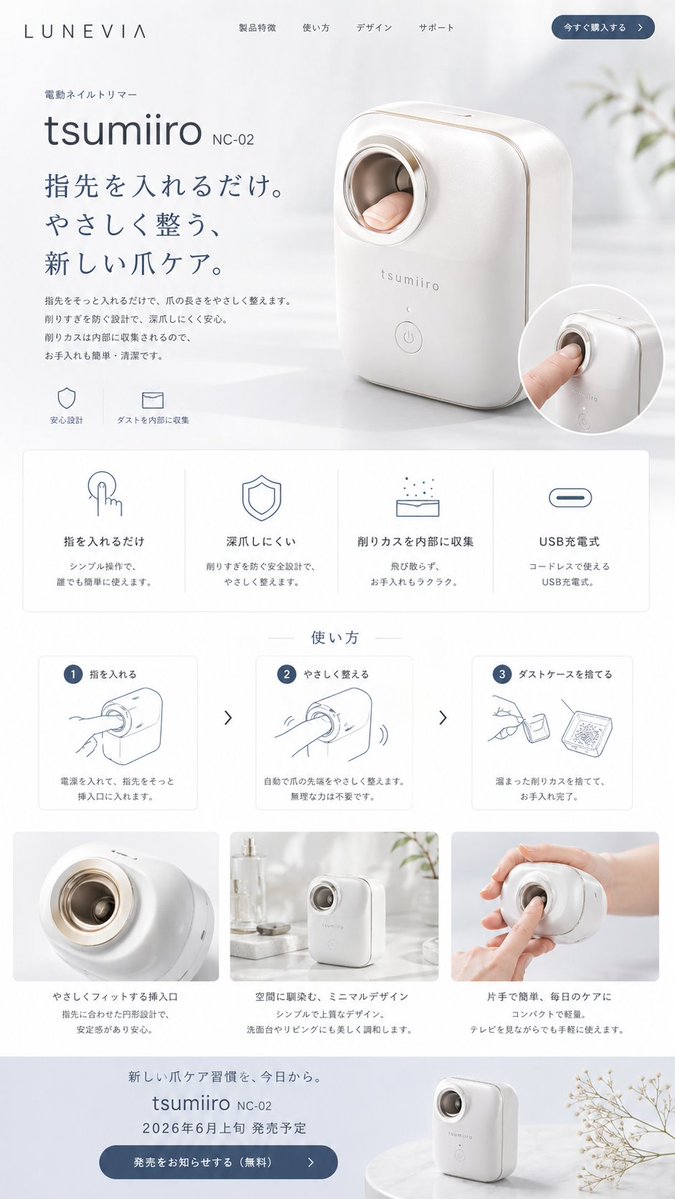
Japon Tırnak Kesme Makinesi Tanıtım Sayfası
Bu, kurgusal bir otomatik tırnak kesme makinesi için, konsept ürünler, girişim tanıtımları ve üst düzey e-ticaret sunumları için uygun, şık bir Japon tarzı ürün web sayfası maketi oluşturur.
Bu Ürün ve Ticari için bir GPT Image 2 örnek senaryosudur. Benzer görseller oluşturmak için aşağıdaki hazır metni kullanın ve yeniden kullanmadan önce Awesome GPT Image 2 Prompts atıfını ve ticari kullanım haklarını inceleyin.
Tüm komut istemi setine mi ihtiyacınız var? Şunu kullanın: Ürün ve Ticari Daha fazla ilgili örnek için konu merkezini ziyaret edin veya açın. GPT Image 2 istem kataloğu Tam örnek dizin, yeniden kullanılabilir yapılar ve kaynak atfı için.
Free 1K preview
Generate one preview image instantly, no sign-up required.
3399/4000
İpucu
Kopyalamaya hazır istemi
{
  "type": "minimal Japanese product landing page mockup",
  "brand": {
    "name": "LUNEVIA"
  },
  "product": {
    "category": "electric nail trimmer",
    "name": "{argument name=\"product name\" default=\"tsumiiro\"}",
    "model": "{argument name=\"model number\" default=\"NC-02\"}",
    "appearance": "compact automatic nail care device with rounded rectangular body, glossy warm white shell, soft champagne-gold trim, circular finger insertion opening with metallic ring, subtle front logo, single round power button near the bottom"
  },
  "style": {
    "overall": "premium, clean, calm, modern Japanese consumer electronics website",
    "palette": "white, soft gray, muted blue-gray, champagne gold accents",
    "lighting": "bright diffused daylight, airy and gentle shadows",
    "background": "minimal interior with sheer white curtains, pale tabletop, faint out-of-focus plant elements"
  },
  "layout": {
    "header": {
      "count": 6,
      "items": [
        "LUNEVIA logo",
        "Product Features",
        "使い方",
        "デザイン",
        "サポート",
        "今すぐ購入する"
      ]
    },
    "hero": {
      "count": 7,
      "items": [
        "small category label 電動ネイルトリマー",
        "large product name {argument name=\"product name\" default=\"tsumiiro\"}",
        "model text {argument name=\"model number\" default=\"NC-02\"}",
        "large Japanese headline {argument name=\"headline text\" default=\"指先を入れるだけ。やさしく整う、新しい爪ケア。\"}",
        "short descriptive paragraph in Japanese",
        "2 small icon captions: 安心設計 and ダストを内部に収集",
        "large three-quarter product photo with a finger inserted plus 1 circular inset close-up image"
      ]
    },
    "feature grid": {
      "title": "none visible",
      "position": "below hero",
      "count": 4,
      "labels": [
        "指を入れるだけ",
        "深爪しにくい",
        "削りカスを内部に収集",
        "USB Rechargeable"
      ],
      "cards": "4 evenly spaced white cards with thin borders, each containing 1 simple line icon, 1 bold heading, and 2 lines of smaller explanatory Japanese text"
    },
    "how to use": {
      "title": "使い方",
      "position": "mid page",
      "count": 3,
      "labels": [
        "1 指を入れる",
        "2 やさしく整える",
        "3 ダストケースを捨てる"
      ],
      "cards": "3 instructional cards with blue numbered circles, simple gray line drawings, and short Japanese descriptions, separated by 2 right-pointing chevrons"
    },
    "lifestyle gallery": {
      "position": "lower middle",
      "count": 3,
      "labels": [
        "close-up insertion opening",
        "device standing on a counter in a bright room",
        "hand holding the device while using it"
      ],
      "captions": [
        "やさしくフィットする挿入口",
        "空間に調和し、ミニマルデザイン",
        "片手で簡単、毎日のケアに"
      ]
    },
    "footer callout": {
      "count": 6,
      "items": [
        "small Japanese tagline about a new nail-care habit",
        "product name and model repeated",
        "release notice in Japanese with date {argument name=\"release date\" default=\"Early June 2026\"}",
        "blue rounded CTA button 発売をお知らせする(無料)",
        "small product photo on a round pedestal",
        "delicate dried flower branch at the right edge"
      ]
    }
  },
  "composition": "tall single-page website screenshot, centered product, generous whitespace, soft rounded panels, subtle shadows, high-end e-commerce presentation"
}
İstem değişkenleri
Komut isteminde bulunan, düzenlenebilir argüman yer tutucuları ve varsayılan değerleri.
Değişken
product name
Varsayılan
tsumiiro
Değişken
model number
Varsayılan
NC-02
Değişken
headline text
Varsayılan
指先を入れるだけ。やさしく整う、新しい爪ケア。
Değişken
release date
Varsayılan
Early June 2026
Best for
- - Ürün ve Ticari visual exploration
- - Image generation and reference-image edits
- - Reusable briefs that keep source attribution visible
Change these parts
- - Subject, product, character, or scene
- - Aspect ratio, camera, lighting, and background
- - Brand, text, color, and output constraints
Recommended model and settings
- - Model: gpt-image-2
- - Input mode: Metinden görsele
- - Aspect ratio: source
- - Commercial status: review original source
How to use this prompt
- 1. Copy the prompt and preserve its structure for the first test.
- 2. Replace the subject, context, and publishing channel.
- 3. Change one camera, lighting, or style variable per iteration.
- 4. Inspect the output, source, text, and rights before reuse.
Limitations, source, and reuse cautions
- - Generated output is an editable draft, not factual, legal, or rights evidence.
- - Review the linked source, people, brands, logos, text, and third-party media before commercial use.
Awesome GPT Image 2 Prompts kaynağından içe aktarılmıştır. Kaynak belirtilmesi zorunludur. Ticari kullanım durumu allowed şeklindedir; ücretli kullanım öncesinde kaynak haklarını inceleyin.
Bu kategoride daha fazla vaka
Kategoriye, giriş modu uyumluluğuna, kaliteye ve düşük riske göre önceliklendirilmiştir.

Transparent Earbuds on Stone Pedestal
Metinden görsele

Overhead Pepperoni Pizza Photo
Metinden görsele

Wet Transparent Earbud Macro
Metinden görsele

Fashion Studio Portrait with Blue Rim Lighting
Metinden görsele

Greyscale Puzzle Portrait with Color Accent
Metinden görsele

Spring Editorial Fashion Collage
Metinden görsele
Yeniden kullanım ve kaynak notları
Vaka önizlemesini yaptıktan sonra bu istemi güvenle kullanın.
- 1.Komut istemini kopyalayın veya oluşturma düğmesini kullanarak doğrudan Dovoo'da açın.
- 2.Değişkenleri, en boy oranını ve referans görselleri kendi kullanım durumunuza göre ayarlayın.
- 3.Yayınlamadan veya ücretli kullanımdan önce, kaynak haklarını, atıf gerekliliklerini ve marka veya benzerlik risklerini doğrulayın.