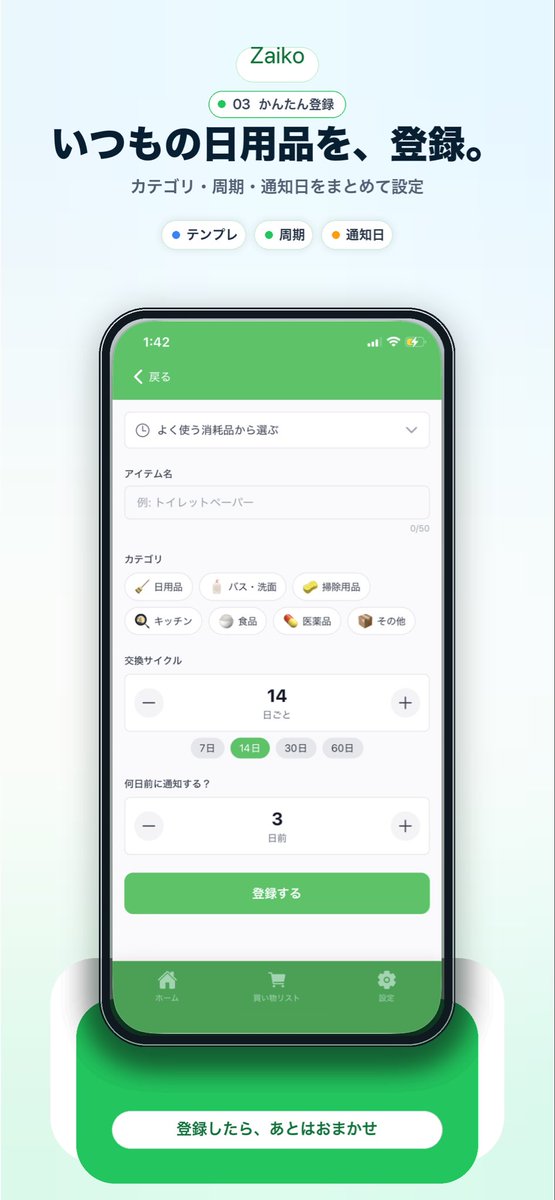
Japon Envanter Uygulaması Tanıtım Maketi
Japonya merkezli bir ev envanter uygulaması için, akıllı telefon arayüzünün merkezde yer aldığı, başlık metni ve güçlü bir alt harekete geçirici mesaj içeren, şık bir dikey pazarlama görseli oluşturur.
Bu Grafik ve Poster için bir GPT Image 2 örnek senaryosudur. Benzer görseller oluşturmak için aşağıdaki hazır metni kullanın ve yeniden kullanmadan önce Awesome GPT Image 2 Prompts atıfını ve ticari kullanım haklarını inceleyin.
Tüm komut istemi setine mi ihtiyacınız var? Şunu kullanın: Grafik ve Poster Daha fazla ilgili örnek için konu merkezini ziyaret edin veya açın. GPT Image 2 istem kataloğu Tam örnek dizin, yeniden kullanılabilir yapılar ve kaynak atfı için.
Free 1K preview
Generate one preview image instantly, no sign-up required.
3762/4000
İpucu
Kopyalamaya hazır istemi
{
  "type": "mobile app promotional screenshot poster",
  "app": {
    "name": "{argument name=\"app name\" default=\"Zaiko\"}",
    "platform": "iPhone-style inventory and household supplies management app",
    "theme": {
      "primary": "fresh green",
      "background": "very light mint gray gradient",
      "accent": "soft white",
      "text": "dark navy"
    }
  },
  "layout": {
    "orientation": "vertical",
    "composition": "single centered smartphone mockup with marketing copy above and CTA card below",
    "sections": [
      {
        "title": "brand header",
        "position": "top center",
        "count": 2,
        "labels": [
          "Zaiko",
          "03 かんたん登録"
        ]
      },
      {
        "title": "hero text",
        "position": "upper center",
        "count": 2,
        "labels": [
          "いつもの日用品を、登録。",
          "カテゴリ・周期・通知日をまとめて設定"
        ]
      },
      {
        "title": "feature chips",
        "position": "below hero text",
        "count": 3,
        "labels": [
          "テンプレ",
          "Cycle",
          "Reminder date"
        ]
      },
      {
        "title": "app screen form",
        "position": "inside phone center",
        "count": 10,
        "labels": [
          "戻る",
          "よく使う消耗品から選ぶ",
          "アイテム名",
          "カテゴリ",
          "交換サイクル",
          "何日前に通知する?",
          "登録する",
          "ホーム",
          "買い物リスト",
          "Settings"
        ]
      },
      {
        "title": "category chips",
        "position": "mid screen inside phone",
        "count": 7,
        "labels": [
          "Daily necessities",
          "バス・洗面",
          "Cleaning supplies",
          "キッチン",
          "Food",
          "Medicine",
          "その他"
        ]
      },
      {
        "title": "cycle options",
        "position": "lower-mid screen inside phone",
        "count": 4,
        "labels": [
          "7 days",
          "14 days",
          "30 days",
          "60 days"
        ]
      },
      {
        "title": "bottom callout",
        "position": "bottom center",
        "count": 1,
        "labels": [
          "登録したら、あとはおまかせ"
        ]
      }
    ]
  },
  "visuals": {
    "style": "clean modern Japanese startup landing page screenshot, polished UI mockup, soft shadows, rounded cards, minimal interface, App Store marketing aesthetic",
    "background": "pale mint vertical canvas with subtle glow behind the device",
    "top_badge": "small rounded white pill with green outline and green text",
    "phone": {
      "color": "black bezel",
      "angle": "front view",
      "size": "large and centered",
      "screen": {
        "header": "green app bar",
        "status_time": "1:42",
        "form_fields": [
          "dropdown selector",
          "text input with placeholder 例: トイレットペーパー",
          "category chip grid",
          "stepper for replacement cycle showing 14",
          "stepper for notification days showing 3",
          "green submit button"
        ],
        "selected_states": [
          "14 days highlighted in green",
          "green primary button",
          "green bottom tab bar"
        ]
      },
      "shadow": "soft diffuse shadow under phone"
    },
    "bottom_card": {
      "shape": "large rounded green rectangle behind a white pill button",
      "text": "{argument name=\"cta text\" default=\"登録したら、あとはおまかせ\"}",
      "effect": "soft glow and layered rounded white side panels"
    }
  },
  "text_customization": {
    "headline": "{argument name=\"headline text\" default=\"いつもの日用品を、登録。\"}",
    "subheadline": "{argument name=\"subheadline text\" default=\"カテゴリ・周期・通知日をまとめて設定\"}"
  },
  "color_customization": {
    "primary": "{argument name=\"primary color\" default=\"fresh green\"}"
  }
}
İstem değişkenleri
Komut isteminde bulunan, düzenlenebilir argüman yer tutucuları ve varsayılan değerleri.
Değişken
app name
Varsayılan
Zaiko
Değişken
cta text
Varsayılan
登録したら、あとはおまかせ
Değişken
headline text
Varsayılan
いつもの日用品を、登録。
Değişken
subheadline text
Varsayılan
カテゴリ・周期・通知日をまとめて設定
Değişken
primary color
Varsayılan
fresh green
Best for
- - Grafik ve Poster visual exploration
- - Image generation and reference-image edits
- - Reusable briefs that keep source attribution visible
Change these parts
- - Subject, product, character, or scene
- - Aspect ratio, camera, lighting, and background
- - Brand, text, color, and output constraints
Recommended model and settings
- - Model: gpt-image-2
- - Input mode: Metinden görsele
- - Aspect ratio: source
- - Commercial status: review original source
How to use this prompt
- 1. Copy the prompt and preserve its structure for the first test.
- 2. Replace the subject, context, and publishing channel.
- 3. Change one camera, lighting, or style variable per iteration.
- 4. Inspect the output, source, text, and rights before reuse.
Limitations, source, and reuse cautions
- - Generated output is an editable draft, not factual, legal, or rights evidence.
- - Review the linked source, people, brands, logos, text, and third-party media before commercial use.
Awesome GPT Image 2 Prompts kaynağından içe aktarılmıştır. Kaynak belirtilmesi zorunludur. Ticari kullanım durumu allowed şeklindedir; ücretli kullanım öncesinde kaynak haklarını inceleyin.
Bu kategoride daha fazla vaka
Kategoriye, giriş modu uyumluluğuna, kaliteye ve düşük riske göre önceliklendirilmiştir.

Transparent Earbuds on Stone Pedestal
Metinden görsele

Fashion Studio Portrait with Blue Rim Lighting
Metinden görsele

Spring Editorial Fashion Collage
Metinden görsele

New Chinese-Style Editorial Portrait
Metinden görsele

Surreal 3D Chess Match Artwork
Metinden görsele

Pink Hijab Mirror Selfie Portrait
Metinden görsele
Yeniden kullanım ve kaynak notları
Vaka önizlemesini yaptıktan sonra bu istemi güvenle kullanın.
- 1.Komut istemini kopyalayın veya oluşturma düğmesini kullanarak doğrudan Dovoo'da açın.
- 2.Değişkenleri, en boy oranını ve referans görselleri kendi kullanım durumunuza göre ayarlayın.
- 3.Yayınlamadan veya ücretli kullanımdan önce, kaynak haklarını, atıf gerekliliklerini ve marka veya benzerlik risklerini doğrulayın.