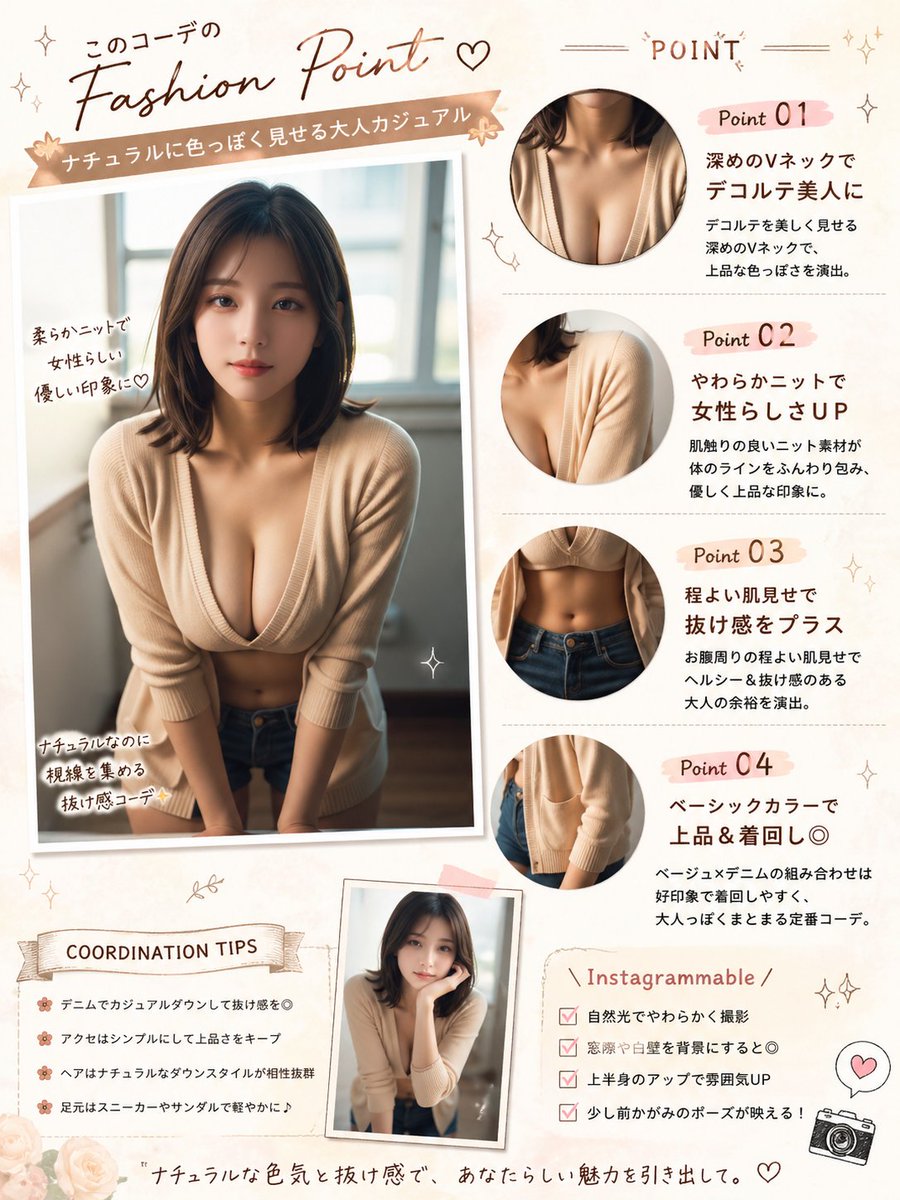
Japon Moda Noktası Poster Düzenlemesi
Bu komut dosyası, referans bir portreyi sosyal medya paylaşımları, kıyafet analizleri ve stil sunumları için Japon dergisi tarzında bir moda yorum posterine dönüştürüyor.
Bu Grafik ve Poster için bir GPT Image 2 örnek senaryosudur. Benzer görseller oluşturmak için aşağıdaki hazır metni kullanın ve yeniden kullanmadan önce Awesome GPT Image 2 Prompts atıfını ve ticari kullanım haklarını inceleyin.
Tüm komut istemi setine mi ihtiyacınız var? Şunu kullanın: Grafik ve Poster Daha fazla ilgili örnek için konu merkezini ziyaret edin veya açın. GPT Image 2 istem kataloğu Tam örnek dizin, yeniden kullanılabilir yapılar ve kaynak atfı için.
Free 1K preview
Generate one preview image instantly, no sign-up required.
Free text preview doesn’t preserve reference-image consistency.
1553/4000
İpucu
Kopyalamaya hazır istemi
Using REFERENCE_0, turn the photo into a soft feminine Japanese fashion-check infographic poster while keeping the same person, outfit, indoor window setting, Show every face clearly with natural, detailed facial features. Create a scrapbook/editorial layout on a warm cream background with blush-pink and beige accents. Place the main full-body photo on the left as a slightly tilted printed snapshot with handwritten callouts. Add 4 circular close-up detail crops on the right showing: 1) neckline/chest area, 2) knit shoulder and sleeve texture, 3) waist and jeans area, 4) cardigan hem and pocket area. Add a small extra inset portrait near the bottom center using the same outfit and person in a casual leaning pose. Include Japanese magazine-style typography and decorative doodles throughout. The visible text should include these sections and labels: top headline 「このコーデの Fashion Point ♡」, ribbon subtitle 「ナチュラルに色っぽく見せる大人カジュアル」, right header 「POINT」, point labels 「Point 01」「Point 02」「Point 03」「Point 04」, left photo notes 「柔らかニットで女性らしい優しい印象に♡」「ナチュラルなのに視線を集める抜け感コーデ✨」, a tips box titled 「COORDINATION TIPS」 with 4 bullet lines, a box titled 「Instagrammable」 with 4 checklist lines, and a bottom tagline 「ナチュラルな色気と抜け感で、あなたらしい魅力を引き出して。」. For the point descriptions, write short Japanese copy praising the deep V-neck, soft knit, subtle midriff reveal, and basic color styling. Add small stars, hearts, sparkles, flowers, stitched lines, and a tiny camera icon. Make it look like a polished social-media fashion advice sheet, portrait orientation.
Best for
- - Grafik ve Poster visual exploration
- - Image generation and reference-image edits
- - Reusable briefs that keep source attribution visible
Change these parts
- - Subject, product, character, or scene
- - Aspect ratio, camera, lighting, and background
- - Brand, text, color, and output constraints
Recommended model and settings
- - Model: gpt-image-2
- - Input mode: Görselden görsele
- - Aspect ratio: source
- - Commercial status: review original source
How to use this prompt
- 1. Copy the prompt and preserve its structure for the first test.
- 2. Replace the subject, context, and publishing channel.
- 3. Change one camera, lighting, or style variable per iteration.
- 4. Inspect the output, source, text, and rights before reuse.
Limitations, source, and reuse cautions
- - Generated output is an editable draft, not factual, legal, or rights evidence.
- - Review the linked source, people, brands, logos, text, and third-party media before commercial use.
Awesome GPT Image 2 Prompts kaynağından içe aktarılmıştır. Kaynak belirtilmesi zorunludur. Ticari kullanım durumu allowed şeklindedir; ücretli kullanım öncesinde kaynak haklarını inceleyin.
Bu kategoride daha fazla vaka
Kategoriye, giriş modu uyumluluğuna, kaliteye ve düşük riske göre önceliklendirilmiştir.

Surreal Macro Fashion Illusion
Görselden görsele

Split Face Horror Transformation
Görselden görsele

Vintage Digital Camera Mirror Selfie
Görselden görsele

Multi-Pose Wavy Dark Hair Portrait
Görselden görsele

Dax Cinematic Character Bible Sheet
Görselden görsele

Pink Hijab Mirror Selfie Portrait
Metinden görsele
Yeniden kullanım ve kaynak notları
Vaka önizlemesini yaptıktan sonra bu istemi güvenle kullanın.
- 1.Komut istemini kopyalayın veya oluşturma düğmesini kullanarak doğrudan Dovoo'da açın.
- 2.Değişkenleri, en boy oranını ve referans görselleri kendi kullanım durumunuza göre ayarlayın.
- 3.Yayınlamadan veya ücretli kullanımdan önce, kaynak haklarını, atıf gerekliliklerini ve marka veya benzerlik risklerini doğrulayın.