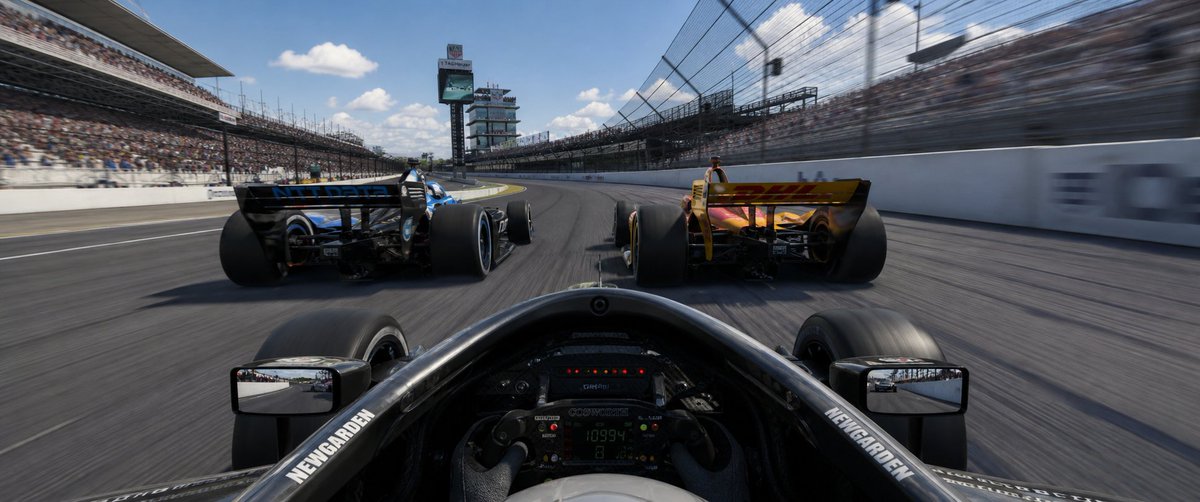
Ultra geniş açılı Indy Kokpit Yarış Görünümü
Fotogerçekçi, ultra geniş açılı bir yarış simülatörü sahnesi; kalabalık bir oval pistte iki rakip aracı kovalayan Indy tarzı bir kokpit görünümünü gösteriyor.
Bu Anime ve Oyun için bir GPT Image 2 örnek senaryosudur. Benzer görseller oluşturmak için aşağıdaki hazır metni kullanın ve yeniden kullanmadan önce Awesome GPT Image 2 Prompts atıfını ve ticari kullanım haklarını inceleyin.
Tüm komut istemi setine mi ihtiyacınız var? Şunu kullanın: Anime ve Oyun Daha fazla ilgili örnek için konu merkezini ziyaret edin veya açın. GPT Image 2 istem kataloğu Tam örnek dizin, yeniden kullanılabilir yapılar ve kaynak atfı için.
Free 1K preview
Generate one preview image instantly, no sign-up required.
1407/4000
İpucu
Kopyalamaya hazır istemi
Create an ultra-wide 32:9 photorealistic racing game screenshot from the driver’s cockpit perspective during an Indy-style oval race at {argument name="race track" default="the Indianapolis 500 speedway"}. The camera is low inside a black open-wheel race car, showing the halo/cockpit rim, steering wheel with tiny digital telemetry, front tires partly visible, and exactly 2 rectangular side mirrors, one on each side reflecting the track behind. Ahead are exactly 2 rival open-wheel cars: a black-and-blue car slightly left and a yellow/orange car slightly right, both seen from the rear with huge rear tires and rear wings, racing side by side into a gentle left-hand banked turn. Use strong speed sensation with motion blur on the asphalt, catch fencing, and packed grandstands, while keeping the cars and cockpit mostly sharp. The track is a large oval with white concrete walls, tall safety fences, full spectator stands on both sides, and a scoring tower/pylon in the distance near the center-left. Bright midday sunlight, blue sky with scattered white clouds, cinematic HDR realism, glossy carbon fiber, detailed tire rubber, immersive AAA racing simulator style. Add small white sponsor-like lettering on the cockpit sides reading {argument name="cockpit sponsor text" default="NEWGARDEN"}, but avoid prominent readable logos elsewhere. No UI overlay, no watermark, no extra cars, no text captions.İstem değişkenleri
Komut isteminde bulunan, düzenlenebilir argüman yer tutucuları ve varsayılan değerleri.
Değişken
race track
Varsayılan
the Indianapolis 500 speedway
Değişken
cockpit sponsor text
Varsayılan
NEWGARDEN
Best for
- - Anime ve Oyun visual exploration
- - Image generation and reference-image edits
- - Reusable briefs that keep source attribution visible
Change these parts
- - Subject, product, character, or scene
- - Aspect ratio, camera, lighting, and background
- - Brand, text, color, and output constraints
Recommended model and settings
- - Model: gpt-image-2
- - Input mode: Metinden görsele
- - Aspect ratio: source
- - Commercial status: review original source
How to use this prompt
- 1. Copy the prompt and preserve its structure for the first test.
- 2. Replace the subject, context, and publishing channel.
- 3. Change one camera, lighting, or style variable per iteration.
- 4. Inspect the output, source, text, and rights before reuse.
Limitations, source, and reuse cautions
- - Generated output is an editable draft, not factual, legal, or rights evidence.
- - Review the linked source, people, brands, logos, text, and third-party media before commercial use.
Awesome GPT Image 2 Prompts kaynağından içe aktarılmıştır. Kaynak belirtilmesi zorunludur. Ticari kullanım durumu allowed şeklindedir; ücretli kullanım öncesinde kaynak haklarını inceleyin.
Bu kategoride daha fazla vaka
Kategoriye, giriş modu uyumluluğuna, kaliteye ve düşük riske göre önceliklendirilmiştir.

Manga Desert Radio Telescope Road Trip
Metinden görsele

Android Quantum Lab Workstation
Metinden görsele

Surreal 3D Chess Match Artwork
Metinden görsele

Female Clown Cyborg Portrait
Metinden görsele

Imperial Research Bunker on Volcanic Planet
Metinden görsele

Greyscale Puzzle Portrait with Color Accent
Metinden görsele
Yeniden kullanım ve kaynak notları
Vaka önizlemesini yaptıktan sonra bu istemi güvenle kullanın.
- 1.Komut istemini kopyalayın veya oluşturma düğmesini kullanarak doğrudan Dovoo'da açın.
- 2.Değişkenleri, en boy oranını ve referans görselleri kendi kullanım durumunuza göre ayarlayın.
- 3.Yayınlamadan veya ücretli kullanımdan önce, kaynak haklarını, atıf gerekliliklerini ve marka veya benzerlik risklerini doğrulayın.