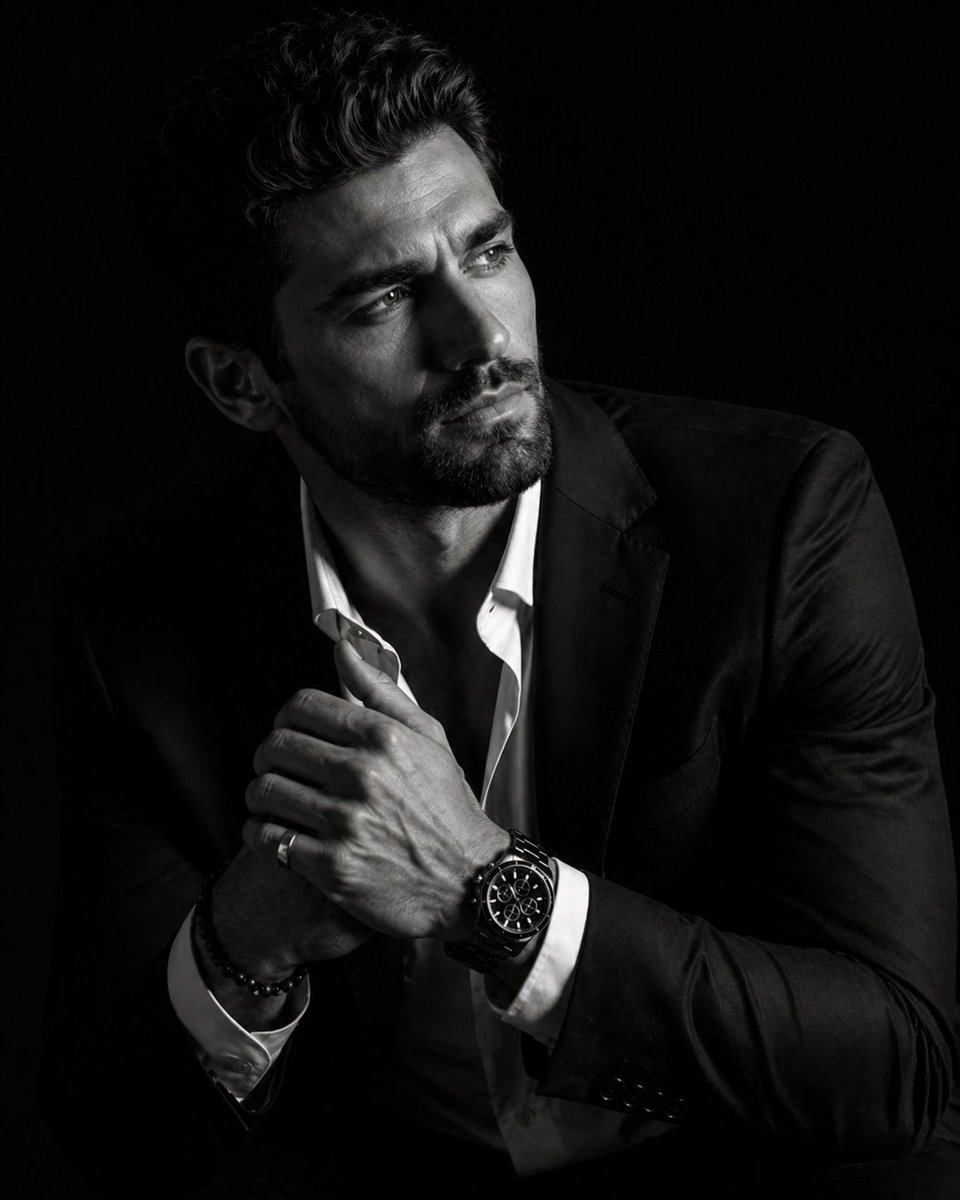
Hiper-Gerçekçi Işık-Gölge Portresi
Yoğun ışık ve derin gölgelerin olduğu lüks bir ortamda bir kişiyi konu alan, dramatik ve yüksek kontrastlı bir portre için bir çizim önerisi.
Bu Portre ve Karakter için bir GPT Image 2 örnek senaryosudur. Benzer görseller oluşturmak için aşağıdaki hazır metni kullanın ve yeniden kullanmadan önce Awesome GPT Image 2 Prompts atıfını ve ticari kullanım haklarını inceleyin.
Tüm komut istemi setine mi ihtiyacınız var? Şunu kullanın: Portre ve Karakter Daha fazla ilgili örnek için konu merkezini ziyaret edin veya açın. GPT Image 2 istem kataloğu Tam örnek dizin, yeniden kullanılabilir yapılar ve kaynak atfı için.
Free 1K preview
Generate one preview image instantly, no sign-up required.
1358/4000
İpucu
Kopyalamaya hazır istemi
A hyper-realistic 8K cinematic portrait of a uploaded person, captured in a dramatic Chiaroscuro style. The subject is seated at a three-quarter angle, leaning slightly forward with a relaxed yet commanding posture. His face is turned away from the lens, with one side of his face clearly illuminated while the other is completely lost in deep, velvety black shadows. His expression is contemplative, not looking at the camera. The pose is precise: his hands are clasped together near his chest; one hand is held straight with fingers slightly tilted, while the other hand is positioned so only the fingers are visible, resting over the first. He wears a {argument name="accessories" default="luxury black chronograph watch with a detailed metal link bracelet, a silver ring, and a beaded bracelet"}. His attire is a {argument name="clothing" default="sharp black suit jacket over a white dress shirt with the top buttons open"}, showing refined fabric textures. The background is a solid, seamless black. The lighting is sharp and directional, highlighting the intricate details of his hair, the individual bristles of his beard, the moisture in his eyes, and the glint off the watch face. Cinematic black-and-white color grade with rich contrast and smooth, natural skin transitions. Shot on 85mm lens, f/1.8, high-resolution commercial photography. ar 4:5İstem değişkenleri
Komut isteminde bulunan, düzenlenebilir argüman yer tutucuları ve varsayılan değerleri.
Değişken
accessories
Varsayılan
luxury black chronograph watch with a detailed metal link bracelet, a silver ring, and a beaded bracelet
Değişken
clothing
Varsayılan
sharp black suit jacket over a white dress shirt with the top buttons open
Best for
- - Portre ve Karakter visual exploration
- - Image generation and reference-image edits
- - Reusable briefs that keep source attribution visible
Change these parts
- - Subject, product, character, or scene
- - Aspect ratio, camera, lighting, and background
- - Brand, text, color, and output constraints
Recommended model and settings
- - Model: gpt-image-2
- - Input mode: Metinden görsele
- - Aspect ratio: source
- - Commercial status: review original source
How to use this prompt
- 1. Copy the prompt and preserve its structure for the first test.
- 2. Replace the subject, context, and publishing channel.
- 3. Change one camera, lighting, or style variable per iteration.
- 4. Inspect the output, source, text, and rights before reuse.
Limitations, source, and reuse cautions
- - Generated output is an editable draft, not factual, legal, or rights evidence.
- - Review the linked source, people, brands, logos, text, and third-party media before commercial use.
Awesome GPT Image 2 Prompts kaynağından içe aktarılmıştır. Kaynak belirtilmesi zorunludur. Ticari kullanım durumu allowed şeklindedir; ücretli kullanım öncesinde kaynak haklarını inceleyin.
Bu kategoride daha fazla vaka
Kategoriye, giriş modu uyumluluğuna, kaliteye ve düşük riske göre önceliklendirilmiştir.

Pink Hijab Mirror Selfie Portrait
Metinden görsele

Greyscale Puzzle Portrait with Color Accent
Metinden görsele

Y2K Style Photo Booth Collage
Metinden görsele

Female Clown Cyborg Portrait
Metinden görsele

Natural Face Realism Modifier
Metinden görsele

Fashion Studio Portrait with Blue Rim Lighting
Metinden görsele
Yeniden kullanım ve kaynak notları
Vaka önizlemesini yaptıktan sonra bu istemi güvenle kullanın.
- 1.Komut istemini kopyalayın veya oluşturma düğmesini kullanarak doğrudan Dovoo'da açın.
- 2.Değişkenleri, en boy oranını ve referans görselleri kendi kullanım durumunuza göre ayarlayın.
- 3.Yayınlamadan veya ücretli kullanımdan önce, kaynak haklarını, atıf gerekliliklerini ve marka veya benzerlik risklerini doğrulayın.