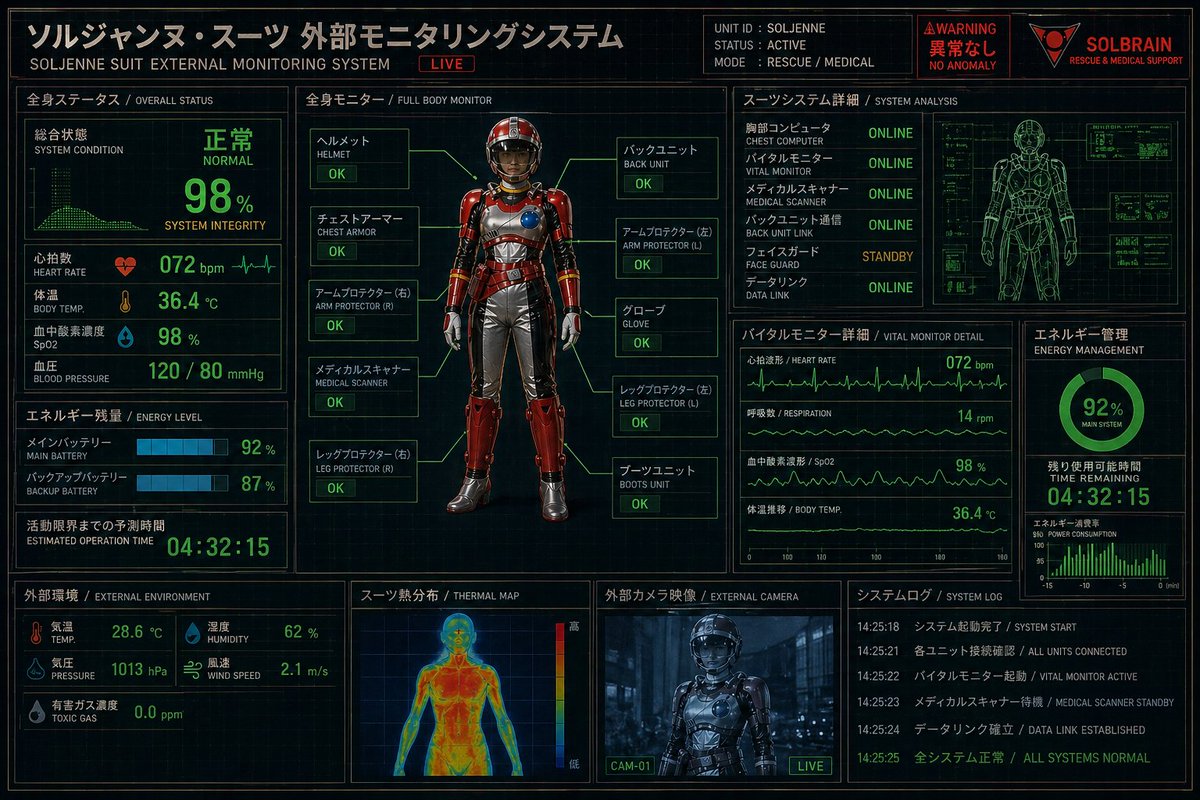
Fütüristik Kurtarma Giysisi İzleme HUD'u
Sinematik kontrol ekranı arayüzleri ve mecha destek sistemi görselleri oluşturmak için ideal olan, Japonca-İngilizce çift dilli durum panellerine sahip kırmızı zırhlı bir kurtarma kıyafetini gösteren detaylı bir bilim kurgu kontrol paneli posteri.
Bu Grafik ve Poster için bir GPT Image 2 örnek senaryosudur. Benzer görseller oluşturmak için aşağıdaki hazır metni kullanın ve yeniden kullanmadan önce Awesome GPT Image 2 Prompts atıfını ve ticari kullanım haklarını inceleyin.
Tüm komut istemi setine mi ihtiyacınız var? Şunu kullanın: Grafik ve Poster Daha fazla ilgili örnek için konu merkezini ziyaret edin veya açın. GPT Image 2 istem kataloğu Tam örnek dizin, yeniden kullanılabilir yapılar ve kaynak atfı için.
Free 1K preview
Generate one preview image instantly, no sign-up required.
4000/4000
İpucu
Kopyalamaya hazır istemi
{
  "type": "futuristic bilingual HUD control panel poster",
  "theme": "Japanese sci-fi rescue and medical monitoring interface",
  "aspect_ratio": "3:2 landscape",
  "style": {
    "overall": "high-detail cyberpunk dashboard, dark navy-black background with faint grid lines, neon green telemetry, amber-gold headers, red warning accents, technical blueprint overlays, subtle screen glow, crisp UI lines",
    "rendering": "clean infographic interface mixed with realistic 3D character render",
    "color_palette": [
      "ブラック",
      "ディープネイビー",
      "ネオングリーン",
      "アンバーゴールド",
      "warning red",
      "スチールグレー"
    ]
  },
  "header": {
    "title_jp": "ソルジャンヌ・スーツ 外部モニタリングシステム",
    "title_en": "SOLJENNE SUIT EXTERNAL MONITORING SYSTEM",
    "live_badge": "LIVE",
    "unit_block": {
      "unit_id": "SOLJENNE",
      "status": "ACTIVE",
      "mode": "RESCUE / MEDICAL"
    },
    "alert_block": {
      "warning": "WARNING",
      "status_jp": "異常なし",
      "status_en": "NO ANOMALY"
    },
    "brand": {
      "name": "{argument name=\"brand name\" default=\"SOLBRAIN\"}",
      "tagline": "RESCUE & MEDICAL SUPPORT"
    }
  },
  "layout": {
    "sections": [
      {
        "title": "全身ステータス",
        "subtitle": "OVERALL STATUS",
        "position": "left upper",
        "count": 10,
        "labels": [
          "Overall condition",
          "SYSTEM CONDITION",
          "Heart rate",
          "HEART RATE",
          "Body temperature",
          "BODY TEMP.",
          "Blood oxygen saturation",
          "SpO2",
          "Blood pressure",
          "BLOOD PRESSURE"
        ]
      },
      {
        "title": "エネルギー残量",
        "subtitle": "ENERGY LEVEL",
        "position": "left middle",
        "count": 5,
        "labels": [
          "メインバッテリー",
          "MAIN BATTERY",
          "バックアップバッテリー",
          "BACKUP BATTERY",
          "活動限界までの予測時間"
        ]
      },
      {
        "title": "External environment",
        "subtitle": "EXTERNAL ENVIRONMENT",
        "position": "left lower",
        "count": 8,
        "labels": [
          "Temperature",
          "TEMP.",
          "Humidity",
          "HUMIDITY",
          "Atmospheric pressure",
          "PRESSURE",
          "Wind speed",
          "WIND SPEED"
        ]
      },
      {
        "title": "全身モニター",
        "subtitle": "FULL BODY MONITOR",
        "position": "center",
        "count": 10,
        "labels": [
          "ヘルメット",
          "チェストアーマー",
          "アームプロテクター (右)",
          "メディカルスキャナー",
          "レッグプロテクター (右)",
          "バックユニット",
          "アームプロテクター (左)",
          "グローブ",
          "レッグプロテクター (左)",
          "ブーツユニット"
        ]
      },
      {
        "title": "スーツシステム詳細",
        "subtitle": "SYSTEM ANALYSIS",
        "position": "right upper",
        "count": 6,
        "labels": [
          "胸部コンピュータ",
          "バイタルモニター",
          "メディカルスキャナー",
          "バックユニット通信",
          "フェイスガード",
          "データリンク"
        ]
      },
      {
        "title": "バイタルモニター 詳細",
        "subtitle": "VITAL MONITOR DETAIL",
        "position": "right middle left",
        "count": 4,
        "labels": [
          "Heart rate waveform",
          "Respiratory rate",
          "Blood oxygen saturation",
          "Body temperature trend"
        ]
      },
      {
        "title": "エネルギー管理",
        "subtitle": "ENERGY MANAGEMENT",
        "position": "right middle right",
        "count": 4,
        "labels": [
          "MAIN SYSTEM",
          "TIME REMAINING",
          "POWER CONSUMPTION",
          "92%"
        ]
      },
      {
        "title": "スーツ熱分布",
        "subtitle": "THERMAL MAP",
        "position": "bottom center left",
        "count": 3,
        "labels": [
          "High",
          "Low",
          "thermal color scale"
        ]
      },
      {
        "title": "外部カメラ映像",
        "subtitle": "EXTERNAL CAMERA",
        "position": "bottom center right",
        "count": 2,
        "labels": [
          "CAM-01",
          "LIVE"
        ]
      },
      {
        "title": "システムログ",
        "subtitle": "SYSTEM LOG",
        "position": "bottom right",
        "count": 5,
        "labels": [
          "SYSTEM START",
          "ALL UNITS CONNECTED",
          "VITAL MONITOR ACTIVE",
          "MEDICAL SCANNER STANDBY",
          "ALL SYSTEMS NORMAL"
        ]
      }
    ],
    "centerpiece": "full-body front-facing armored rescue suit standing upright in a diagnostic display frame"
  },
  "subject": {
    "character": "anonymous faceless humanoid mannequin in a high-tech powered rescue suit",
    "suit": {
      "primary_color": "{argument name=\"armor color\" default=\"metallic red\"}",
      "secondary_color": "シルバーグレー",
      "materials": "glossy segmented hard armor over flexible undersuit",
      "design_features": [
        "smooth enclosed helmet with dark opaque visor and no visible face",
        "rounded chest armor with a circular blue module on the right chest",
        "ribbed metallic abdomen panels",
        "red shoulder plates",
        "red forearm guards",
        "シルバーのグローブ",
        "silver pants with red thigh and shin armor",
        "heavy armored boots",
        "small mechanical details and gold trim"
      ]
    },
    "callouts": {
      "count": 10,
      "statuses": [
        "OK",
        "OK",
        "OK",
        "OK",
        "OK",
        "OK",
        "OK",
        "OK",
        "OK",
        "OK"
      ]
    }
  },
  "data": {
    "overall_status": {
      "system_condition": "NORMAL",
      "system_integrity": "98%",
      "heart_rate": "072 bpm",
      "body_temp": "36.4 °C",
      "spo2": "98 %",
      "blood_pressure": "120 / 80 mmHg"
    },
    "energy": {
      "main_battery": "92 %",
      "backup_battery": "87 %",
      "estimated_operation_time": "04:32:15"
    },
    "environment": {
      "temperature": "28.6 °C",
      "humidity": "62 %",
      "pressure": "1013 hPa",
      "wind_speed": "2.1 m/s",
      "toxic_gas": "0.0 ppm"
    },
    "system_analysis": {
      "chest_computer": "ONLINE",
      "vital_monitor": "ONLINE",
      "medical_scanner": "ONLINE",
      "back_unit_link": "ONLINE",
      "face_guard": "STANDBY",
      "data_link": "ONLINE"
    },
    "vital_detail": {
      "heart_rate": "072 bpm",
      "respiration": "14 rpm",
      "spo2": "98 %",
      "body_temp": "36.4 °C"
    },
    "energy_management": {
      "main_system": "92%",
      "time_remaining": "04:32:15"
    }
  },
  "additional_visuals": {
    "right_upper_panel": "green wireframe human body technical scan with small side diagnostic boxes",
    "thermal_panel": "front human heatmap silhouette in blue-green-yellow-red gradient",
    "camera_panel": "dark bluish live camera view of the suit in an industrial corridor",
    "graphs": "multiple ECG-like line graphs, bar meters, circular battery gauge, small monitor grids"
  },
  "text_treatment": "all major headings bilingual Japanese and English, with Japanese larger and more prominent",
  "quality": "ultra-detailed, sharp, polished, cinematic screen interface, poster-like composition"
}
İstem değişkenleri
Komut isteminde bulunan, düzenlenebilir argüman yer tutucuları ve varsayılan değerleri.
Değişken
brand name
Varsayılan
SOLBRAIN
Değişken
armor color
Varsayılan
metallic red
Best for
- - Grafik ve Poster visual exploration
- - Image generation and reference-image edits
- - Reusable briefs that keep source attribution visible
Change these parts
- - Subject, product, character, or scene
- - Aspect ratio, camera, lighting, and background
- - Brand, text, color, and output constraints
Recommended model and settings
- - Model: gpt-image-2
- - Input mode: Metinden görsele
- - Aspect ratio: source
- - Commercial status: review original source
How to use this prompt
- 1. Copy the prompt and preserve its structure for the first test.
- 2. Replace the subject, context, and publishing channel.
- 3. Change one camera, lighting, or style variable per iteration.
- 4. Inspect the output, source, text, and rights before reuse.
Limitations, source, and reuse cautions
- - Generated output is an editable draft, not factual, legal, or rights evidence.
- - Review the linked source, people, brands, logos, text, and third-party media before commercial use.
Awesome GPT Image 2 Prompts kaynağından içe aktarılmıştır. Kaynak belirtilmesi zorunludur. Ticari kullanım durumu allowed şeklindedir; ücretli kullanım öncesinde kaynak haklarını inceleyin.
Bu kategoride daha fazla vaka
Kategoriye, giriş modu uyumluluğuna, kaliteye ve düşük riske göre önceliklendirilmiştir.

Android Quantum Lab Workstation
Metinden görsele

Surreal 3D Chess Match Artwork
Metinden görsele

Manga Desert Radio Telescope Road Trip
Metinden görsele

Female Clown Cyborg Portrait
Metinden görsele

Imperial Research Bunker on Volcanic Planet
Metinden görsele

Greyscale Puzzle Portrait with Color Accent
Metinden görsele
Yeniden kullanım ve kaynak notları
Vaka önizlemesini yaptıktan sonra bu istemi güvenle kullanın.
- 1.Komut istemini kopyalayın veya oluşturma düğmesini kullanarak doğrudan Dovoo'da açın.
- 2.Değişkenleri, en boy oranını ve referans görselleri kendi kullanım durumunuza göre ayarlayın.
- 3.Yayınlamadan veya ücretli kullanımdan önce, kaynak haklarını, atıf gerekliliklerini ve marka veya benzerlik risklerini doğrulayın.