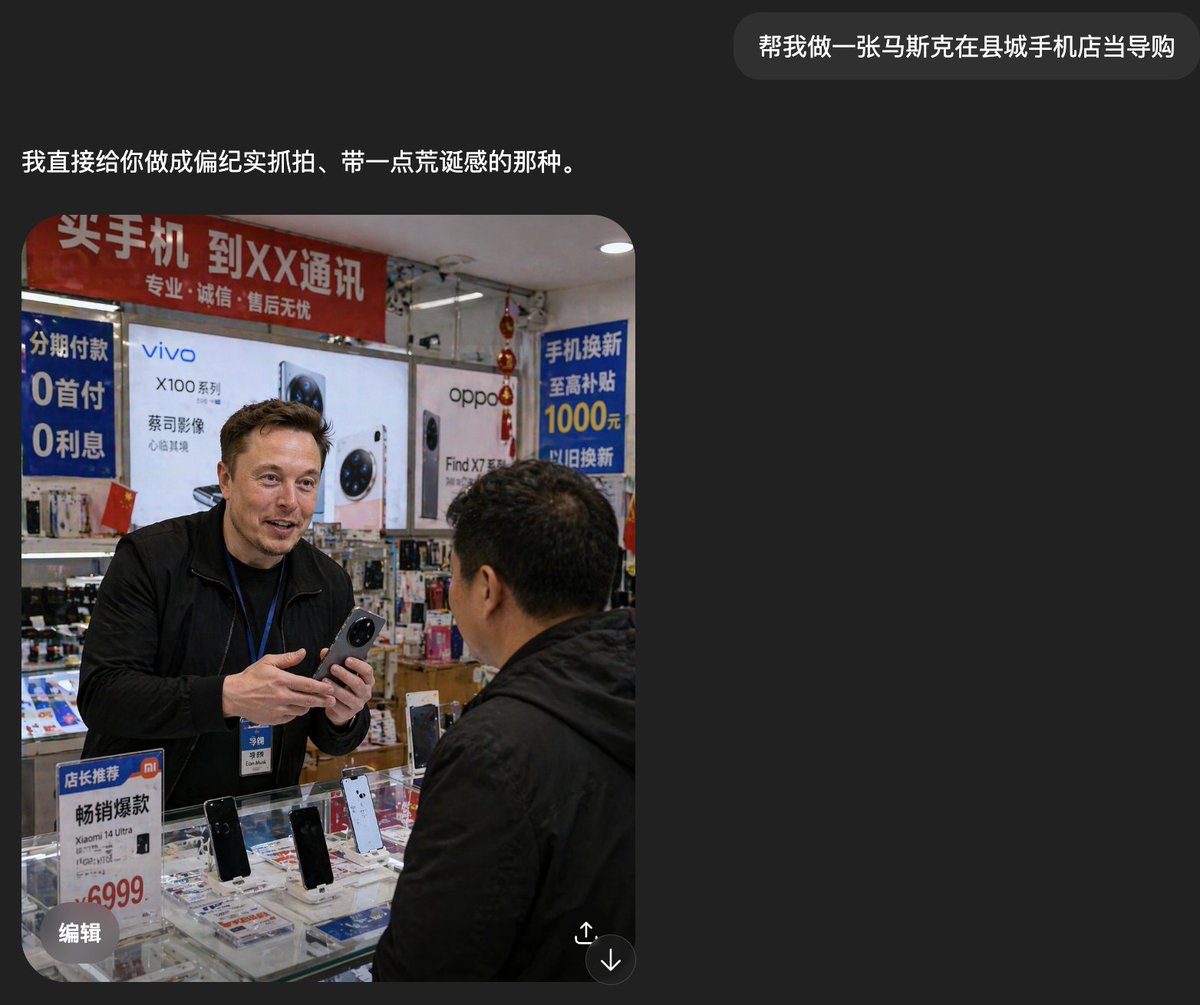
İlçe Telefon Dükkanında Yabancılar Memuru
Bu komut, Çin'deki kalabalık bir cep telefonu mağazasında telefon satan yabancı bir satış görevlisinin gerçekçi ve doğal bir fotoğrafını oluşturur; bu fotoğraf, belgesel tarzı sosyal medya görselleri için kullanışlıdır.
Bu İç Mekan ve Mimari için bir GPT Image 2 örnek senaryosudur. Benzer görseller oluşturmak için aşağıdaki hazır metni kullanın ve yeniden kullanmadan önce Awesome GPT Image 2 Prompts atıfını ve ticari kullanım haklarını inceleyin.
Tüm komut istemi setine mi ihtiyacınız var? Şunu kullanın: İç Mekan ve Mimari Daha fazla ilgili örnek için konu merkezini ziyaret edin veya açın. GPT Image 2 istem kataloğu Tam örnek dizin, yeniden kullanılabilir yapılar ve kaynak atfı için.
Free 1K preview
Generate one preview image instantly, no sign-up required.
1695/4000
İpucu
Kopyalamaya hazır istemi
A realistic documentary-style smartphone photo inside a small county-town mobile phone shop in China, showing a candid sales interaction at the counter. A tall foreign man, about {argument name="shop clerk nationality" default="Russian"}, stands behind a glass display case wearing a black jacket and a blue employee lanyard with badge, holding a smartphone in both hands as if introducing it to a customer. Show every face clearly with natural, detailed facial features. In the foreground, a middle-aged Chinese male customer in a black jacket is seen from behind and slightly to the side, facing the clerk. The store is cramped, brightly lit, and visually cluttered with authentic retail details. Behind them are large smartphone brand posters and lightbox ads, including 2 major phone brand ads: vivo and oppo. There are 4 prominent Chinese promotional signs visible: a red overhead banner about buying phones and carrier service, a blue vertical installment-payment sign mentioning 0 down payment and 0 interest, a blue trade-in subsidy sign mentioning 1000 yuan, and a small counter sign promoting a Xiaomi model with a 6999 price. The glass counter contains multiple display phones, with 4 clearly visible upright demo phones on stands, plus scattered brochures and accessories beneath the glass. Add dense shelves of boxed accessories and hanging decorations in the background, with slightly messy composition, harsh indoor shop lighting, mild lens distortion, and the rough, unpolished realism of a casually taken phone snapshot. The mood should feel mundane, local, and faintly surreal because the foreign clerk appears completely integrated into an ordinary Chinese mobile phone store.İstem değişkenleri
Komut isteminde bulunan, düzenlenebilir argüman yer tutucuları ve varsayılan değerleri.
Değişken
shop clerk nationality
Varsayılan
Russian
Best for
- - İç Mekan ve Mimari visual exploration
- - Image generation and reference-image edits
- - Reusable briefs that keep source attribution visible
Change these parts
- - Subject, product, character, or scene
- - Aspect ratio, camera, lighting, and background
- - Brand, text, color, and output constraints
Recommended model and settings
- - Model: gpt-image-2
- - Input mode: Metinden görsele
- - Aspect ratio: source
- - Commercial status: review original source
How to use this prompt
- 1. Copy the prompt and preserve its structure for the first test.
- 2. Replace the subject, context, and publishing channel.
- 3. Change one camera, lighting, or style variable per iteration.
- 4. Inspect the output, source, text, and rights before reuse.
Limitations, source, and reuse cautions
- - Generated output is an editable draft, not factual, legal, or rights evidence.
- - Review the linked source, people, brands, logos, text, and third-party media before commercial use.
Awesome GPT Image 2 Prompts kaynağından içe aktarılmıştır. Kaynak belirtilmesi zorunludur. Ticari kullanım durumu allowed şeklindedir; ücretli kullanım öncesinde kaynak haklarını inceleyin.
Bu kategoride daha fazla vaka
Kategoriye, giriş modu uyumluluğuna, kaliteye ve düşük riske göre önceliklendirilmiştir.






Yeniden kullanım ve kaynak notları
Vaka önizlemesini yaptıktan sonra bu istemi güvenle kullanın.
- 1.Komut istemini kopyalayın veya oluşturma düğmesini kullanarak doğrudan Dovoo'da açın.
- 2.Değişkenleri, en boy oranını ve referans görselleri kendi kullanım durumunuza göre ayarlayın.
- 3.Yayınlamadan veya ücretli kullanımdan önce, kaynak haklarını, atıf gerekliliklerini ve marka veya benzerlik risklerini doğrulayın.