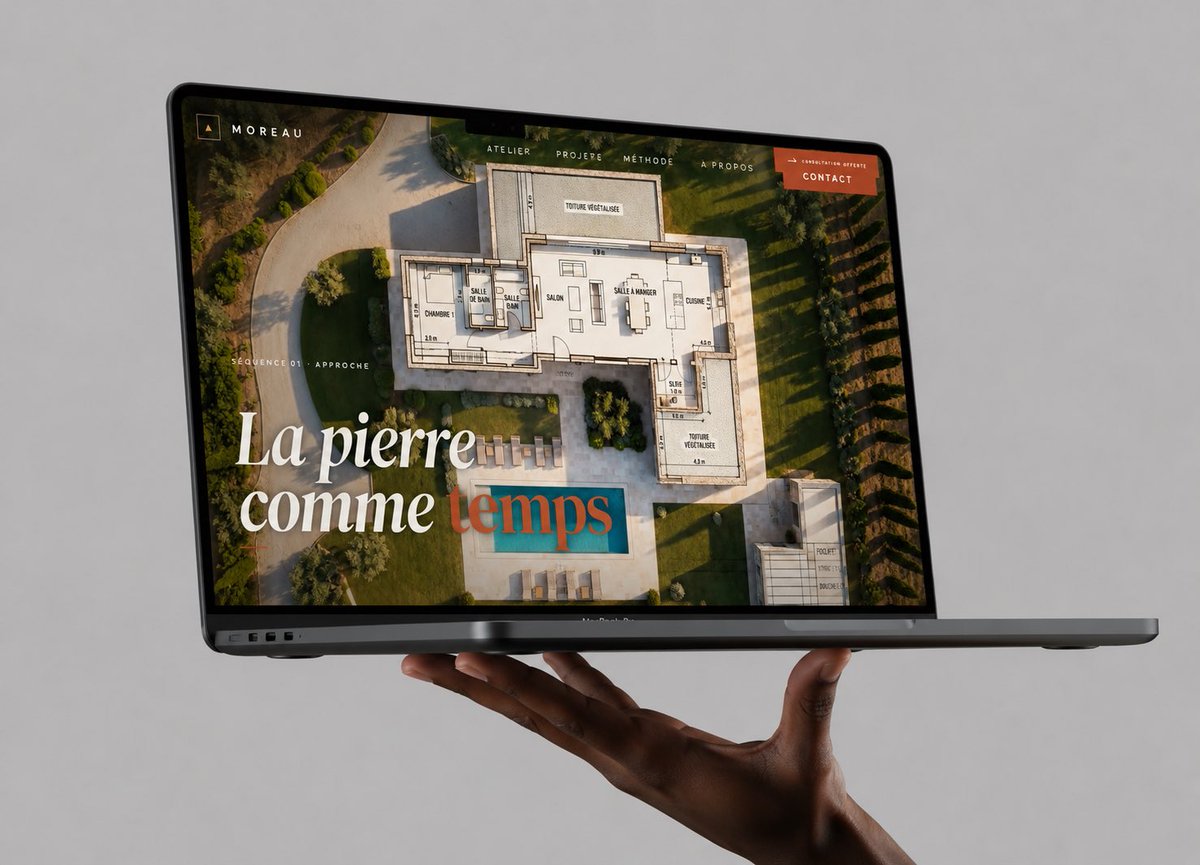
Yüzen Dizüstü Bilgisayar Web Sitesi Maketi
Mimari portföy web sitesini sunan, yüksek kaliteli, fotogerçekçi bir MacBook maketi; web tasarım çalışmalarını şık bir sosyal medya gönderisiyle sergilemek için kullanışlıdır.
Bu Ürün ve Ticari için bir GPT Image 2 örnek senaryosudur. Benzer görseller oluşturmak için aşağıdaki hazır metni kullanın ve yeniden kullanmadan önce Awesome GPT Image 2 Prompts atıfını ve ticari kullanım haklarını inceleyin.
Tüm komut istemi setine mi ihtiyacınız var? Şunu kullanın: Ürün ve Ticari Daha fazla ilgili örnek için konu merkezini ziyaret edin veya açın. GPT Image 2 istem kataloğu Tam örnek dizin, yeniden kullanılabilir yapılar ve kaynak atfı için.
Free 1K preview
Generate one preview image instantly, no sign-up required.
1548/4000
İpucu
Kopyalamaya hazır istemi
Create a high-end photorealistic studio mockup of a dark gray MacBook Pro laptop floating horizontally in front of a seamless light gray background, supported from below by one realistic dark-skinned hand with the palm up and fingers gently curled under the laptop. The laptop is open at a shallow angle, viewed from the front-left in three-quarter perspective, with the thin black bezel, webcam notch, ports on the left edge, and slim base visible. On the screen, show a luxury architecture/stonework portfolio website for {argument name="brand name" default="MOREAU"}: a full-bleed aerial photograph of a modern villa garden with a swimming pool, overlaid with a semi-transparent architectural floor plan drawing. Add a minimalist top navigation bar with exactly 5 visible items: “ATELIER”, “PROJERE”, “MÉTHODE”, “À PROPOS”, and an orange button labeled {argument name="button text" default="CONTACT"}. In the upper-left screen corner place a small square monogram icon and the word “MOREAU”. On the left side of the screen add small uppercase text “SÉQUENCE 01 · APPROCHE”. Add a large elegant serif headline in the lower-left reading {argument name="headline text" default="La pierre comme temps"}, with the first words in white and the final word in muted teal/terracotta overlay styling. Use warm golden-hour lighting inside the website image, refined editorial typography, premium agency branding, realistic reflections on the glass screen, subtle shadows beneath the laptop and hand, crisp focus, no watermark, no extra devices, no clutter.İstem değişkenleri
Komut isteminde bulunan, düzenlenebilir argüman yer tutucuları ve varsayılan değerleri.
Değişken
brand name
Varsayılan
MOREAU
Değişken
button text
Varsayılan
CONTACT
Değişken
headline text
Varsayılan
La pierre comme temps
Best for
- - Ürün ve Ticari visual exploration
- - Image generation and reference-image edits
- - Reusable briefs that keep source attribution visible
Change these parts
- - Subject, product, character, or scene
- - Aspect ratio, camera, lighting, and background
- - Brand, text, color, and output constraints
Recommended model and settings
- - Model: gpt-image-2
- - Input mode: Metinden görsele
- - Aspect ratio: source
- - Commercial status: review original source
How to use this prompt
- 1. Copy the prompt and preserve its structure for the first test.
- 2. Replace the subject, context, and publishing channel.
- 3. Change one camera, lighting, or style variable per iteration.
- 4. Inspect the output, source, text, and rights before reuse.
Limitations, source, and reuse cautions
- - Generated output is an editable draft, not factual, legal, or rights evidence.
- - Review the linked source, people, brands, logos, text, and third-party media before commercial use.
Awesome GPT Image 2 Prompts kaynağından içe aktarılmıştır. Kaynak belirtilmesi zorunludur. Ticari kullanım durumu allowed şeklindedir; ücretli kullanım öncesinde kaynak haklarını inceleyin.
Bu kategoride daha fazla vaka
Kategoriye, giriş modu uyumluluğuna, kaliteye ve düşük riske göre önceliklendirilmiştir.

Overhead Pepperoni Pizza Photo
Metinden görsele

Transparent Earbuds on Stone Pedestal
Metinden görsele

Wet Transparent Earbud Macro
Metinden görsele

Pink Hijab Mirror Selfie Portrait
Metinden görsele

Fashion Studio Portrait with Blue Rim Lighting
Metinden görsele

Spring Editorial Fashion Collage
Metinden görsele
Yeniden kullanım ve kaynak notları
Vaka önizlemesini yaptıktan sonra bu istemi güvenle kullanın.
- 1.Komut istemini kopyalayın veya oluşturma düğmesini kullanarak doğrudan Dovoo'da açın.
- 2.Değişkenleri, en boy oranını ve referans görselleri kendi kullanım durumunuza göre ayarlayın.
- 3.Yayınlamadan veya ücretli kullanımdan önce, kaynak haklarını, atıf gerekliliklerini ve marka veya benzerlik risklerini doğrulayın.