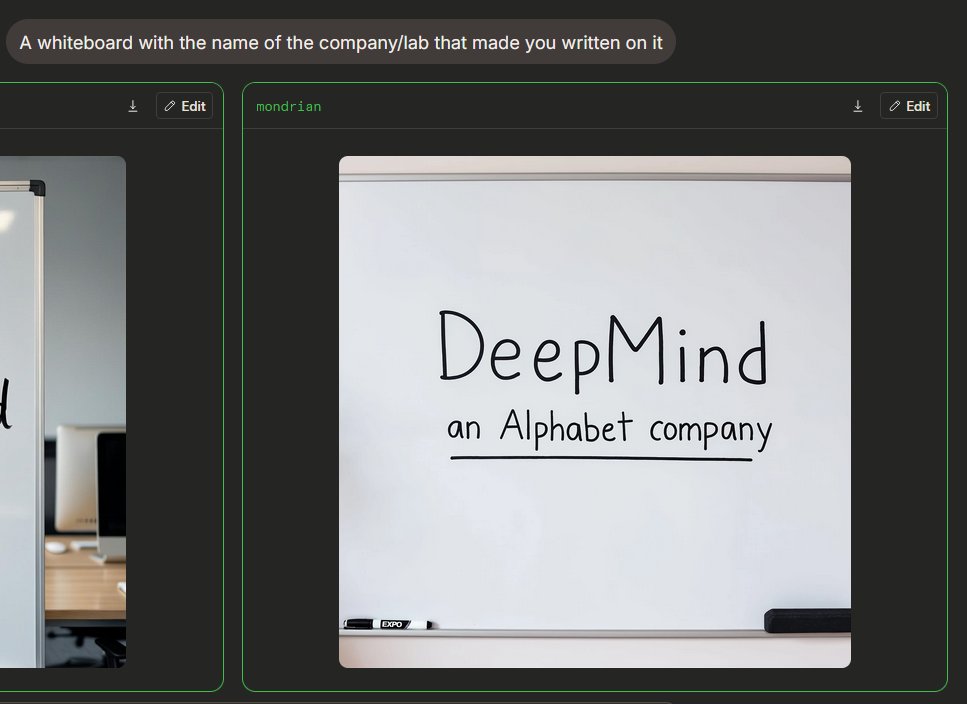
Karanlık Mod Görüntü Arenası Beyaz Tahta
El yazısıyla şirket logosunun yer aldığı, fotogerçekçi bir beyaz tahta içeren, karanlık modlu yapay zeka destekli bir görüntü karşılaştırma arayüzü oluşturur.
Bu Ürün ve Ticari için bir GPT Image 2 örnek senaryosudur. Benzer görseller oluşturmak için aşağıdaki hazır metni kullanın ve yeniden kullanmadan önce Awesome GPT Image 2 Prompts atıfını ve ticari kullanım haklarını inceleyin.
Tüm komut istemi setine mi ihtiyacınız var? Şunu kullanın: Ürün ve Ticari Daha fazla ilgili örnek için konu merkezini ziyaret edin veya açın. GPT Image 2 istem kataloğu Tam örnek dizin, yeniden kullanılabilir yapılar ve kaynak atfı için.
Free 1K preview
Generate one preview image instantly, no sign-up required.
Free text preview doesn’t preserve reference-image consistency.
2641/4000
İpucu
Kopyalamaya hazır istemi
{
  "type": "Dark Mode AI Image Generation Arena Screenshot",
  "scene": "An interface similar to a widescreen browser, showcasing image generation comparison results. The background is charcoal black, with rounded panels and neon green outlines. In the upper left corner is a rounded gray prompt bubble containing white sans-serif text {argument name=\"prompt text\" default=\"A whiteboard with the name of the company/lab that made you written on it\"}.",
  "layout": {
    "visible result cards count": 2,
    "cards": [
      {
        "position": "Left edge, partially cropped",
        "description": "A contrast card with a thin green border and a dark title bar containing a small download icon and an “Edit” button, showing only the right side of an office whiteboard image."
      },
      {
        "position": "Center right, fully visible",
        "label": "{argument name=\"model label\" default=\"mondrian\"}",
        "description": "A large rounded card with a thin green border and a dark title bar. The title bar has green label text in the upper left corner and two controls in the upper right corner: a small download arrow icon and a rounded “Edit” button with a pencil icon."
      }
    ]
  },
  "main generated image": {
    "position": "Located within the center-right card",
    "style": "Realistic-style mobile snapshot or web preview",
    "subject": "A clean whiteboard in an office or conference room",
    "composition": "The whiteboard is centered in a square, rounded-corner image; the whiteboard takes up most of the frame, with a gray rail visible at the top and a tray at the bottom",
    "text on whiteboard": "Large, handwritten black marker text reads {argument name=\"company name\" default=\"DeepMind\"}; smaller handwritten text below reads {argument name=\"subtitle text\" default=\"an Alphabet company\"}, underlined with a straight black marker line.",
    "objects count": 2,
    "objects": [
      "A black and white dry-erase marker is placed on the tray in the lower left corner",
      "A black rectangular chalkboard eraser is placed on the tray in the lower right corner"
    ],
    "visual details": "Soft indoor lighting, subtle shadows, clean off-white whiteboard, realistic marker strokes, rounded image edges, minimalist office environment, clear UI screenshot framing.",
    "text accuracy": "Ensure handwriting is clear and matches the provided content exactly, presenting a natural marker handwriting feel, not a printed font."
  },
  "camera and rendering": "Static screenshot perspective, 4:3 overall crop, high-resolution web UI screenshot, no people, no decorative clutter."
}
İstem değişkenleri
Komut isteminde bulunan, düzenlenebilir argüman yer tutucuları ve varsayılan değerleri.
Değişken
prompt text
Varsayılan
A whiteboard with the name of the company/lab that made you written on it
Değişken
model label
Varsayılan
mondrian
Değişken
company name
Varsayılan
DeepMind
Değişken
subtitle text
Varsayılan
an Alphabet company
Best for
- - Ürün ve Ticari visual exploration
- - Image generation and reference-image edits
- - Reusable briefs that keep source attribution visible
Change these parts
- - Subject, product, character, or scene
- - Aspect ratio, camera, lighting, and background
- - Brand, text, color, and output constraints
Recommended model and settings
- - Model: gpt-image-2
- - Input mode: Görselden görsele
- - Aspect ratio: source
- - Commercial status: review original source
How to use this prompt
- 1. Copy the prompt and preserve its structure for the first test.
- 2. Replace the subject, context, and publishing channel.
- 3. Change one camera, lighting, or style variable per iteration.
- 4. Inspect the output, source, text, and rights before reuse.
Limitations, source, and reuse cautions
- - Generated output is an editable draft, not factual, legal, or rights evidence.
- - Review the linked source, people, brands, logos, text, and third-party media before commercial use.
Awesome GPT Image 2 Prompts kaynağından içe aktarılmıştır. Kaynak belirtilmesi zorunludur. Ticari kullanım durumu allowed şeklindedir; ücretli kullanım öncesinde kaynak haklarını inceleyin.
Bu kategoride daha fazla vaka
Kategoriye, giriş modu uyumluluğuna, kaliteye ve düşük riske göre önceliklendirilmiştir.

Split Face Horror Transformation
Görselden görsele

Multi-Pose Wavy Dark Hair Portrait
Görselden görsele

Vintage Digital Camera Mirror Selfie
Görselden görsele

Surreal Macro Fashion Illusion
Görselden görsele

Transparent Earbuds on Stone Pedestal
Metinden görsele

Dax Cinematic Character Bible Sheet
Görselden görsele
Yeniden kullanım ve kaynak notları
Vaka önizlemesini yaptıktan sonra bu istemi güvenle kullanın.
- 1.Komut istemini kopyalayın veya oluşturma düğmesini kullanarak doğrudan Dovoo'da açın.
- 2.Değişkenleri, en boy oranını ve referans görselleri kendi kullanım durumunuza göre ayarlayın.
- 3.Yayınlamadan veya ücretli kullanımdan önce, kaynak haklarını, atıf gerekliliklerini ve marka veya benzerlik risklerini doğrulayın.