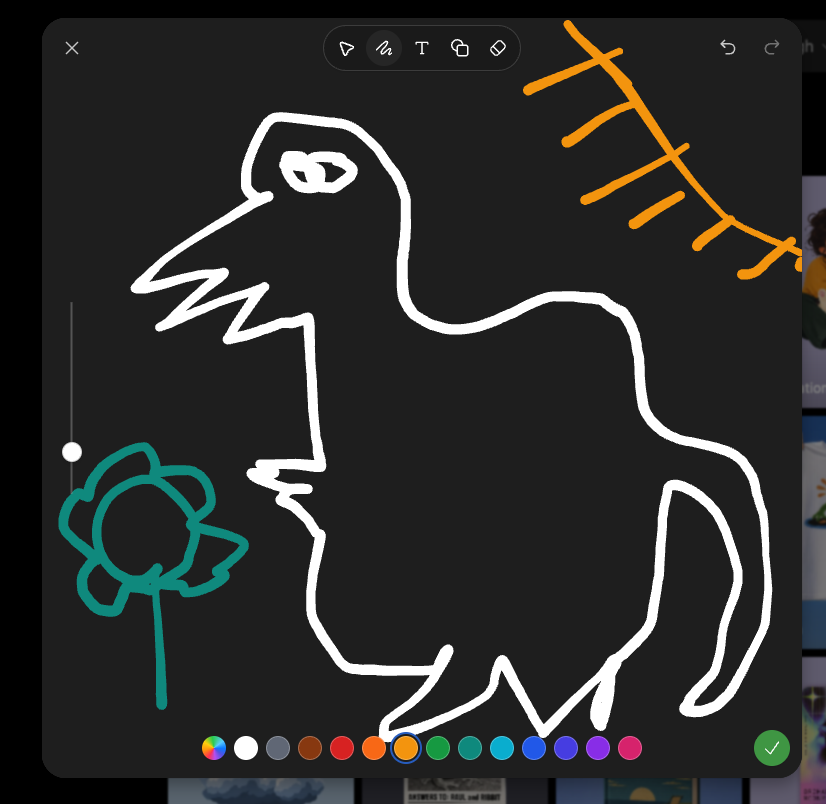
Dark Sketch Mode Monster Doodle
Generates a screenshot-style dark drawing interface with a crude monster doodle, color palette, toolbar, and sketch-mode controls.
Bu Diğer İlham Kaynakları için bir GPT Image 2 örnek senaryosudur. Benzer görseller oluşturmak için aşağıdaki hazır metni kullanın ve yeniden kullanmadan önce Awesome GPT Image 2 Prompts atıfını ve ticari kullanım haklarını inceleyin.
Tüm komut istemi setine mi ihtiyacınız var? Şunu kullanın: Diğer İlham Kaynakları Daha fazla ilgili örnek için konu merkezini ziyaret edin veya açın. GPT Image 2 istem kataloğu Tam örnek dizin, yeniden kullanılabilir yapılar ve kaynak atfı için.
Free 1K preview
Generate one preview image instantly, no sign-up required.
2318/4000
İpucu
Kopyalamaya hazır istemi
Goal: Create a screenshot-like image of a dark sketch/drawing mode interface showing a deliberately crude digital doodle being edited, as if in an image-generation app's sketch tool.

Canvas: Square-ish 4:3 screenshot, dark charcoal drawing panel centered with rounded corners over a dimmed gallery/app background barely visible at the right and bottom edges.

Layout: The main drawing area fills most of the frame. A top toolbar floats near the upper center, with a close X at top left and undo/redo icons at top right. A vertical brush-size slider sits on the left side with one white circular handle. A horizontal color palette runs along the bottom. A green circular checkmark confirmation button sits at the bottom right.

Main sketch: Draw a rough white line-art monster resembling a hunched fantasy boss creature, made with thick uneven brush strokes. It has one long pointed beak or snout facing left, a jagged open mouth, one scribbled oval eye near the top, a high arched back, a bulky torso, bent legs, and a long curved tail on the right. Add a small teal flower-like doodle on a stem at the lower left, facing the monster. Add an orange sketch of a sun or diagonal branch-like rays in the upper right corner.

Interface details: Include exactly 6 visible top toolbar icons: pointer/selection arrow, squiggle brush icon, letter T text tool, overlapping shapes/copy icon, eraser/diamond icon, and the surrounding rounded toolbar container. Include exactly 2 top-right history icons: undo and redo. Include exactly 1 close X icon at top left. Include exactly 1 vertical slider with 1 white knob. Include exactly 16 bottom color swatches, from left to right: multicolor rainbow circle, white, gray, brown, red, orange, yellow-orange selected with a blue ring, green, teal-green, cyan, blue, indigo, violet, purple, pink, plus exactly 1 green confirmation check button at the far right.

Visual style: Rough hand-drawn sketch mode, thick uneven strokes, dark UI, playful messy drawing, casual screenshot aesthetic. Use {argument name="creature outline color" default="white"}, {argument name="flower color" default="teal"}, {argument name="sun sketch color" default="orange"}, and {argument name="background panel color" default="dark charcoal"}. No polished rendering; keep it intentionally sloppy and simple.
İstem değişkenleri
Komut isteminde bulunan, düzenlenebilir argüman yer tutucuları ve varsayılan değerleri.
Değişken
creature outline color
Varsayılan
white
Değişken
flower color
Varsayılan
teal
Değişken
sun sketch color
Varsayılan
orange
Değişken
background panel color
Varsayılan
dark charcoal
Best for
- - Diğer İlham Kaynakları visual exploration
- - Image generation and reference-image edits
- - Reusable briefs that keep source attribution visible
Change these parts
- - Subject, product, character, or scene
- - Aspect ratio, camera, lighting, and background
- - Brand, text, color, and output constraints
Recommended model and settings
- - Model: gpt-image-2
- - Input mode: Metinden görsele
- - Aspect ratio: source
- - Commercial status: review original source
How to use this prompt
- 1. Copy the prompt and preserve its structure for the first test.
- 2. Replace the subject, context, and publishing channel.
- 3. Change one camera, lighting, or style variable per iteration.
- 4. Inspect the output, source, text, and rights before reuse.
Limitations, source, and reuse cautions
- - Generated output is an editable draft, not factual, legal, or rights evidence.
- - Review the linked source, people, brands, logos, text, and third-party media before commercial use.
Awesome GPT Image 2 Prompts kaynağından içe aktarılmıştır. Kaynak belirtilmesi zorunludur. Ticari kullanım durumu allowed şeklindedir; ücretli kullanım öncesinde kaynak haklarını inceleyin.
Bu kategoride daha fazla vaka
Kategoriye, giriş modu uyumluluğuna, kaliteye ve düşük riske göre önceliklendirilmiştir.

MotoGP POV Cornering Shot
Metinden görsele

Cute Speech Bubble Mascot Profile Icon
Metinden görsele

Autumn Cozy Casual Outfit Prompt
Metinden görsele

Cute Focus Desk Flat Lay and Kawaii Illustration
Metinden görsele

Street Selfie with Cat in Matching Cap
Metinden görsele

Morning Bed Stretching Legs Prompt
Metinden görsele
Yeniden kullanım ve kaynak notları
Vaka önizlemesini yaptıktan sonra bu istemi güvenle kullanın.
- 1.Komut istemini kopyalayın veya oluşturma düğmesini kullanarak doğrudan Dovoo'da açın.
- 2.Değişkenleri, en boy oranını ve referans görselleri kendi kullanım durumunuza göre ayarlayın.
- 3.Yayınlamadan veya ücretli kullanımdan önce, kaynak haklarını, atıf gerekliliklerini ve marka veya benzerlik risklerini doğrulayın.