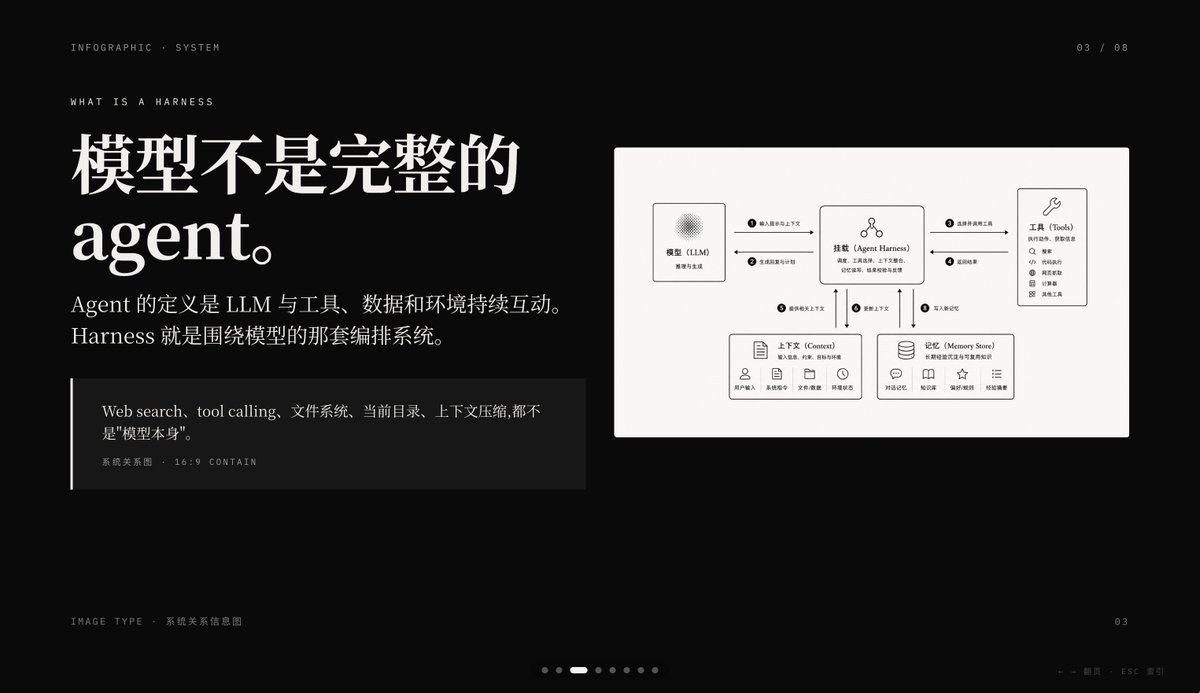
Karanlık Yapay Zekanın Kullanımına İlişkin Bilgilendirme Grafiği Slaydı
Büyük Çince yazı tipi ve sade bir sistem ilişkisi diyagramı içeren, yapay zeka ajanı geliştirme sürecini açıklayan, siyah arka planlı, yüksek kaliteli bir sunum slaydı; PowerPoint kapakları veya kavram açıklama sayfaları için idealdir.
Bu Grafik ve Poster için bir GPT Image 2 örnek senaryosudur. Benzer görseller oluşturmak için aşağıdaki hazır metni kullanın ve yeniden kullanmadan önce Awesome GPT Image 2 Prompts atıfını ve ticari kullanım haklarını inceleyin.
Tüm komut istemi setine mi ihtiyacınız var? Şunu kullanın: Grafik ve Poster Daha fazla ilgili örnek için konu merkezini ziyaret edin veya açın. GPT Image 2 istem kataloğu Tam örnek dizin, yeniden kullanılabilir yapılar ve kaynak atfı için.
Free 1K preview
Generate one preview image instantly, no sign-up required.
4000/4000
İpucu
Kopyalamaya hazır istemi
{
  "type": "dark editorial infographic slide",
  "style": "premium keynote-style presentation page with minimalist Swiss-inspired layout, strong contrast, elegant serif headline paired with small uppercase sans-serif metadata, lots of negative space, cinematic black background, subtle grain, refined white typography, monochrome diagram card",
  "aspect_ratio": "16:9",
  "background": {
    "color": "deep black"
  },
  "layout": {
    "sections": [
      {
        "title": "top metadata",
        "position": "top edge",
        "count": 3,
        "labels": [
          "INFOGRAPHIC · SYSTEM",
          "03 / 08",
          "WHAT IS A HARNESS"
        ]
      },
      {
        "title": "main text block",
        "position": "left side",
        "count": 3,
        "labels": [
          "The model is not a complete Agent.",
          "The definition of an Agent is the continuous interaction of an LLM with tools, data, and the environment. Harness is the orchestration system around the model.",
          "Web search, tool calling, file system, current directory, and context compression are not the \"model itself\"."
        ]
      },
      {
        "title": "diagram card",
        "position": "right side",
        "count": 5,
        "labels": [
          "Model (LLM)",
          "Mount (Agent Harness)",
          "Tools",
          "Context",
          "Memory Store"
        ]
      },
      {
        "title": "footer",
        "position": "bottom edge",
        "count": 4,
        "labels": [
          "Image Type · System Relationship Diagram",
          "03",
          "← → Page   ESC Close",
          "7 pagination dots with the 3rd highlighted"
        ]
      }
    ],
    "centerpiece": "a large off-white rectangular card on the right containing a clean systems diagram"
  },
  "typography": {
    "headline_font": "high-contrast editorial serif, oversized, bold",
    "body_font": "modern serif for Chinese body copy",
    "meta_font": "thin uppercase sans-serif with generous tracking"
  },
  "diagram": {
    "card_color": "warm light gray",
    "border": "none or extremely subtle",
    "line_style": "thin black connector arrows",
    "icon_style": "simple outline icons",
    "nodes": [
      {
        "name": "Model (LLM)",
        "position": "upper left inside card",
        "details": "small box with subtle radial texture behind the heading, subtitle suggests reasoning and generation"
      },
      {
        "name": "Mount (Agent Harness)",
        "position": "upper center inside card",
        "details": "central orchestration box with small person-like icon above title and short descriptive text below"
      },
      {
        "name": "Tools",
        "position": "upper right inside card",
        "details": "tall box with wrench icon and a vertical list of 8 tool items"
      },
      {
        "name": "Context",
        "position": "lower left inside card",
        "details": "wide box with document icon, description line, and 5 small labeled icons along the bottom"
      },
      {
        "name": "Memory Store",
        "position": "lower right inside card",
        "details": "wide box with database icon, description line, and 5 small labeled icons along the bottom"
      }
    ],
    "connections": {
      "count": 8,
      "description": "numbered circular markers on the connector arrows show the orchestration flow between the 5 nodes, including bidirectional links from the central harness to tools, context, and memory, plus one link from the model to the harness"
    }
  },
  "color_palette": {
    "count": 4,
    "colors": [
      "black background",
      "white headline text",
      "soft gray body text",
      "warm light-gray diagram panel"
    ]
  },
  "customization": {
    "headline": "{argument name=\"headline text\" default=\"The model is not a complete Agent.\"}",
    "page_index": "{argument name=\"page number\" default=\"03 / 08\"}",
    "section_kicker": "{argument name=\"section label\" default=\"WHAT IS A HARNESS\"}",
    "diagram_topic": "{argument name=\"diagram topic\" default=\"System Relationship Diagram\"}",
    "quote": "{argument name=\"quote\" default=\"Web search, tool calling, file system, current directory, and context compression are not the "model itself".\"}"
  }
}
İstem değişkenleri
Komut isteminde bulunan, düzenlenebilir argüman yer tutucuları ve varsayılan değerleri.
Değişken
headline text
Varsayılan
The model is not a complete Agent.
Değişken
page number
Varsayılan
03 / 08
Değişken
section label
Varsayılan
WHAT IS A HARNESS
Değişken
diagram topic
Varsayılan
System Relationship Diagram
Değişken
quote
Varsayılan
Web search, tool calling, file system, current directory, and context compression are not the "model itself".
Best for
- - Grafik ve Poster visual exploration
- - Image generation and reference-image edits
- - Reusable briefs that keep source attribution visible
Change these parts
- - Subject, product, character, or scene
- - Aspect ratio, camera, lighting, and background
- - Brand, text, color, and output constraints
Recommended model and settings
- - Model: gpt-image-2
- - Input mode: Metinden görsele
- - Aspect ratio: source
- - Commercial status: review original source
How to use this prompt
- 1. Copy the prompt and preserve its structure for the first test.
- 2. Replace the subject, context, and publishing channel.
- 3. Change one camera, lighting, or style variable per iteration.
- 4. Inspect the output, source, text, and rights before reuse.
Limitations, source, and reuse cautions
- - Generated output is an editable draft, not factual, legal, or rights evidence.
- - Review the linked source, people, brands, logos, text, and third-party media before commercial use.
Awesome GPT Image 2 Prompts kaynağından içe aktarılmıştır. Kaynak belirtilmesi zorunludur. Ticari kullanım durumu allowed şeklindedir; ücretli kullanım öncesinde kaynak haklarını inceleyin.
Bu kategoride daha fazla vaka
Kategoriye, giriş modu uyumluluğuna, kaliteye ve düşük riske göre önceliklendirilmiştir.

Surreal 3D Chess Match Artwork
Metinden görsele

Pink Hijab Mirror Selfie Portrait
Metinden görsele

Fashion Studio Portrait with Blue Rim Lighting
Metinden görsele

Spring Editorial Fashion Collage
Metinden görsele

Glitch Aesthetic Surreal Portrait
Metinden görsele

New Chinese-Style Editorial Portrait
Metinden görsele
Yeniden kullanım ve kaynak notları
Vaka önizlemesini yaptıktan sonra bu istemi güvenle kullanın.
- 1.Komut istemini kopyalayın veya oluşturma düğmesini kullanarak doğrudan Dovoo'da açın.
- 2.Değişkenleri, en boy oranını ve referans görselleri kendi kullanım durumunuza göre ayarlayın.
- 3.Yayınlamadan veya ücretli kullanımdan önce, kaynak haklarını, atıf gerekliliklerini ve marka veya benzerlik risklerini doğrulayın.