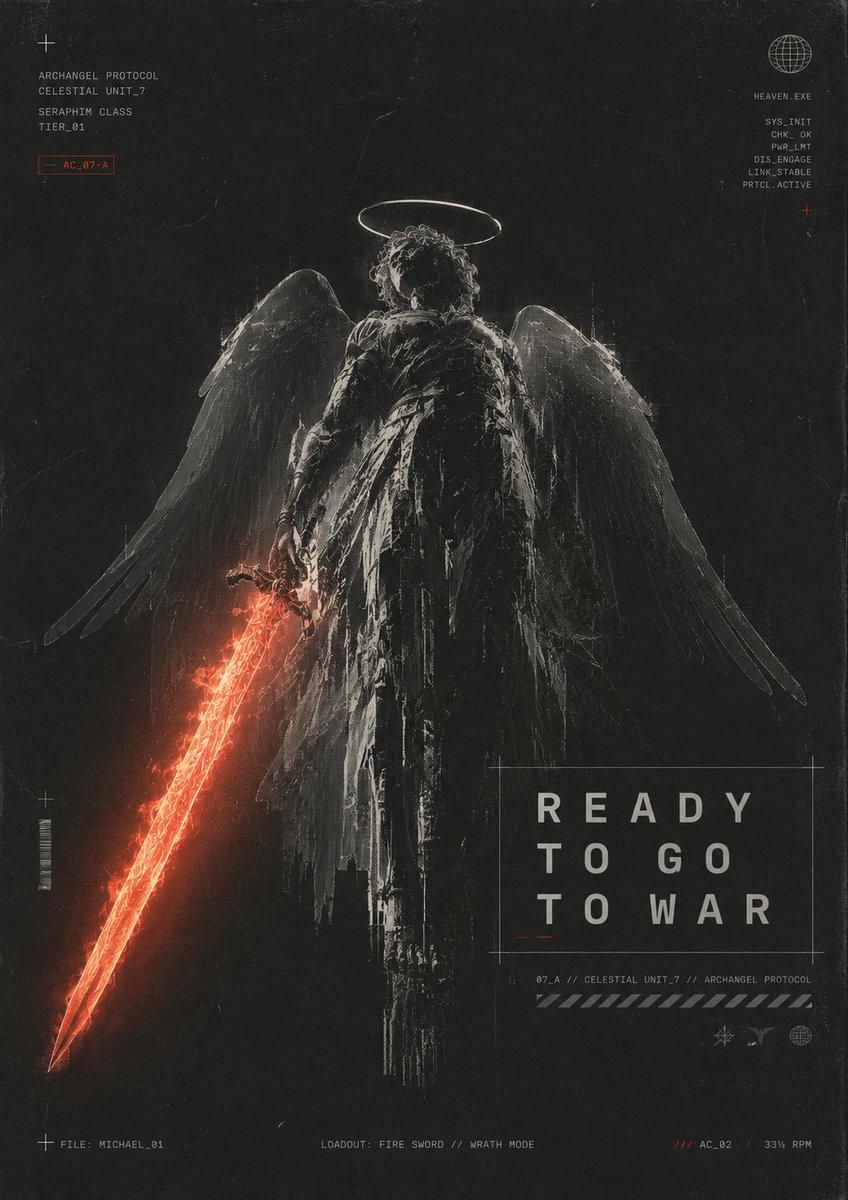
Karanlık Başmelek Savaş Posteri
Kanatlı bir başmeleğin elinde alevli bir kılıç tuttuğu ve askeri tarzda HUD yazı tipine sahip, sert bir bilim kurgu temalı dini poster.
Bu Grafik ve Poster için bir GPT Image 2 örnek senaryosudur. Benzer görseller oluşturmak için aşağıdaki hazır metni kullanın ve yeniden kullanmadan önce Awesome GPT Image 2 Prompts atıfını ve ticari kullanım haklarını inceleyin.
Tüm komut istemi setine mi ihtiyacınız var? Şunu kullanın: Grafik ve Poster Daha fazla ilgili örnek için konu merkezini ziyaret edin veya açın. GPT Image 2 istem kataloğu Tam örnek dizin, yeniden kullanılabilir yapılar ve kaynak atfı için.
Free 1K preview
Generate one preview image instantly, no sign-up required.
2456/4000
İpucu
Kopyalamaya hazır istemi
Create a dark futuristic religious sci-fi poster in a gritty black-and-charcoal palette with distressed film grain, scratches, dust, scanline artifacts, and worn paper texture. Center a full-body archangel warrior seen from behind, standing upright and imposing, with a glowing thin white halo above curly hair, large semi-transparent feathered wings spread downward and outward, and a tattered long black robe or armor cloak with ragged vertical strips. The angel holds a blazing red-orange energy fire sword in the left hand, angled diagonally down toward the bottom-left corner; the sword should be the main color accent, with molten cracks, sparks, and a triangular glowing blade tip. Use harsh monochrome rim lighting and etched, high-contrast sketch-like detailing, making the figure feel ancient, cybernetic, and battle-worn. Add minimal HUD typography and technical markings around the composition: top-left small cross icon and stacked text reading “ARCHANGEL PROTOCOL”, “CELESTIAL UNIT_7”, “SERAPHIM CLASS”, “TIER_01”, plus a small red outlined tag “AC_07-A”; top-right wireframe globe icon with “HEAVEN.EXE” and a vertical diagnostic list “SYS_INIT”, “CHK_OK”, “PNR_LMT”, “DIS_ENGAGE”, “LINK_STABLE”, “PRTCL_ACTIVE”, plus a tiny red cross. Place the main title in a thin outlined rectangle in the lower-right quadrant, large spaced uppercase text on three lines: “READY”, “TO GO”, “TO WAR”. Below it add small technical text “07_A // CELESTIAL UNIT_7 // ARCHANGEL PROTOCOL”, a diagonal hazard stripe bar, and three tiny interface icons. Along the bottom edge add three small captions: left “FILE: MICHAEL_01”, center “LOADOUT: FIRE SWORD // WRATH MODE”, right “/// AC_02 33% RPM”. Include exactly one central angel figure, one halo, two wings, one fiery sword, one large title box, two corner diagnostic text clusters, and three bottom status captions. Vertical poster aspect ratio, cinematic concept art, brutalist sci-fi graphic design, no extra characters, no watermark. The central title text may be customized as {argument name="headline text" default="READY TO GO TO WAR"}; the unit name may be customized as {argument name="unit name" default="CELESTIAL UNIT_7"}; the file name may be customized as {argument name="file name" default="MICHAEL_01"}; the weapon caption may be customized as {argument name="weapon caption" default="FIRE SWORD // WRATH MODE"}; the red tag may be customized as {argument name="red tag" default="AC_07-A"}.İstem değişkenleri
Komut isteminde bulunan, düzenlenebilir argüman yer tutucuları ve varsayılan değerleri.
Değişken
headline text
Varsayılan
READY TO GO TO WAR
Değişken
unit name
Varsayılan
CELESTIAL UNIT_7
Değişken
file name
Varsayılan
MICHAEL_01
Değişken
weapon caption
Varsayılan
FIRE SWORD // WRATH MODE
Değişken
red tag
Varsayılan
AC_07-A
Best for
- - Grafik ve Poster visual exploration
- - Image generation and reference-image edits
- - Reusable briefs that keep source attribution visible
Change these parts
- - Subject, product, character, or scene
- - Aspect ratio, camera, lighting, and background
- - Brand, text, color, and output constraints
Recommended model and settings
- - Model: gpt-image-2
- - Input mode: Metinden görsele
- - Aspect ratio: source
- - Commercial status: review original source
How to use this prompt
- 1. Copy the prompt and preserve its structure for the first test.
- 2. Replace the subject, context, and publishing channel.
- 3. Change one camera, lighting, or style variable per iteration.
- 4. Inspect the output, source, text, and rights before reuse.
Limitations, source, and reuse cautions
- - Generated output is an editable draft, not factual, legal, or rights evidence.
- - Review the linked source, people, brands, logos, text, and third-party media before commercial use.
Awesome GPT Image 2 Prompts kaynağından içe aktarılmıştır. Kaynak belirtilmesi zorunludur. Ticari kullanım durumu allowed şeklindedir; ücretli kullanım öncesinde kaynak haklarını inceleyin.
Related prompt packs
Bu kategoride daha fazla vaka
Kategoriye, giriş modu uyumluluğuna, kaliteye ve düşük riske göre önceliklendirilmiştir.

Hell Hound Character Sheet Infographic
Metinden görsele

MotoGP POV Cornering Shot
Metinden görsele

Boisterous Shrimpers Entering Pub
Metinden görsele

Cinematic Blue Backlit Portrait
Metinden görsele

Luxury Travel Fashion Portrait Prompt
Metinden görsele

Cute Focus Desk Flat Lay and Kawaii Illustration
Metinden görsele
Yeniden kullanım ve kaynak notları
Vaka önizlemesini yaptıktan sonra bu istemi güvenle kullanın.
- 1.Komut istemini kopyalayın veya oluşturma düğmesini kullanarak doğrudan Dovoo'da açın.
- 2.Değişkenleri, en boy oranını ve referans görselleri kendi kullanım durumunuza göre ayarlayın.
- 3.Yayınlamadan veya ücretli kullanımdan önce, kaynak haklarını, atıf gerekliliklerini ve marka veya benzerlik risklerini doğrulayın.