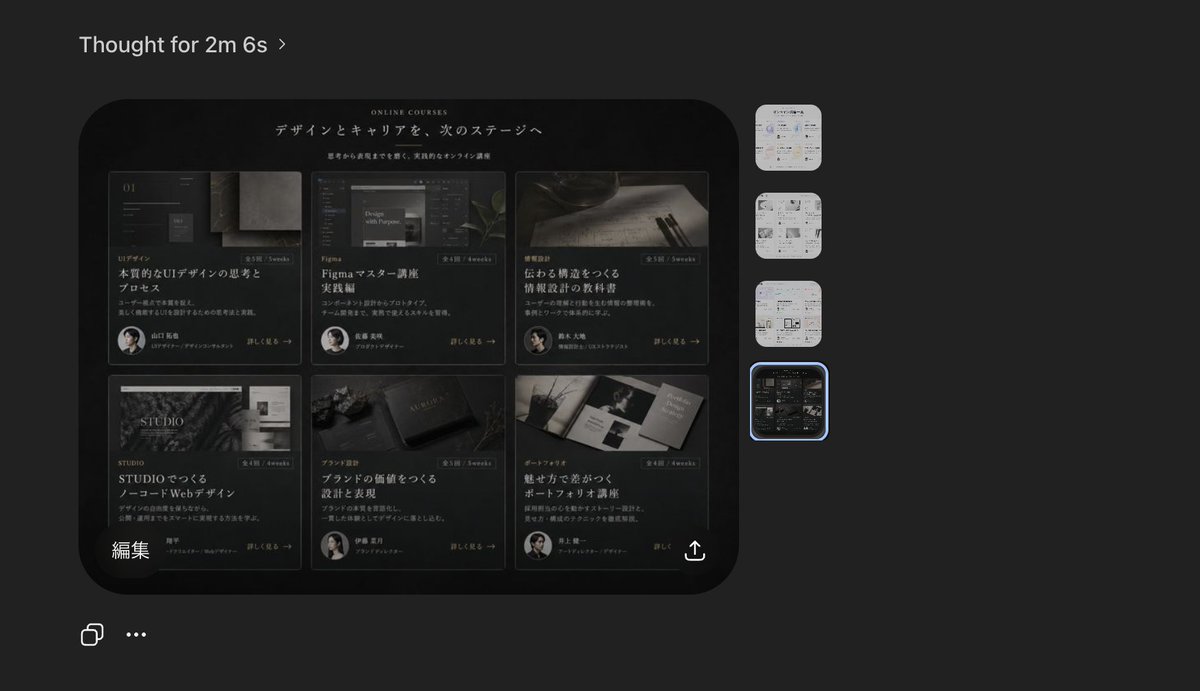
Kurs Web Sitesi Önizlemesi Özelliğine Sahip Karanlık Yapay Zeka Görüntüleyici
Bu, ürün maketleri, sosyal medya paylaşımları ve tasarım iş akışı sunumları için kullanışlı olan, üst düzey bir Japon çevrimiçi kurs açılış sayfası konseptini içeren gerçekçi, koyu temalı bir yapay zeka görüntüleyici ekran görüntüsü oluşturur.
Bu Diğer İlham Kaynakları için bir GPT Image 2 örnek senaryosudur. Benzer görseller oluşturmak için aşağıdaki hazır metni kullanın ve yeniden kullanmadan önce Awesome GPT Image 2 Prompts atıfını ve ticari kullanım haklarını inceleyin.
Tüm komut istemi setine mi ihtiyacınız var? Şunu kullanın: Diğer İlham Kaynakları Daha fazla ilgili örnek için konu merkezini ziyaret edin veya açın. GPT Image 2 istem kataloğu Tam örnek dizin, yeniden kullanılabilir yapılar ve kaynak atfı için.
Free 1K preview
Generate one preview image instantly, no sign-up required.
2333/4000
İpucu
Kopyalamaya hazır istemi
A dark-mode desktop screenshot of an AI image viewer interface showing a generated website design preview. The overall canvas is charcoal gray with a minimal modern app UI. At the top left, place the heading “Thought for 2m 6s” in small white sans-serif text with a subtle chevron. Center-left, show one large rounded-rectangle preview image with a glossy black luxury editorial web landing page for online courses in Japanese. Inside that preview, the website hero area has a black background, elegant serif and sans-serif typography, and the small English heading “ONLINE COURSES” above a large Japanese headline that reads “デザインとキャリアを、次のステージへ”. Beneath it is a smaller Japanese subheading. The main content area of the website contains exactly 6 course cards arranged in a 3-column by 2-row grid. Each card is dark, cinematic, and premium, with a moody photo, category label, Japanese title, short description, a small circular instructor portrait, and a “詳しく見る →” style link. Card 1 shows UI design imagery and the large title “本質的なUIデザインの思考とプロセス”. Card 2 shows a Figma-related screen image and the title “Figmaマスター講座 実践編”. Card 3 shows writing tools on paper and the title “伝わる構造をつくる 情報設計の技術”. Card 4 shows a STUDIO-themed visual and the title “STUDIOでつくる ノーコードWebデザイン”. Card 5 shows a branding or book-like object and the title “ブランドの価値をつくる 設計と表現”. Card 6 shows a portfolio booklet spread and the title “魅せ方で差がつく ポートフォリオ講座”. Add subtle gold-gray highlights, thin borders, soft reflections, and a refined high-end Japanese design aesthetic. At the lower left inside the preview image, include the white Japanese label “編集”. At the lower right inside the preview image, add a small white share/export icon. On the far right side of the app interface, place exactly 4 vertically stacked rounded-square thumbnails representing alternate generated images; the top 3 thumbnails are pale light-theme page designs, and the 4th thumbnail matches the dark course-grid design. Highlight the 4th thumbnail with a glowing blue selection outline. At the bottom left of the overall screenshot, add exactly 2 small white interface icons: a copy icon and a horizontal three-dots menu. The composition should feel like a real product screenshot from a creative AI tool, with crisp UI spacing, subtle shadows, and accurate screen-capture realism.
Best for
- - Diğer İlham Kaynakları visual exploration
- - Image generation and reference-image edits
- - Reusable briefs that keep source attribution visible
Change these parts
- - Subject, product, character, or scene
- - Aspect ratio, camera, lighting, and background
- - Brand, text, color, and output constraints
Recommended model and settings
- - Model: gpt-image-2
- - Input mode: Metinden görsele
- - Aspect ratio: source
- - Commercial status: review original source
How to use this prompt
- 1. Copy the prompt and preserve its structure for the first test.
- 2. Replace the subject, context, and publishing channel.
- 3. Change one camera, lighting, or style variable per iteration.
- 4. Inspect the output, source, text, and rights before reuse.
Limitations, source, and reuse cautions
- - Generated output is an editable draft, not factual, legal, or rights evidence.
- - Review the linked source, people, brands, logos, text, and third-party media before commercial use.
Awesome GPT Image 2 Prompts kaynağından içe aktarılmıştır. Kaynak belirtilmesi zorunludur. Ticari kullanım durumu allowed şeklindedir; ücretli kullanım öncesinde kaynak haklarını inceleyin.
Bu kategoride daha fazla vaka
Kategoriye, giriş modu uyumluluğuna, kaliteye ve düşük riske göre önceliklendirilmiştir.






Yeniden kullanım ve kaynak notları
Vaka önizlemesini yaptıktan sonra bu istemi güvenle kullanın.
- 1.Komut istemini kopyalayın veya oluşturma düğmesini kullanarak doğrudan Dovoo'da açın.
- 2.Değişkenleri, en boy oranını ve referans görselleri kendi kullanım durumunuza göre ayarlayın.
- 3.Yayınlamadan veya ücretli kullanımdan önce, kaynak haklarını, atıf gerekliliklerini ve marka veya benzerlik risklerini doğrulayın.