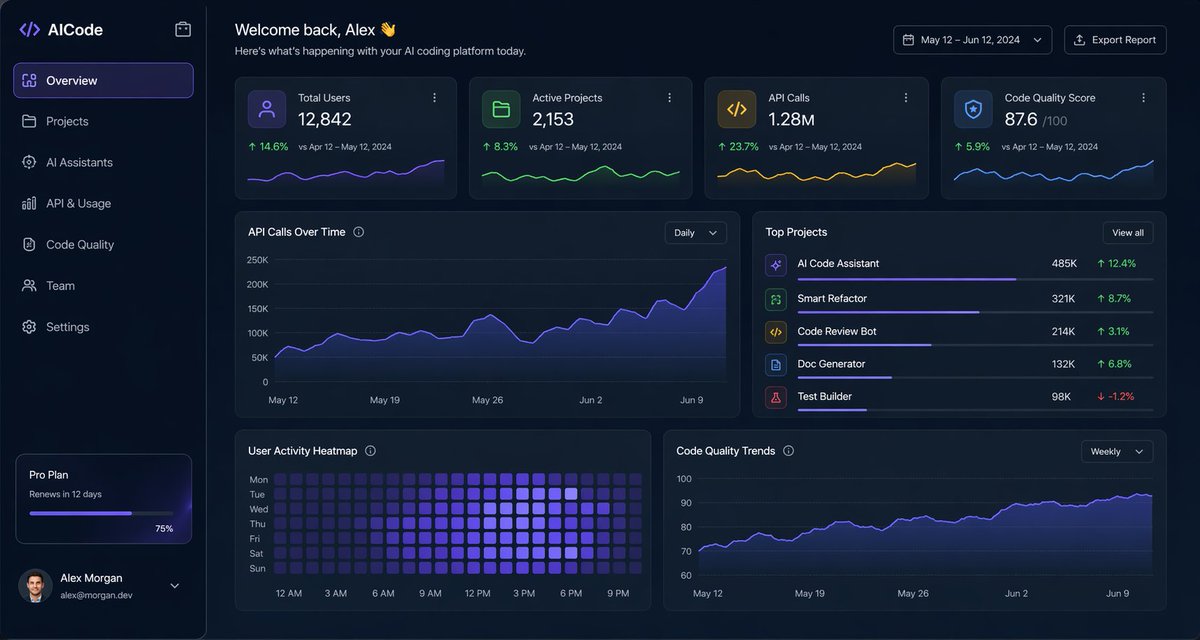
Karanlık Yapay Zeka Kodlama Kontrol Paneli Kullanıcı Arayüzü
Yapay zeka kodlama platformu için tasarlanmış, şık bir karanlık mod analiz paneli; SaaS ürün tasarım örnekleri, yönetim panelleri ve veri açısından zengin web arayüzü sunumları için uygundur.
Bu Diğer İlham Kaynakları için bir GPT Image 2 örnek senaryosudur. Benzer görseller oluşturmak için aşağıdaki hazır metni kullanın ve yeniden kullanmadan önce Awesome GPT Image 2 Prompts atıfını ve ticari kullanım haklarını inceleyin.
Tüm komut istemi setine mi ihtiyacınız var? Şunu kullanın: Diğer İlham Kaynakları Daha fazla ilgili örnek için konu merkezini ziyaret edin veya açın. GPT Image 2 istem kataloğu Tam örnek dizin, yeniden kullanılabilir yapılar ve kaynak atfı için.
Free 1K preview
Generate one preview image instantly, no sign-up required.
3885/4000
İpucu
Kopyalamaya hazır istemi
{
  "type": "dark SaaS analytics dashboard UI",
  "product": {
    "brand": "{argument name=\"brand name\" default=\"AICode\"}",
    "theme": "dark navy blue glassmorphism interface with subtle gradients, soft glow, rounded cards, thin borders, modern developer-tool aesthetic"
  },
  "canvas": {
    "aspect_ratio": "16:9",
    "background": "deep midnight blue with faint vignette and soft radial lighting"
  },
  "layout": {
    "structure": "left sidebar plus main content area",
    "sections": [
      {
        "title": "Sidebar",
        "position": "left",
        "count": 8,
        "labels": [
          "AICode",
          "Overview",
          "Projects",
          "AI Assistants",
          "API & Usage",
          "Code Quality",
          "Team",
          "Settings"
        ],
        "details": "logo at top, Overview selected with purple highlight, lower subscription card showing Pro Plan, renews in 12 days, horizontal progress bar at 75%, user profile at bottom with avatar, {argument name=\"user name\" default=\"Alex Morgan\"}, and email [email protected]"
      },
      {
        "title": "Header",
        "position": "top main area",
        "count": 4,
        "labels": [
          "Welcome back, Alex 👋",
          "Here's what's happening with your AI coding platform today.",
          "May 12 – Jun 12, 2024",
          "Export Report"
        ],
        "details": "large greeting on left, date range picker and export button on right"
      },
      {
        "title": "Metric cards",
        "position": "top row under header",
        "count": 4,
        "labels": [
          "Total Users",
          "Active Projects",
          "API Calls",
          "Code Quality Score"
        ],
        "values": [
          "12,842",
          "2,153",
          "1.28M",
          "876"
        ],
        "details": "each card has a small colored icon, large main value, comparison text vs Apr 12 – May 12, 2024, positive change percentages 14.6%, 8.3%, 23.7%, 5.9%, and a miniature line chart at the bottom; colors are purple, green, amber, and blue"
      },
      {
        "title": "Main analytics panels",
        "position": "middle and bottom rows",
        "count": 4,
        "labels": [
          "API Calls Over Time",
          "Top Projects",
          "User Activity Heatmap",
          "Code Quality Trends"
        ],
        "details": "API Calls Over Time is a wide area chart with Daily dropdown and rising purple line ending near 250K; Top Projects is a ranked list of 5 items with progress bars and percentage changes; User Activity Heatmap is a 7-row weekly heatmap with hour labels from 12 AM to 9 PM; Code Quality Trends is a line chart with Weekly dropdown and smooth upward purple trend from about 70 to low 90s"
      },
      {
        "title": "Top Projects list",
        "position": "middle right panel",
        "count": 5,
        "labels": [
          "AI Code Assistant",
          "Smart Refactor",
          "Code Review Bot",
          "Doc Generator",
          "Test Builder"
        ],
        "values": [
          "485K",
          "321K",
          "214K",
          "132K",
          "98K"
        ],
        "details": "green positive deltas for first four items 12.4%, 8.7%, 3.1%, 6.8%, and red negative delta -1.2% for Test Builder; each row has a colored square icon and thin horizontal progress bar"
      }
    ]
  },
  "style": {
    "visual_language": "premium fintech and AI product design mockup",
    "rendering": "crisp high-fidelity UI mockup, subtle shadows, neon edge lighting, polished charts, clean sans-serif typography",
    "primary_accent": "{argument name=\"accent color\" default=\"electric purple\"}",
    "secondary_accents": [
      "emerald green",
      "amber yellow",
      "cyan blue"
    ],
    "density": "information-rich but spacious, balanced grid, highly legible"
  }
}
İstem değişkenleri
Komut isteminde bulunan, düzenlenebilir argüman yer tutucuları ve varsayılan değerleri.
Değişken
brand name
Varsayılan
AICode
Değişken
user name
Varsayılan
Alex Morgan
Değişken
accent color
Varsayılan
electric purple
Best for
- - Diğer İlham Kaynakları visual exploration
- - Image generation and reference-image edits
- - Reusable briefs that keep source attribution visible
Change these parts
- - Subject, product, character, or scene
- - Aspect ratio, camera, lighting, and background
- - Brand, text, color, and output constraints
Recommended model and settings
- - Model: gpt-image-2
- - Input mode: Metinden görsele
- - Aspect ratio: source
- - Commercial status: review original source
How to use this prompt
- 1. Copy the prompt and preserve its structure for the first test.
- 2. Replace the subject, context, and publishing channel.
- 3. Change one camera, lighting, or style variable per iteration.
- 4. Inspect the output, source, text, and rights before reuse.
Limitations, source, and reuse cautions
- - Generated output is an editable draft, not factual, legal, or rights evidence.
- - Review the linked source, people, brands, logos, text, and third-party media before commercial use.
Awesome GPT Image 2 Prompts kaynağından içe aktarılmıştır. Kaynak belirtilmesi zorunludur. Ticari kullanım durumu allowed şeklindedir; ücretli kullanım öncesinde kaynak haklarını inceleyin.
Bu kategoride daha fazla vaka
Kategoriye, giriş modu uyumluluğuna, kaliteye ve düşük riske göre önceliklendirilmiştir.

Android Quantum Lab Workstation
Metinden görsele

Female Clown Cyborg Portrait
Metinden görsele

Imperial Research Bunker on Volcanic Planet
Metinden görsele

Surreal 3D Chess Match Artwork
Metinden görsele

Greyscale Puzzle Portrait with Color Accent
Metinden görsele

Transparent Earbuds on Stone Pedestal
Metinden görsele
Yeniden kullanım ve kaynak notları
Vaka önizlemesini yaptıktan sonra bu istemi güvenle kullanın.
- 1.Komut istemini kopyalayın veya oluşturma düğmesini kullanarak doğrudan Dovoo'da açın.
- 2.Değişkenleri, en boy oranını ve referans görselleri kendi kullanım durumunuza göre ayarlayın.
- 3.Yayınlamadan veya ücretli kullanımdan önce, kaynak haklarını, atıf gerekliliklerini ve marka veya benzerlik risklerini doğrulayın.