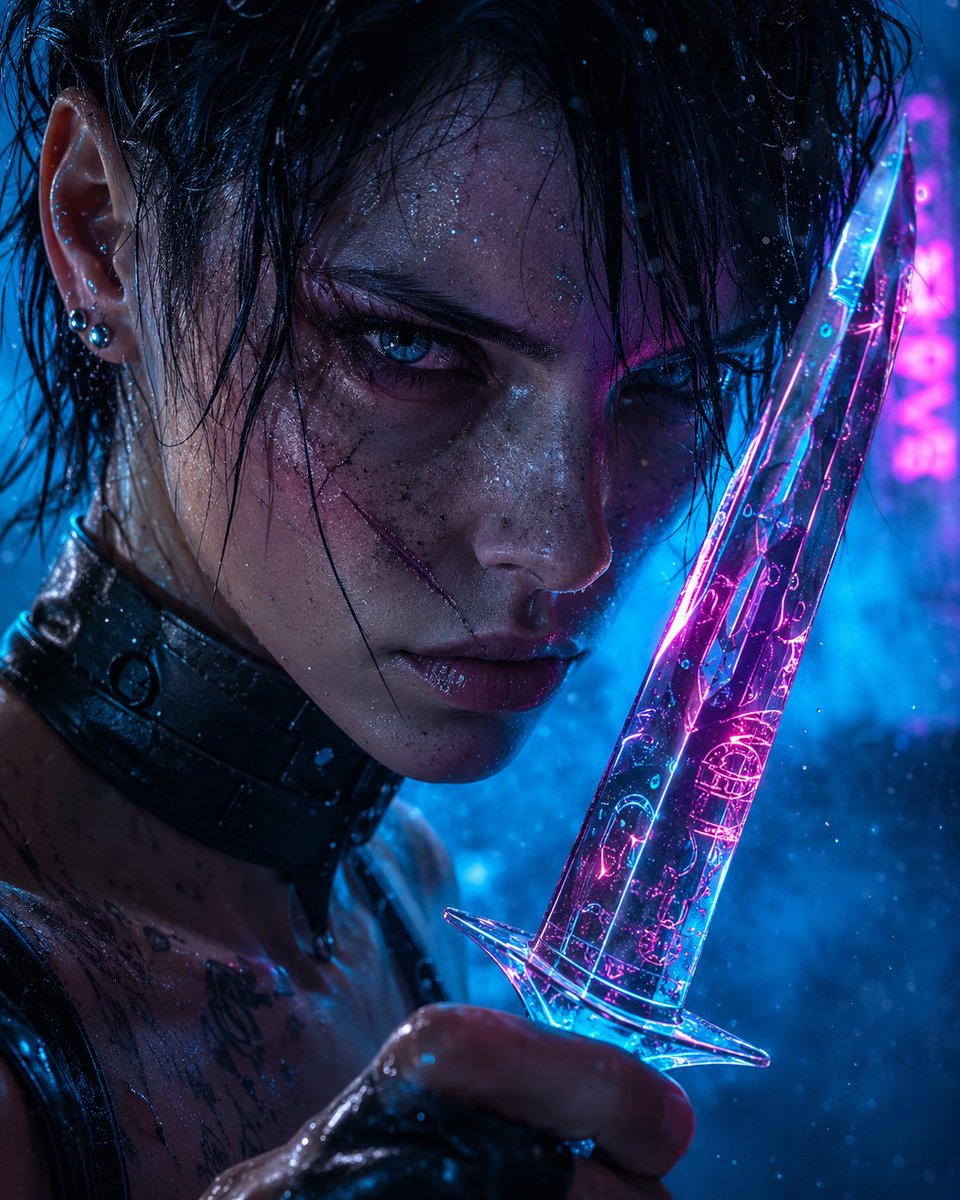
Neon Cam Hançerli Siberpunk Suikastçı
Yağmur altında ıslanmış bir siberpunk suikastçının, mavi ve macenta neon ışık altında parlayan kristal bir hançeri tuttuğu hiperrealist sinematik bir yakın çekim.
Bu Portre ve Karakter için bir GPT Image 2 örnek senaryosudur. Benzer görseller oluşturmak için aşağıdaki hazır metni kullanın ve yeniden kullanmadan önce Awesome GPT Image 2 Prompts atıfını ve ticari kullanım haklarını inceleyin.
Tüm komut istemi setine mi ihtiyacınız var? Şunu kullanın: Portre ve Karakter Daha fazla ilgili örnek için konu merkezini ziyaret edin veya açın. GPT Image 2 istem kataloğu Tam örnek dizin, yeniden kullanılabilir yapılar ve kaynak atfı için.
Free 1K preview
Generate one preview image instantly, no sign-up required.
1624/4000
İpucu
Kopyalamaya hazır istemi
Create a hyperreal cinematic close-up portrait of {argument name="character" default="a rain-soaked cyberpunk female assassin"} holding {argument name="object" default="a translucent neon glass dagger"} with intense, deliberate intent. The composition is very tight and vertical, focused on the left side of the character’s wet face, ear, neck, shoulder, and hand gripping the weapon; Show every face clearly with natural, detailed facial features, about two thirds of the image width, filled with a dark navy-to-muted-blue gradient. Show slick black wet hair clinging to skin, a visible ear with two small metallic piercings, glossy black leather or tactical collar around the neck, bare wet shoulder, subtle tattoos on the upper chest, and water droplets across skin and clothing. The dagger is held upright along the right side of the frame, close to the face, made of clear glass or crystal with glowing cyan and magenta circuitry-like reflections inside it. Use {argument name="lighting" default="electric blue and hot magenta neon rim lighting"}, with strong reflections on wet skin, hair, leather, and the blade. Add {argument name="atmospheric elements" default="mist, rain droplets, tiny floating particles, and blue haze"} drifting through the frame to create a moody futuristic noir tone. The visible eye area is hidden by the square overlay, but the body language should imply {argument name="emotion" default="cold determination"}. Shallow depth of field, dramatic high contrast, ultra-detailed skin texture, glossy specular highlights, bokeh neon background, hyperreal photography style, no text, no watermark.İstem değişkenleri
Komut isteminde bulunan, düzenlenebilir argüman yer tutucuları ve varsayılan değerleri.
Değişken
character
Varsayılan
a rain-soaked cyberpunk female assassin
Değişken
object
Varsayılan
a translucent neon glass dagger
Değişken
lighting
Varsayılan
electric blue and hot magenta neon rim lighting
Değişken
atmospheric elements
Varsayılan
mist, rain droplets, tiny floating particles, and blue haze
Değişken
emotion
Varsayılan
cold determination
Best for
- - Portre ve Karakter visual exploration
- - Image generation and reference-image edits
- - Reusable briefs that keep source attribution visible
Change these parts
- - Subject, product, character, or scene
- - Aspect ratio, camera, lighting, and background
- - Brand, text, color, and output constraints
Recommended model and settings
- - Model: gpt-image-2
- - Input mode: Metinden görsele
- - Aspect ratio: source
- - Commercial status: review original source
How to use this prompt
- 1. Copy the prompt and preserve its structure for the first test.
- 2. Replace the subject, context, and publishing channel.
- 3. Change one camera, lighting, or style variable per iteration.
- 4. Inspect the output, source, text, and rights before reuse.
Limitations, source, and reuse cautions
- - Generated output is an editable draft, not factual, legal, or rights evidence.
- - Review the linked source, people, brands, logos, text, and third-party media before commercial use.
Awesome GPT Image 2 Prompts kaynağından içe aktarılmıştır. Kaynak belirtilmesi zorunludur. Ticari kullanım durumu allowed şeklindedir; ücretli kullanım öncesinde kaynak haklarını inceleyin.
Bu kategoride daha fazla vaka
Kategoriye, giriş modu uyumluluğuna, kaliteye ve düşük riske göre önceliklendirilmiştir.

Cinematic Blue Backlit Portrait
Metinden görsele

Hell Hound Character Sheet Infographic
Metinden görsele

Studio Portrait of Woman with Sunglasses
Metinden görsele

Street Selfie with Cat in Matching Cap
Metinden görsele

Cute Speech Bubble Mascot Profile Icon
Metinden görsele

Playful Morning Selfie Portrait
Metinden görsele
Yeniden kullanım ve kaynak notları
Vaka önizlemesini yaptıktan sonra bu istemi güvenle kullanın.
- 1.Komut istemini kopyalayın veya oluşturma düğmesini kullanarak doğrudan Dovoo'da açın.
- 2.Değişkenleri, en boy oranını ve referans görselleri kendi kullanım durumunuza göre ayarlayın.
- 3.Yayınlamadan veya ücretli kullanımdan önce, kaynak haklarını, atıf gerekliliklerini ve marka veya benzerlik risklerini doğrulayın.