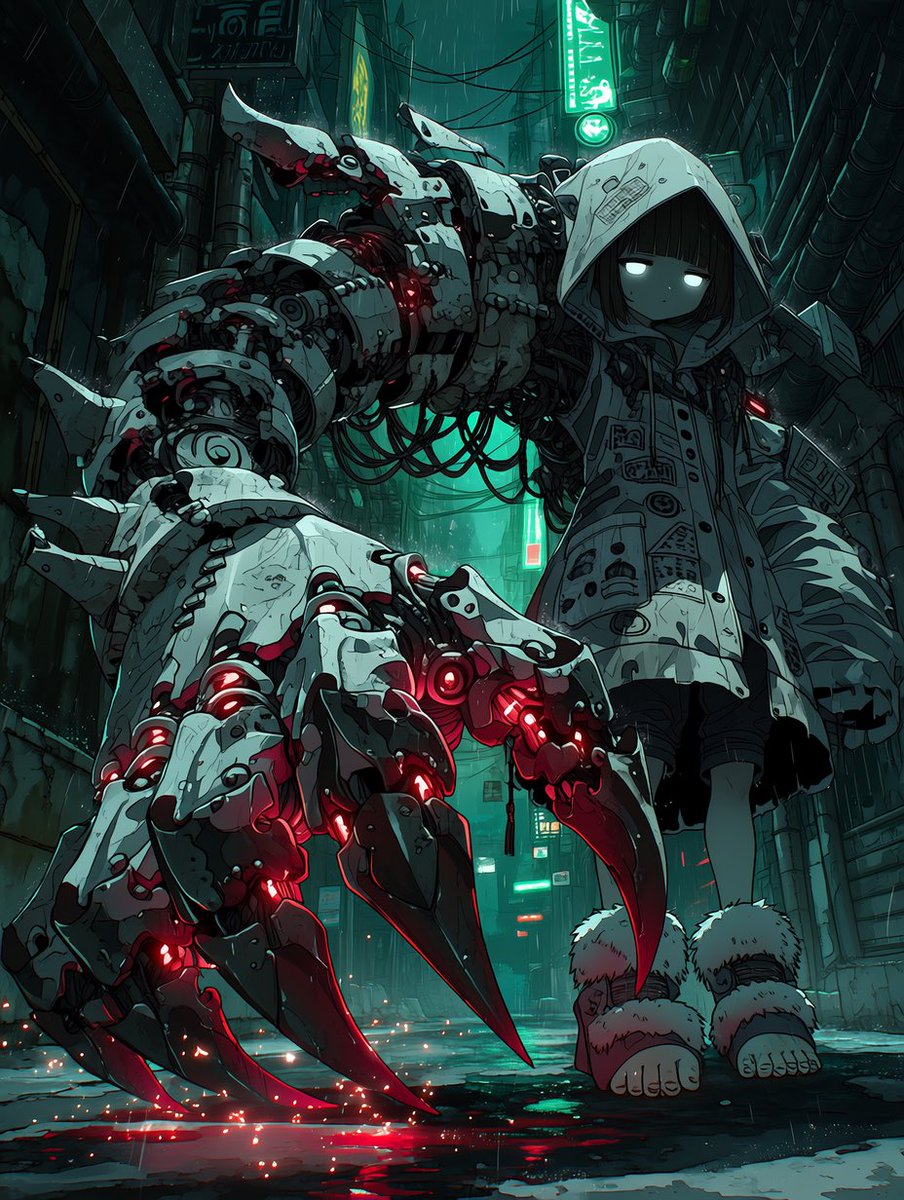
Dev Mekanik Pençeli Siberpunk Kız
Bu komut, yağmurlu neon ışıklı bir sokakta, devasa parlayan mekanik pençe kolu olan kapüşonlu bir kızın kasvetli anime tarzı siberpunk karakter portresini oluşturur; konsept sanat çalışmaları veya dramatik bilim kurgu karakter illüstrasyonları için idealdir.
Bu Portre ve Karakter için bir GPT Image 2 örnek senaryosudur. Benzer görseller oluşturmak için aşağıdaki hazır metni kullanın ve yeniden kullanmadan önce Awesome GPT Image 2 Prompts atıfını ve ticari kullanım haklarını inceleyin.
Free 1K preview
Generate one preview image instantly, no sign-up required.
İpucu
Kopyalamaya hazır istemi
A dark cyberpunk anime illustration of a small eerie girl standing in a narrow rain-soaked alley at night, viewed from a dramatic low angle that makes her oversized mechanical arm dominate the foreground. She wears a large white hooded coat covered with printed patch-like symbols, diagrams, and industrial markings, the hood casting deep shadow over her face. Her face is minimal and doll-like with short straight black hair, pale skin, and two glowing white eyes with no visible pupils, giving a quiet emotionless expression. One of her arms is replaced by an enormous heavy mech limb that is far larger than her body, extending toward the viewer. The arm is built from layered white armored plates, exposed joints, cables, bolts, pistons, and segmented machinery, with scratches and grime for a worn combat-industrial look. The hand has exactly 4 massive clawed fingers touching the wet ground, each ending in long black-red talons, with red internal lights glowing through vents and gaps across the knuckles, wrist, and forearm. Add dangling black cables beneath the upper arm and subtle red light leaks around the elbow and shoulder mechanisms. Her other sleeve hangs normally at her side. She wears dark shorts or a skirt beneath the coat and oversized fluffy white leg warmers around her lower legs, with bare feet visible on the reflective pavement. The alley is dense with pipes, conduits, cables, vents, and old signage, including teal-green vertical neon signs in the background, creating a moody cyan backlight. Rain falls through the scene, puddles reflect teal and red light, and tiny orange-red sparks scatter near the claw tips on the ground. Use a muted palette of dirty white, charcoal, teal, and crimson, with cinematic contrast, highly detailed linework, gritty textures, atmospheric fog, and a haunting futuristic dystopian mood. Make the character {argument name="character name" default="a hooded mech-arm girl"}, with {argument name="coat color" default="dirty white"} outerwear, {argument name="glow color" default="crimson red"} mechanical lights, and {argument name="neon color" default="teal green"} alley signage.İstem değişkenleri
Komut isteminde bulunan, düzenlenebilir argüman yer tutucuları ve varsayılan değerleri.
Best for
- - Portre ve Karakter visual exploration
- - Image generation and reference-image edits
- - Reusable briefs that keep source attribution visible
Change these parts
- - Subject, product, character, or scene
- - Aspect ratio, camera, lighting, and background
- - Brand, text, color, and output constraints
Recommended model and settings
- - Model: gpt-image-2
- - Input mode: Metinden görsele
- - Aspect ratio: source
- - Commercial status: review original source
How to use this prompt
- 1. Copy the prompt and preserve its structure for the first test.
- 2. Replace the subject, context, and publishing channel.
- 3. Change one camera, lighting, or style variable per iteration.
- 4. Inspect the output, source, text, and rights before reuse.
Limitations, source, and reuse cautions
- - Generated output is an editable draft, not factual, legal, or rights evidence.
- - Review the linked source, people, brands, logos, text, and third-party media before commercial use.
Bu kategoride daha fazla vaka
Kategoriye, giriş modu uyumluluğuna, kaliteye ve düşük riske göre önceliklendirilmiştir.






Yeniden kullanım ve kaynak notları
Vaka önizlemesini yaptıktan sonra bu istemi güvenle kullanın.
- 1.Komut istemini kopyalayın veya oluşturma düğmesini kullanarak doğrudan Dovoo'da açın.
- 2.Değişkenleri, en boy oranını ve referans görselleri kendi kullanım durumunuza göre ayarlayın.
- 3.Yayınlamadan veya ücretli kullanımdan önce, kaynak haklarını, atıf gerekliliklerini ve marka veya benzerlik risklerini doğrulayın.