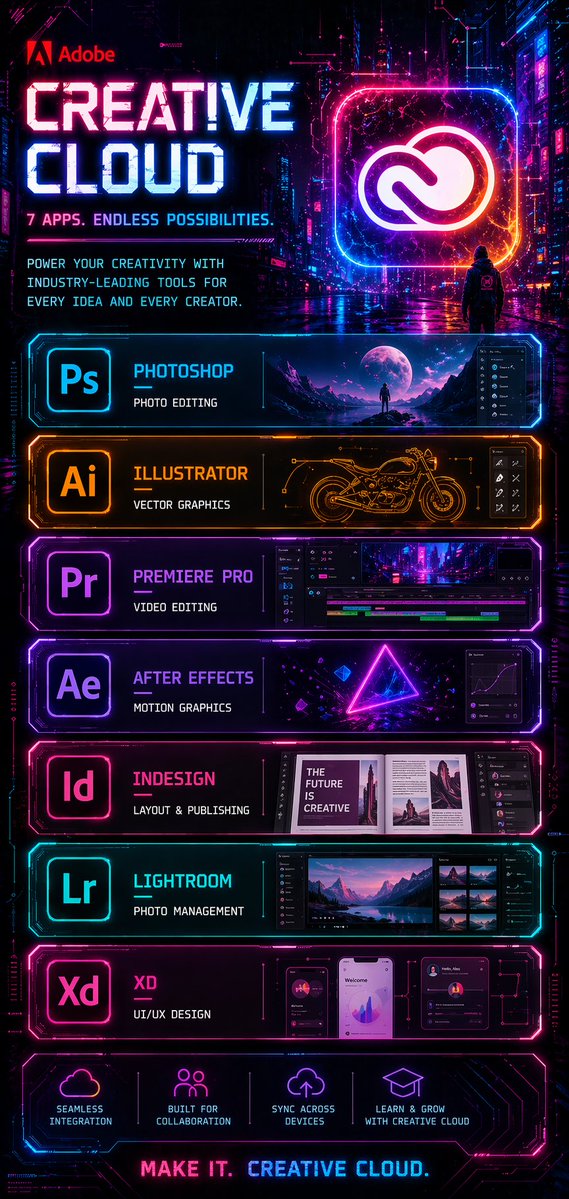
Siberpunk Yaratıcı Bulut Posteri
Adobe Creative Cloud için tasarlanmış, neon ışıklı, siberpunk tarzı uzun bir tanıtım posteri; üst üste dizilmiş uygulama sergileme panelleriyle fütüristik bir yazılım reklamı oluşturmak için ideal.
Bu Grafik ve Poster için bir GPT Image 2 örnek senaryosudur. Benzer görseller oluşturmak için aşağıdaki hazır metni kullanın ve yeniden kullanmadan önce Awesome GPT Image 2 Prompts atıfını ve ticari kullanım haklarını inceleyin.
Free 1K preview
Generate one preview image instantly, no sign-up required.
Free text preview doesn’t preserve reference-image consistency.
İpucu
Kopyalamaya hazır istemi
{
  "type": "cyberpunk software advertisement poster",
  "brand": "Adobe",
  "product": "Creative Cloud",
  "style": "futuristic neon sci-fi marketing poster with a dark rainy cyberpunk city background, glossy reflections, magenta, cyan, violet, and electric orange lighting, high contrast, ultra-detailed UI-inspired frames, holographic glow, sleek tech panel design",
  "format": "tall vertical poster",
  "background": {
    "scene": "nighttime neon city alley with towering buildings, digital signage, wet pavement reflecting pink and blue lights, cinematic atmosphere",
    "figure": "a single small hooded person seen from behind in the mid-background, standing on the street and facing a giant glowing Creative Cloud logo"
  },
  "header": {
    "logo": "Adobe",
    "headline": "{argument name=\"headline text\" default=\"CREATIVE CLOUD\"}",
    "subheadline": "7 APPS. ENDLESS POSSIBILITIES.",
    "body_text": "POWER YOUR CREATIVITY WITH INDUSTRY-LEADING TOOLS FOR EVERY IDEA AND EVERY CREATOR.",
    "hero_icon": "large glowing rounded-square frame containing the Creative Cloud logo in white, surrounded by pink, blue, and orange neon"
  },
  "layout": {
    "sections": [
      {
        "title": "Photoshop",
        "position": "top app panel",
        "count": 1,
        "labels": [
          "Ps"
        ],
        "description": "cyan neon framed panel with app icon on the left, title Photoshop, subtitle PHOTO EDITING, and a wide preview image of a surreal moonlit landscape with a lone figure plus a dark editing interface sidebar on the right"
      },
      {
        "title": "Illustrator",
        "position": "second app panel",
        "count": 1,
        "labels": [
          "Ai"
        ],
        "description": "orange neon framed panel with app icon on the left, title Illustrator, subtitle VECTOR GRAPHICS, and a central technical line-art motorcycle drawing with small vector-tool interface icons on the right"
      },
      {
        "title": "Premiere Pro",
        "position": "third app panel",
        "count": 1,
        "labels": [
          "Pr"
        ],
        "description": "purple neon framed panel with app icon on the left, title Premiere Pro, subtitle VIDEO EDITING, and a timeline-based video editing interface showing a cyberpunk city clip"
      },
      {
        "title": "After Effects",
        "position": "fourth app panel",
        "count": 1,
        "labels": [
          "Ae"
        ],
        "description": "violet neon framed panel with app icon on the left, title After Effects, subtitle MOTION GRAPHICS, and a glowing triangle composition with floating geometric elements plus a graph editor panel on the right"
      },
      {
        "title": "InDesign",
        "position": "fifth app panel",
        "count": 1,
        "labels": [
          "Id"
        ],
        "description": "pink neon framed panel with app icon on the left, title InDesign, subtitle LAYOUT & PUBLISHING, and an editorial magazine spread preview with the visible cover text THE FUTURE IS CREATIVE and layout panels to the right"
      },
      {
        "title": "Lightroom",
        "position": "sixth app panel",
        "count": 1,
        "labels": [
          "Lr"
        ],
        "description": "cyan neon framed panel with app icon on the left, title Lightroom, subtitle PHOTO MANAGEMENT, and a photo browser interface featuring a mountain lake landscape with thumbnail images on the right"
      },
      {
        "title": "XD",
        "position": "seventh app panel",
        "count": 1,
        "labels": [
          "Xd"
        ],
        "description": "magenta neon framed panel with app icon on the left, title XD, subtitle UI/UX DESIGN, and three mobile app mockup screens with charts, profile cards, and dashboard widgets"
      },
      {
        "title": "feature icons",
        "position": "bottom strip",
        "count": 4,
        "labels": [
          "SEAMLESS INTEGRATION",
          "BUILT FOR COLLABORATION",
          "SYNC ACROSS DEVICES",
          "LEARN & GROW WITH CREATIVE CLOUD"
        ],
        "description": "four glowing line icons with short captions, evenly spaced across a dark neon panel"
      }
    ],
    "footer": {
      "tagline": "MAKE IT. CREATIVE CLOUD."
    }
  },
  "color_palette": {
    "primary": [
      "electric blue",
      "hot pink",
      "purple",
      "deep black"
    ],
    "accent": [
      "orange",
      "white"
    ]
  },
  "rendering": "crisp graphic design poster, polished commercial key art, symmetrical stacked panel layout, intense glow effects, legible typography, premium tech-ad aesthetic"
}
İstem değişkenleri
Komut isteminde bulunan, düzenlenebilir argüman yer tutucuları ve varsayılan değerleri.
Best for
- - Grafik ve Poster visual exploration
- - Image generation and reference-image edits
- - Reusable briefs that keep source attribution visible
Change these parts
- - Subject, product, character, or scene
- - Aspect ratio, camera, lighting, and background
- - Brand, text, color, and output constraints
Recommended model and settings
- - Model: gpt-image-2
- - Input mode: Görselden görsele
- - Aspect ratio: source
- - Commercial status: review original source
How to use this prompt
- 1. Copy the prompt and preserve its structure for the first test.
- 2. Replace the subject, context, and publishing channel.
- 3. Change one camera, lighting, or style variable per iteration.
- 4. Inspect the output, source, text, and rights before reuse.
Limitations, source, and reuse cautions
- - Generated output is an editable draft, not factual, legal, or rights evidence.
- - Review the linked source, people, brands, logos, text, and third-party media before commercial use.
Bu kategoride daha fazla vaka
Kategoriye, giriş modu uyumluluğuna, kaliteye ve düşük riske göre önceliklendirilmiştir.






Yeniden kullanım ve kaynak notları
Vaka önizlemesini yaptıktan sonra bu istemi güvenle kullanın.
- 1.Komut istemini kopyalayın veya oluşturma düğmesini kullanarak doğrudan Dovoo'da açın.
- 2.Değişkenleri, en boy oranını ve referans görselleri kendi kullanım durumunuza göre ayarlayın.
- 3.Yayınlamadan veya ücretli kullanımdan önce, kaynak haklarını, atıf gerekliliklerini ve marka veya benzerlik risklerini doğrulayın.