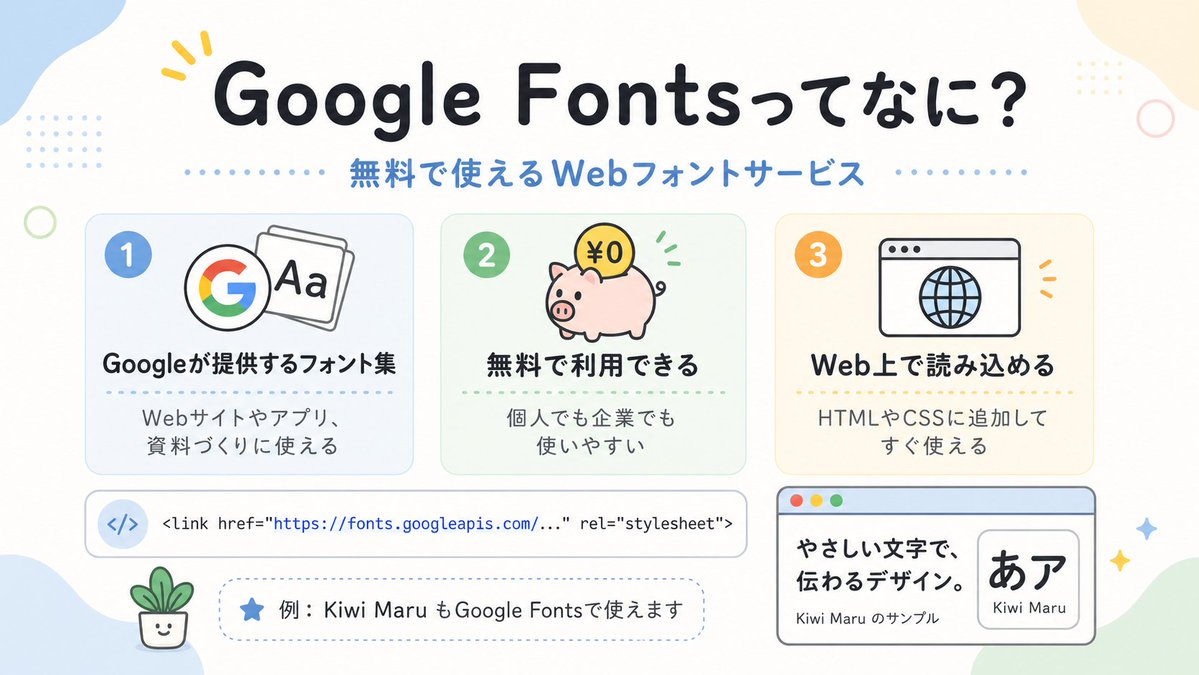
Sevimli Google Yazı Tipleri Japonca Bilgi Grafiği
Google Font'ları tanıtan, pastel tonlarda hazırlanmış Japon tarzı bir açıklayıcı infografik; sosyal medya paylaşımları, sunumlar veya yeni başlayanlar için web tasarım eğitimi görselleri için idealdir.
Bu Grafik ve Poster için bir GPT Image 2 örnek senaryosudur. Benzer görseller oluşturmak için aşağıdaki hazır metni kullanın ve yeniden kullanmadan önce Awesome GPT Image 2 Prompts atıfını ve ticari kullanım haklarını inceleyin.
Tüm komut istemi setine mi ihtiyacınız var? Şunu kullanın: Grafik ve Poster Daha fazla ilgili örnek için konu merkezini ziyaret edin veya açın. GPT Image 2 istem kataloğu Tam örnek dizin, yeniden kullanılabilir yapılar ve kaynak atfı için.
Free 1K preview
Generate one preview image instantly, no sign-up required.
2567/4000
İpucu
Kopyalamaya hazır istemi
A clean, cute Japanese infographic on a soft off-white background with rounded pastel abstract corner blobs and tiny decorative dots and rings, designed like a friendly web-design explainer poster. At the top center, place a large bold rounded headline in Japanese reading {argument name="headline text" default="Google Fontsってなに?"}, in very dark navy, with a small yellow accent mark near the first word. Directly below it, add a medium-size blue subheading reading {argument name="subheadline text" default="無料で使えるWebフォントサービス"}, with dotted divider lines extending left and right. In the middle, arrange exactly 3 rounded rectangular feature cards in a horizontal row, evenly spaced. Card 1 is pale blue with a blue number badge "1" in the upper left, an icon showing the multicolor Google G beside overlapping font sheets with "Aa", a bold Japanese title "Googleが提供するフォント集", and smaller text below "Webサイトやアプリ、資料づくりに使える". Card 2 is pale mint green with a green number badge "2", an icon of a pink piggy bank with a gold coin labeled "¥0" and small green motion marks, a bold title "無料で利用できる", and smaller text "個人でも企業でも使いやすい". Card 3 is pale warm cream with an orange number badge "3", an icon of a simple browser window with a globe, a bold title "Web上で読み込める", and smaller text "HTMLやCSSに追加してすぐ使える". Below the three cards, place a wide horizontal white code bar with rounded corners and a subtle outline; on the left include a pale blue circular icon containing </>, and to the right show a single line of code in a monospaced style: "<link href=\"https://fonts.googleapis.com/...\" rel=\"stylesheet\">" with the URL in blue. Under that, add a dashed rounded pill-shaped note box containing a blue star icon and Japanese text {argument name="example text" default="例:Kiwi Maru もGoogle Fontsで使えます"}. At the bottom left, place a tiny smiling potted plant illustration. At the bottom right, add a larger browser-style sample panel with a light blue title bar and three small traffic-light circles in the top left; inside, on the left, show bold Japanese sample copy "やさしい文字で、伝わるデザイン。" and smaller text "Kiwi Maru のサンプル", and on the right a rounded white inset card displaying large black Japanese characters "あア" with the font name {argument name="font sample name" default="Kiwi Maru"} beneath. Scatter 4 small sparkle/star accents around the lower right area. Use a flat vector illustration style, crisp outlines, soft pastel palette, centered composition, generous spacing, rounded sans-serif typography, and a cheerful beginner-friendly tech education aesthetic.İstem değişkenleri
Komut isteminde bulunan, düzenlenebilir argüman yer tutucuları ve varsayılan değerleri.
Değişken
headline text
Varsayılan
Google Fontsってなに?
Değişken
subheadline text
Varsayılan
無料で使えるWebフォントサービス
Değişken
example text
Varsayılan
例:Kiwi Maru もGoogle Fontsで使えます
Değişken
font sample name
Varsayılan
Kiwi Maru
Best for
- - Grafik ve Poster visual exploration
- - Image generation and reference-image edits
- - Reusable briefs that keep source attribution visible
Change these parts
- - Subject, product, character, or scene
- - Aspect ratio, camera, lighting, and background
- - Brand, text, color, and output constraints
Recommended model and settings
- - Model: gpt-image-2
- - Input mode: Metinden görsele
- - Aspect ratio: source
- - Commercial status: review original source
How to use this prompt
- 1. Copy the prompt and preserve its structure for the first test.
- 2. Replace the subject, context, and publishing channel.
- 3. Change one camera, lighting, or style variable per iteration.
- 4. Inspect the output, source, text, and rights before reuse.
Limitations, source, and reuse cautions
- - Generated output is an editable draft, not factual, legal, or rights evidence.
- - Review the linked source, people, brands, logos, text, and third-party media before commercial use.
Awesome GPT Image 2 Prompts kaynağından içe aktarılmıştır. Kaynak belirtilmesi zorunludur. Ticari kullanım durumu allowed şeklindedir; ücretli kullanım öncesinde kaynak haklarını inceleyin.
Bu kategoride daha fazla vaka
Kategoriye, giriş modu uyumluluğuna, kaliteye ve düşük riske göre önceliklendirilmiştir.

Grumpy Rhino Storybook Illustration
Metinden görsele

Y2K Style Photo Booth Collage
Metinden görsele

Martial Arts Legend Character Bible Sheet
Metinden görsele

Surreal 3D Chess Match Artwork
Metinden görsele

Pink Hijab Mirror Selfie Portrait
Metinden görsele

Manga Desert Radio Telescope Road Trip
Metinden görsele
Yeniden kullanım ve kaynak notları
Vaka önizlemesini yaptıktan sonra bu istemi güvenle kullanın.
- 1.Komut istemini kopyalayın veya oluşturma düğmesini kullanarak doğrudan Dovoo'da açın.
- 2.Değişkenleri, en boy oranını ve referans görselleri kendi kullanım durumunuza göre ayarlayın.
- 3.Yayınlamadan veya ücretli kullanımdan önce, kaynak haklarını, atıf gerekliliklerini ve marka veya benzerlik risklerini doğrulayın.