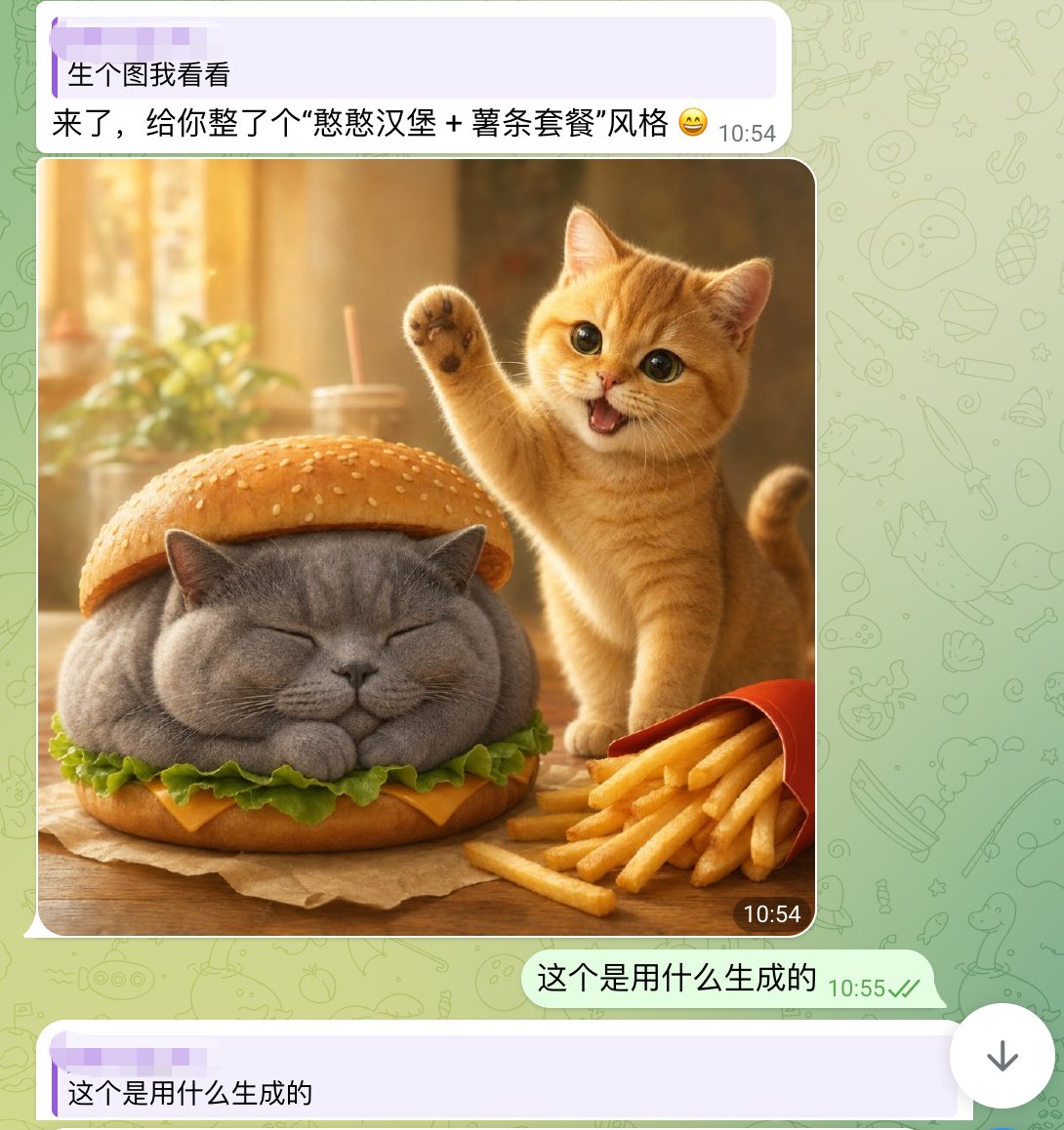
Sevimli Kedi Burger Sohbet Ekran Görüntüsü
WhatsApp tarzı bir akıllı telefon sohbet ekran görüntüsü; gerçekçi bir şekilde tasarlanmış sevimli bir kedi burger görseli içeriyor ve sosyal medyada viral yapay zeka destekli görsel paylaşım gönderilerini yeniden oluşturmak için kullanışlı.
Bu Portre ve Karakter için bir GPT Image 2 örnek senaryosudur. Benzer görseller oluşturmak için aşağıdaki hazır metni kullanın ve yeniden kullanmadan önce Awesome GPT Image 2 Prompts atıfını ve ticari kullanım haklarını inceleyin.
Tüm komut istemi setine mi ihtiyacınız var? Şunu kullanın: Portre ve Karakter Daha fazla ilgili örnek için konu merkezini ziyaret edin veya açın. GPT Image 2 istem kataloğu Tam örnek dizin, yeniden kullanılabilir yapılar ve kaynak atfı için.
Free 1K preview
Generate one preview image instantly, no sign-up required.
1903/4000
İpucu
Kopyalamaya hazır istemi
A realistic and fun mobile chat screenshot displayed in full screen, with an interface similar to WhatsApp. The background is a light green with faint doodle icons. At the top is a light purple receive message bubble containing two lines of Chinese text, with a timestamp on the right. The first line reads: “生个图我看看” (Show me a generated image), and the second line reads: “来了,给你整了个“憨憨汉堡 + 薯条套餐”风格 😄” (Here, I've created a “Silly Burger + Fries Combo” style for you 😄). Below is a large, rounded image in the chat. The generated image depicts a warm and inviting desktop food scene: a chubby gray British Shorthair cat is designed as a burger, with its eyes closed and paws tucked in, sandwiched between the top and bottom sesame seed bun layers. Green lettuce and a slice of yellow cheese are visible around the cat's body. To the right of the burger cat is a small orange cat, lively and cute, standing upright with one paw raised in a waving gesture, its mouth open in a happy smile, and large, bright eyes looking at the camera. In the lower right foreground is a slightly tilted red fries box, with golden fries spilling out. The table is wooden, and a brown baking paper is placed under the burger cat. The photo background is softly blurred, presenting a golden sunlight effect with out-of-focus images of cups, straws, and plants. Add a dark rounded timestamp label “10:54” in the lower right corner of the image. Below the image, add a right-aligned light green send message bubble with the Chinese text “这个是用什么生成的” (What was this generated with?), accompanied by a gray-green timestamp “10:55” and two checkmarks. At the very bottom, display another light purple receive bubble, starting with “这个是用什么生成的” (What was this generated with?). The overall composition should fully simulate a mobile chat screenshot, combining lovely, photo-realistic animal food art with a simple social software UI.
Best for
- - Portre ve Karakter visual exploration
- - Image generation and reference-image edits
- - Reusable briefs that keep source attribution visible
Change these parts
- - Subject, product, character, or scene
- - Aspect ratio, camera, lighting, and background
- - Brand, text, color, and output constraints
Recommended model and settings
- - Model: gpt-image-2
- - Input mode: Metinden görsele
- - Aspect ratio: source
- - Commercial status: review original source
How to use this prompt
- 1. Copy the prompt and preserve its structure for the first test.
- 2. Replace the subject, context, and publishing channel.
- 3. Change one camera, lighting, or style variable per iteration.
- 4. Inspect the output, source, text, and rights before reuse.
Limitations, source, and reuse cautions
- - Generated output is an editable draft, not factual, legal, or rights evidence.
- - Review the linked source, people, brands, logos, text, and third-party media before commercial use.
Awesome GPT Image 2 Prompts kaynağından içe aktarılmıştır. Kaynak belirtilmesi zorunludur. Ticari kullanım durumu allowed şeklindedir; ücretli kullanım öncesinde kaynak haklarını inceleyin.
Bu kategoride daha fazla vaka
Kategoriye, giriş modu uyumluluğuna, kaliteye ve düşük riske göre önceliklendirilmiştir.






Yeniden kullanım ve kaynak notları
Vaka önizlemesini yaptıktan sonra bu istemi güvenle kullanın.
- 1.Komut istemini kopyalayın veya oluşturma düğmesini kullanarak doğrudan Dovoo'da açın.
- 2.Değişkenleri, en boy oranını ve referans görselleri kendi kullanım durumunuza göre ayarlayın.
- 3.Yayınlamadan veya ücretli kullanımdan önce, kaynak haklarını, atıf gerekliliklerini ve marka veya benzerlik risklerini doğrulayın.