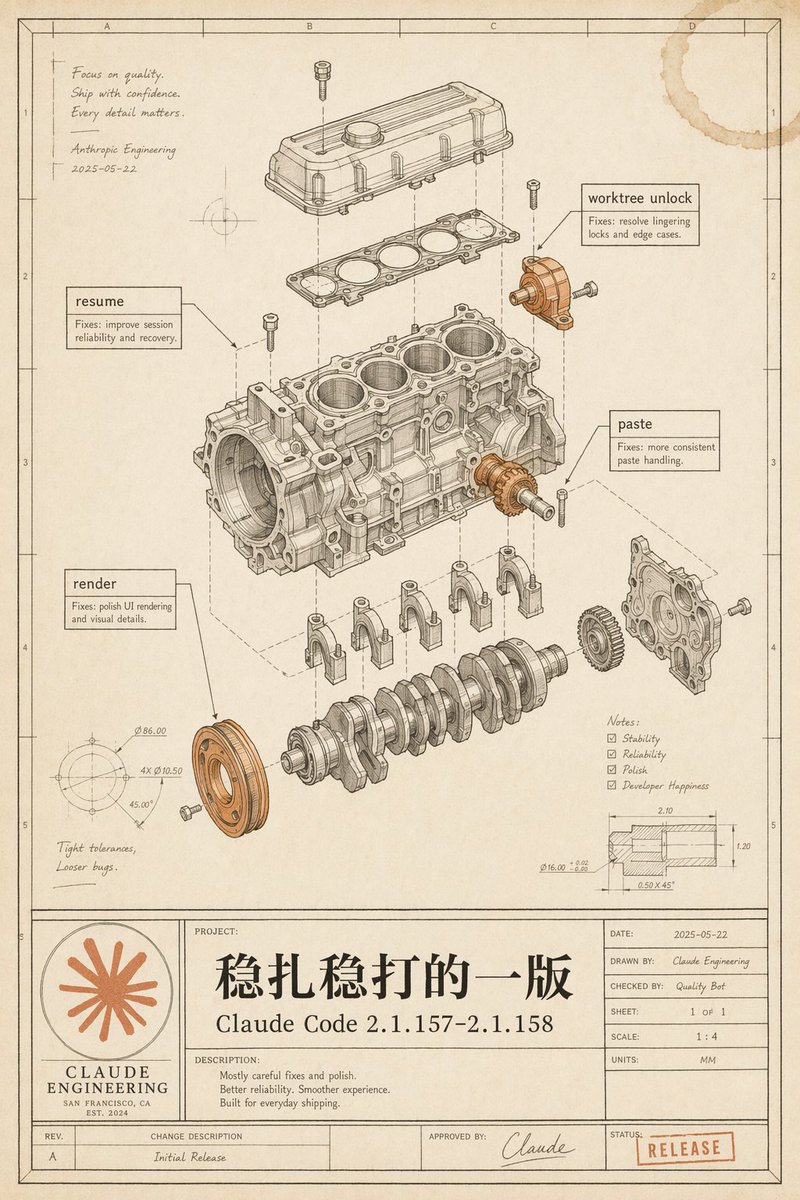
Vintage Claude Code Release Blueprint
Generates a nostalgic engineering blueprint poster that visualizes a Claude Code software release as an exploded mechanical engine diagram.
Bu Grafik ve Poster için bir GPT Image 2 örnek senaryosudur. Benzer görseller oluşturmak için aşağıdaki hazır metni kullanın ve yeniden kullanmadan önce Awesome GPT Image 2 Prompts atıfını ve ticari kullanım haklarını inceleyin.
Tüm komut istemi setine mi ihtiyacınız var? Şunu kullanın: Grafik ve Poster Daha fazla ilgili örnek için konu merkezini ziyaret edin veya açın. GPT Image 2 istem kataloğu Tam örnek dizin, yeniden kullanılabilir yapılar ve kaynak atfı için.
Free 1K preview
Generate one preview image instantly, no sign-up required.
3878/4000
İpucu
Kopyalamaya hazır istemi
Goal: Create a vintage engineering blueprint poster for {argument name="software release name" default="Claude Code 2.1.157–2.1.158"}, presented as an exploded mechanical engine assembly diagram that metaphorically documents a polished software release.

Canvas: Portrait technical drawing sheet, 4:5 aspect ratio, warm aged cream paper with subtle stains, worn edges, faint grid coordinates, thin black drafting border, and a title-block table along the bottom. Use monochrome ink linework with selective muted copper-orange highlights on a few mechanical parts and the logo/stamp.

Main illustration: Center the page on a detailed exploded isometric engine block assembly, drawn like a patent/automotive CAD manual. Show exactly 11 major visible mechanical groups: 1) top valve cover, 2) gasket plate beneath it, 3) main engine block with four cylinder bores, 4) crankshaft at the bottom, 5) four connecting caps beneath the block, 6) front circular pulley highlighted in copper-orange, 7) right-side gear highlighted in copper-orange, 8) right-side front cover plate, 9) upper-right small bracket/actuator highlighted in copper-orange, 10) scattered bolts/screws around the assembly, 11) dashed vertical and diagonal alignment/construction lines connecting the exploded components. Keep all linework precise, layered, and technically plausible.

Callouts and annotations: Include exactly 4 rectangular software-fix callout boxes with leader lines: 1) “resume” with small text “Fixes: improve session reliability and recovery.” 2) “worktree unlock” with small text “Fixes: resolve lingering locks and edge cases.” 3) “paste” with small text “Fixes: more consistent paste handling.” 4) “render” with small text “Fixes: polish UI rendering and visual details.” Add a handwritten note in the upper-left: “Focus on quality. Ship with confidence. Every detail matters.” followed by “Anthropic Engineering” and the date “2025-05-22”. Add lower-left handwritten note: “Tight tolerances, Looser bugs.” Add a lower-right notes checklist with exactly 4 checked items: “Stability”, “Reliability”, “Polish”, “Developer Happiness”. Add two small technical detail drawings: one circular dimension diagram in the lower-left with tiny dimension labels, and one sectional dimension diagram in the lower-right with tiny measurements.

Bottom title block: Make a large blueprint title panel spanning the bottom. On the left, include a circular orange Claude-like radial starburst logo above the words “CLAUDE ENGINEERING”, “SAN FRANCISCO, CA”, and “EST. 2024”. In the central project area, write a very large Chinese project title {argument name="main Chinese title" default="Steady and sure"}, with the release name below it. Under “DESCRIPTION:” include exactly 3 short lines: “Mostly careful fixes and polish.” “Better reliability. Smoother experience.” “Built for everyday shipping.” On the right, include a standard engineering metadata table with: “DATE: 2025-05-22”, “DRAWN BY: Claude Engineering”, “CHECKED BY: Quality Bot”, “SHEET: 1 OF 1”, “SCALE: 1 : 4”, “UNITS: MM”. Along the bottom revision row include “REV. A”, “CHANGE DESCRIPTION Initial Release”, “APPROVED BY: Claude” with a signature, and a red-orange rubber stamp reading {argument name="status stamp" default="RELEASE"}.

Visual style: High-end retro technical illustration, fine black/brown ink, hatching, small dimension ticks, subtle perspective, realistic paper grain, faint coffee-ring stain in the top-right corner, no glossy modern UI styling. The image should feel like a carefully archived engineering release drawing, elegant, intentional, and slightly nostalgic.

Constraints: Preserve all listed text exactly where specified, keep the Chinese title prominent, avoid extra software names, avoid photorealistic rendering, avoid clutter outside the blueprint page, and make the mechanical diagram the visual focus.
İstem değişkenleri
Komut isteminde bulunan, düzenlenebilir argüman yer tutucuları ve varsayılan değerleri.
Değişken
software release name
Varsayılan
Claude Code 2.1.157–2.1.158
Değişken
main Chinese title
Varsayılan
Steady and sure
Değişken
status stamp
Varsayılan
RELEASE
Best for
- - Grafik ve Poster visual exploration
- - Image generation and reference-image edits
- - Reusable briefs that keep source attribution visible
Change these parts
- - Subject, product, character, or scene
- - Aspect ratio, camera, lighting, and background
- - Brand, text, color, and output constraints
Recommended model and settings
- - Model: gpt-image-2
- - Input mode: Metinden görsele
- - Aspect ratio: source
- - Commercial status: review original source
How to use this prompt
- 1. Copy the prompt and preserve its structure for the first test.
- 2. Replace the subject, context, and publishing channel.
- 3. Change one camera, lighting, or style variable per iteration.
- 4. Inspect the output, source, text, and rights before reuse.
Limitations, source, and reuse cautions
- - Generated output is an editable draft, not factual, legal, or rights evidence.
- - Review the linked source, people, brands, logos, text, and third-party media before commercial use.
Awesome GPT Image 2 Prompts kaynağından içe aktarılmıştır. Kaynak belirtilmesi zorunludur. Ticari kullanım durumu allowed şeklindedir; ücretli kullanım öncesinde kaynak haklarını inceleyin.
Bu kategoride daha fazla vaka
Kategoriye, giriş modu uyumluluğuna, kaliteye ve düşük riske göre önceliklendirilmiştir.

Boisterous Shrimpers Entering Pub
Metinden görsele

Tuxedo Cat Photo and Line Art Diptych
Metinden görsele

Cute Focus Desk Flat Lay and Kawaii Illustration
Metinden görsele

Anime Girl Heterochromia Portrait
Metinden görsele

Hell Hound Character Sheet Infographic
Metinden görsele

Luxury Travel Fashion Portrait Prompt
Metinden görsele
Yeniden kullanım ve kaynak notları
Vaka önizlemesini yaptıktan sonra bu istemi güvenle kullanın.
- 1.Komut istemini kopyalayın veya oluşturma düğmesini kullanarak doğrudan Dovoo'da açın.
- 2.Değişkenleri, en boy oranını ve referans görselleri kendi kullanım durumunuza göre ayarlayın.
- 3.Yayınlamadan veya ücretli kullanımdan önce, kaynak haklarını, atıf gerekliliklerini ve marka veya benzerlik risklerini doğrulayın.