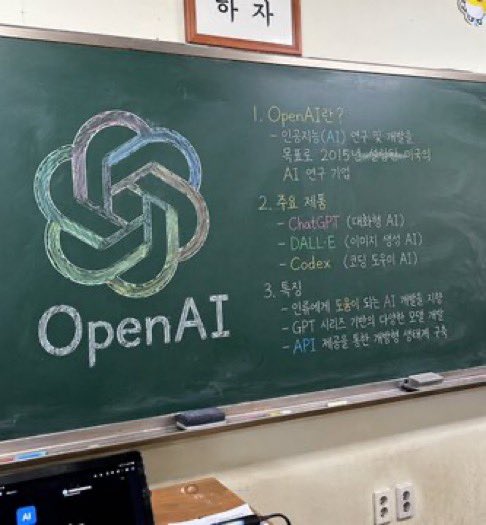
Sınıf Tahtası Dersi
Renkli bir logo çizimi ve yapılandırılmış el yazısıyla yazılmış ders notları içeren bir sınıf tahtasının fotogerçekçi bir görüntüsünü oluşturur.
Bu İç Mekan ve Mimari için bir GPT Image 2 örnek senaryosudur. Benzer görseller oluşturmak için aşağıdaki hazır metni kullanın ve yeniden kullanmadan önce Awesome GPT Image 2 Prompts atıfını ve ticari kullanım haklarını inceleyin.
Tüm komut istemi setine mi ihtiyacınız var? Şunu kullanın: İç Mekan ve Mimari Daha fazla ilgili örnek için konu merkezini ziyaret edin veya açın. GPT Image 2 istem kataloğu Tam örnek dizin, yeniden kullanılabilir yapılar ve kaynak atfı için.
Free 1K preview
Generate one preview image instantly, no sign-up required.
1232/4000
İpucu
Kopyalamaya hazır istemi
A photorealistic, slightly angled snapshot of a green classroom chalkboard. On the left side of the board is a large, meticulously drawn chalk illustration of the {argument name="company name" default="OpenAI"} logo, rendered in blended pastel colors like green, blue, and purple, with the word "{argument name="logo text" default="OpenAI"}" written in neat white chalk beneath it. The right side of the board features handwritten text organized into exactly 3 numbered sections. Section 1 is titled "{argument name="section one title" default="1. OpenAI란?"}" followed by a brief explanatory paragraph. Section 2 is titled "{argument name="section two title" default="2. 주요 제품"}" and lists 3 bullet points including ChatGPT, DALL-E, and Codex. Section 3 is titled "{argument name="section three title" default="3. 특징"}" and contains 3 bullet points describing features. The chalkboard has a silver metal frame and a chalk ledge holding 2 rectangular erasers and scattered pieces of chalk. Below the board is an off-white wall with a double electrical outlet. In the bottom left foreground, the top edge of a dark laptop screen is partially visible, and above the chalkboard, the bottom edge of a framed sign is cut off by the frame.İstem değişkenleri
Komut isteminde bulunan, düzenlenebilir argüman yer tutucuları ve varsayılan değerleri.
Değişken
company name
Varsayılan
OpenAI
Değişken
logo text
Varsayılan
OpenAI
Değişken
section one title
Varsayılan
1. OpenAI란?
Değişken
section two title
Varsayılan
2. 주요 제품
Değişken
section three title
Varsayılan
3. 특징
Best for
- - İç Mekan ve Mimari visual exploration
- - Image generation and reference-image edits
- - Reusable briefs that keep source attribution visible
Change these parts
- - Subject, product, character, or scene
- - Aspect ratio, camera, lighting, and background
- - Brand, text, color, and output constraints
Recommended model and settings
- - Model: gpt-image-2
- - Input mode: Metinden görsele
- - Aspect ratio: source
- - Commercial status: review original source
How to use this prompt
- 1. Copy the prompt and preserve its structure for the first test.
- 2. Replace the subject, context, and publishing channel.
- 3. Change one camera, lighting, or style variable per iteration.
- 4. Inspect the output, source, text, and rights before reuse.
Limitations, source, and reuse cautions
- - Generated output is an editable draft, not factual, legal, or rights evidence.
- - Review the linked source, people, brands, logos, text, and third-party media before commercial use.
Awesome GPT Image 2 Prompts kaynağından içe aktarılmıştır. Kaynak belirtilmesi zorunludur. Ticari kullanım durumu allowed şeklindedir; ücretli kullanım öncesinde kaynak haklarını inceleyin.
Bu kategoride daha fazla vaka
Kategoriye, giriş modu uyumluluğuna, kaliteye ve düşük riske göre önceliklendirilmiştir.

Luxury Travel Fashion Portrait Prompt
Metinden görsele

Autumn Cozy Casual Outfit Prompt
Metinden görsele

Cute Focus Desk Flat Lay and Kawaii Illustration
Metinden görsele

Studio Portrait of Woman with Sunglasses
Metinden görsele

Street Selfie with Cat in Matching Cap
Metinden görsele

Matte Black B.AI Keyboard Keycap
Metinden görsele
Yeniden kullanım ve kaynak notları
Vaka önizlemesini yaptıktan sonra bu istemi güvenle kullanın.
- 1.Komut istemini kopyalayın veya oluşturma düğmesini kullanarak doğrudan Dovoo'da açın.
- 2.Değişkenleri, en boy oranını ve referans görselleri kendi kullanım durumunuza göre ayarlayın.
- 3.Yayınlamadan veya ücretli kullanımdan önce, kaynak haklarını, atıf gerekliliklerini ve marka veya benzerlik risklerini doğrulayın.