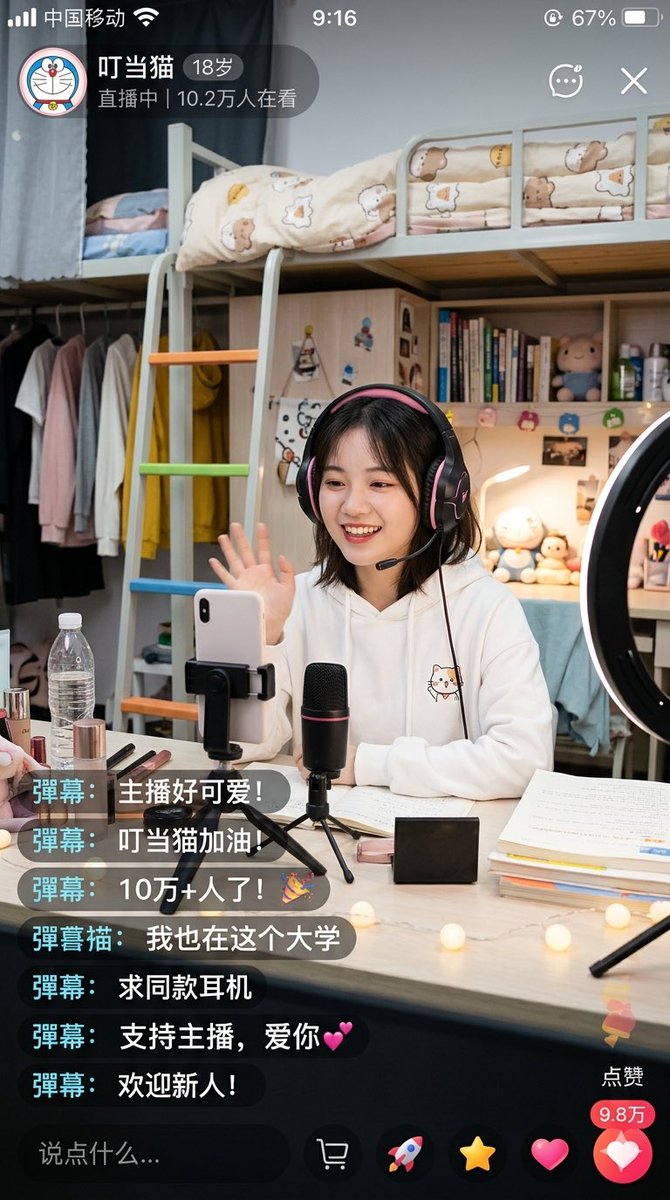
Çin Yurdu Canlı Yayın Ekran Görüntüsü
Bu, sosyal medya arayüzü tasarımları ve gerçekçi yapay zeka yaşam tarzı sahneleri için kullanışlı olan, yurt odasından canlı yayın yapan bir üniversite öğrencisinin fotogerçekçi bir mobil canlı yayın uygulaması ekran görüntüsünü oluşturur.
Bu Portre ve Karakter için bir GPT Image 2 örnek senaryosudur. Benzer görseller oluşturmak için aşağıdaki hazır metni kullanın ve yeniden kullanmadan önce Awesome GPT Image 2 Prompts atıfını ve ticari kullanım haklarını inceleyin.
Tüm komut istemi setine mi ihtiyacınız var? Şunu kullanın: Portre ve Karakter Daha fazla ilgili örnek için konu merkezini ziyaret edin veya açın. GPT Image 2 istem kataloğu Tam örnek dizin, yeniden kullanılabilir yapılar ve kaynak atfı için.
Free 1K preview
Generate one preview image instantly, no sign-up required.
2876/4000
İpucu
Kopyalamaya hazır istemi
A highly realistic vertical smartphone screenshot showcasing a warm university dorm livestream scene within a Chinese livestreaming app. The interface should resemble a genuine iPhone screenshot, including a status bar displaying Chinese carrier text, time 9:16, and approximately 67% battery. The upper left corner features a circular cartoon avatar and a livestream badge displaying the streamer's name “Dingdang Cat”, age “18 years old”, and the text “LIVE | 102k viewers”. Add small icons for chat, menu, and close in the upper right corner. The main scene depicts a young female college student sitting at a desk, waving towards the phone camera. Show every face clearly with natural, detailed facial features. She has shoulder-length dark short hair, wears large black and pink over-ear gaming headphones, and is dressed in a white hooded sweatshirt with a cute cat illustration on the chest. She is livestreaming in a tidy, warmly lit dorm bedroom. Behind her is a light-colored loft bed with safety rails and cream-colored bedding featuring bear and star patterns, along with a ladder with orange, green, and blue rungs. Below and to the side of the loft bed are shelves and a wardrobe area with light-colored clothes and a bright yellow hooded sweatshirt hanging. The shelves display vertically stacked books, small plush toys, bottles, and personal items. A ring light is visible on the right edge of the frame. On the desk in front of her are: a smartphone clamped in a holder, a black desktop microphone with a faint red accent mounted on a mini tripod, an open laptop and papers, stacked textbooks, cosmetics including lipstick and makeup brushes, a transparent water bottle, a small black rectangular box, and warm-toned string lights scattered on the desktop. The lighting should feel soft, homely, and inviting, with realistic indoor shadows and a slight smartphone shooting texture. Overlay 7 floating real-time chat comments in the lower left corner, using dark semi-transparent rounded rectangles with cyan name tags. The comments, from top to bottom, are: “Bullet comment: The streamer is so cute!”, “Bullet comment: Go Dingdang Cat!”, “Bullet comment: 100k+ viewers!🎉”, “Bullet comment Cat: I'm at this university too”, “Bullet comment: Where can I buy the same headphones?”, “Bullet comment: Support the streamer, love you💕”, “Bullet comment: Welcome newcomers!”. Include a dark comment input field at the bottom with the placeholder text “Say something…”, and a row of livestream operation icons. Add a vertical like area in the lower right corner with a “Like” label, a red count bubble displaying “98k”, and a large pink heart button. Overall style: Photo-realistic Chinese social media livestream screenshot, credible App UI, detailed dorm environment, cute young campus streamer aesthetic, natural composition, clear text rendering, no extra panels.
Best for
- - Portre ve Karakter visual exploration
- - Image generation and reference-image edits
- - Reusable briefs that keep source attribution visible
Change these parts
- - Subject, product, character, or scene
- - Aspect ratio, camera, lighting, and background
- - Brand, text, color, and output constraints
Recommended model and settings
- - Model: gpt-image-2
- - Input mode: Metinden görsele
- - Aspect ratio: source
- - Commercial status: review original source
How to use this prompt
- 1. Copy the prompt and preserve its structure for the first test.
- 2. Replace the subject, context, and publishing channel.
- 3. Change one camera, lighting, or style variable per iteration.
- 4. Inspect the output, source, text, and rights before reuse.
Limitations, source, and reuse cautions
- - Generated output is an editable draft, not factual, legal, or rights evidence.
- - Review the linked source, people, brands, logos, text, and third-party media before commercial use.
Awesome GPT Image 2 Prompts kaynağından içe aktarılmıştır. Kaynak belirtilmesi zorunludur. Ticari kullanım durumu allowed şeklindedir; ücretli kullanım öncesinde kaynak haklarını inceleyin.
Bu kategoride daha fazla vaka
Kategoriye, giriş modu uyumluluğuna, kaliteye ve düşük riske göre önceliklendirilmiştir.






Yeniden kullanım ve kaynak notları
Vaka önizlemesini yaptıktan sonra bu istemi güvenle kullanın.
- 1.Komut istemini kopyalayın veya oluşturma düğmesini kullanarak doğrudan Dovoo'da açın.
- 2.Değişkenleri, en boy oranını ve referans görselleri kendi kullanım durumunuza göre ayarlayın.
- 3.Yayınlamadan veya ücretli kullanımdan önce, kaynak haklarını, atıf gerekliliklerini ve marka veya benzerlik risklerini doğrulayın.