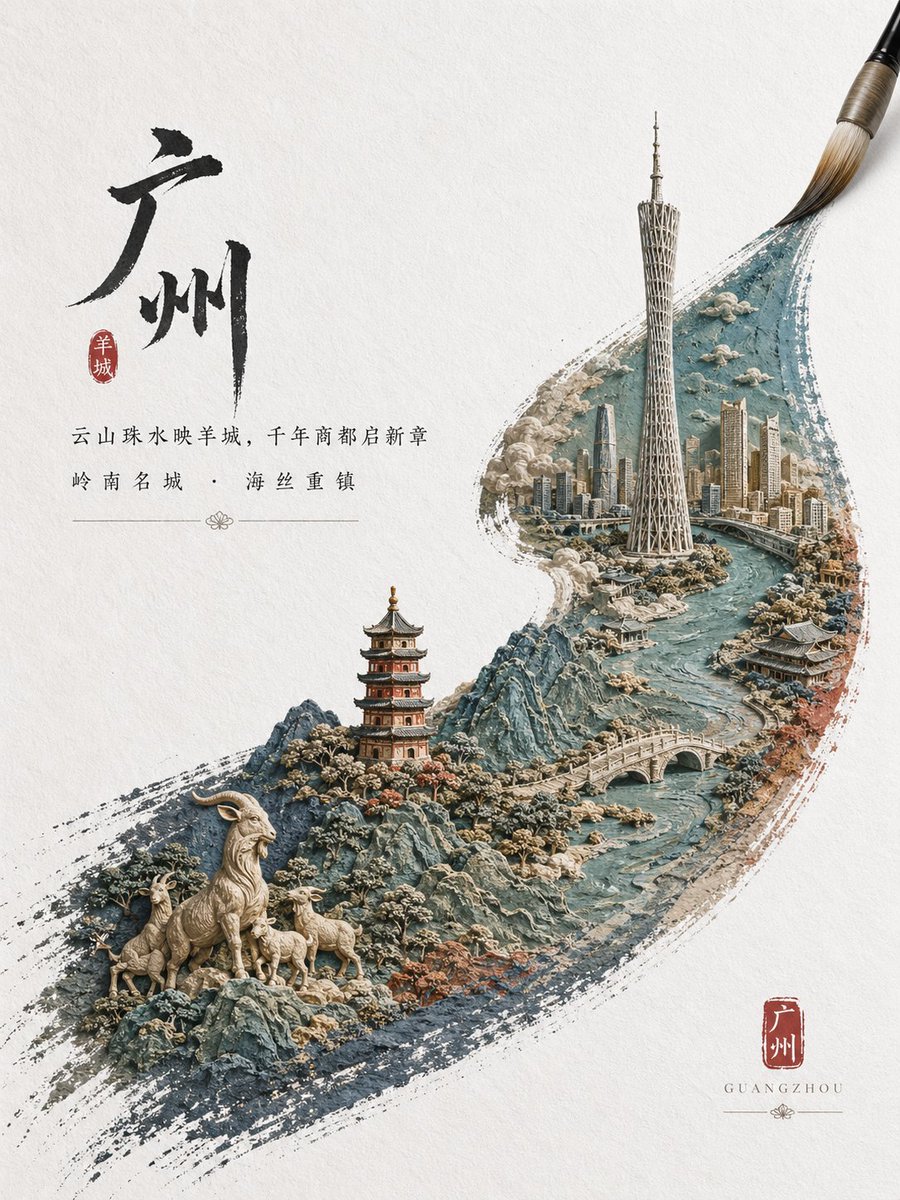
Çin Şehri Fırça Darbesi Posteri
Bu komut, Çin kaligrafisi, mühür tasarımı ve minyatür bir şehir manzarasını geniş bir mürekkep fırça darbesi içinde birleştiren, birinci sınıf dikey bir turizm posteri oluşturur.
Bu Grafik ve Poster için bir GPT Image 2 örnek senaryosudur. Benzer görseller oluşturmak için aşağıdaki hazır metni kullanın ve yeniden kullanmadan önce Awesome GPT Image 2 Prompts atıfını ve ticari kullanım haklarını inceleyin.
Tüm komut istemi setine mi ihtiyacınız var? Şunu kullanın: Grafik ve Poster Daha fazla ilgili örnek için konu merkezini ziyaret edin veya açın. GPT Image 2 istem kataloğu Tam örnek dizin, yeniden kullanılabilir yapılar ve kaynak atfı için.
Free 1K preview
Generate one preview image instantly, no sign-up required.
1844/4000
İpucu
Kopyalamaya hazır istemi
An elegant vertical Chinese city-poster on textured off-white rice paper, with a large black ink-brush calligraphy character for {argument name="city name" default="Guangzhou"} placed in the upper left and a small red seal stamp beside it. Beneath the calligraphy, add two centered lines of refined Chinese promotional copy in a classic serif-like print style, thin and balanced, with a delicate ornamental divider line. In the lower right, place a second red seal containing the city name and the romanized English name “GUANGZHOU” below it in small spaced capitals. The main image should be a sweeping ink-brush stroke that curves diagonally from the lower left toward the upper right, as if painted by a traditional calligraphy brush whose tip is still visible at the top right corner. Inside this single brushstroke, create a highly detailed miniature sculptural landscape that merges heritage and modern city identity: a winding turquoise river, rugged blue-gray mountains, a traditional multi-story pagoda, an arched stone bridge, a dense futuristic skyline, and a very tall landmark tower resembling the Canton Tower rising near the center-right. In the lower left foreground within the brushstroke, include 4 goats total: 1 large standing ram and 3 smaller goats on rocky terrain, referencing the city’s symbolic folklore. Blend clouds, stone textures, flowering shrubs, and architectural details into the scene so it feels like a carved diorama or relief sculpture embedded in paint. Use a restrained palette of ink black, muted teal, slate blue, warm beige stone, soft terracotta, and cinnabar red accents. The composition should feel premium, poetic, and culturally sophisticated, combining traditional Chinese ink painting, seal design, and ultra-detailed 3D miniature cityscape illustration for a high-end tourism publicity poster.İstem değişkenleri
Komut isteminde bulunan, düzenlenebilir argüman yer tutucuları ve varsayılan değerleri.
Değişken
city name
Varsayılan
Guangzhou
Best for
- - Grafik ve Poster visual exploration
- - Image generation and reference-image edits
- - Reusable briefs that keep source attribution visible
Change these parts
- - Subject, product, character, or scene
- - Aspect ratio, camera, lighting, and background
- - Brand, text, color, and output constraints
Recommended model and settings
- - Model: gpt-image-2
- - Input mode: Metinden görsele
- - Aspect ratio: source
- - Commercial status: review original source
How to use this prompt
- 1. Copy the prompt and preserve its structure for the first test.
- 2. Replace the subject, context, and publishing channel.
- 3. Change one camera, lighting, or style variable per iteration.
- 4. Inspect the output, source, text, and rights before reuse.
Limitations, source, and reuse cautions
- - Generated output is an editable draft, not factual, legal, or rights evidence.
- - Review the linked source, people, brands, logos, text, and third-party media before commercial use.
Awesome GPT Image 2 Prompts kaynağından içe aktarılmıştır. Kaynak belirtilmesi zorunludur. Ticari kullanım durumu allowed şeklindedir; ücretli kullanım öncesinde kaynak haklarını inceleyin.
Bu kategoride daha fazla vaka
Kategoriye, giriş modu uyumluluğuna, kaliteye ve düşük riske göre önceliklendirilmiştir.

Grumpy Rhino Storybook Illustration
Metinden görsele

Martial Arts Legend Character Bible Sheet
Metinden görsele

Android Quantum Lab Workstation
Metinden görsele

Surreal 3D Chess Match Artwork
Metinden görsele

Manga Desert Radio Telescope Road Trip
Metinden görsele

Overhead Pepperoni Pizza Photo
Metinden görsele
Yeniden kullanım ve kaynak notları
Vaka önizlemesini yaptıktan sonra bu istemi güvenle kullanın.
- 1.Komut istemini kopyalayın veya oluşturma düğmesini kullanarak doğrudan Dovoo'da açın.
- 2.Değişkenleri, en boy oranını ve referans görselleri kendi kullanım durumunuza göre ayarlayın.
- 3.Yayınlamadan veya ücretli kullanımdan önce, kaynak haklarını, atıf gerekliliklerini ve marka veya benzerlik risklerini doğrulayın.