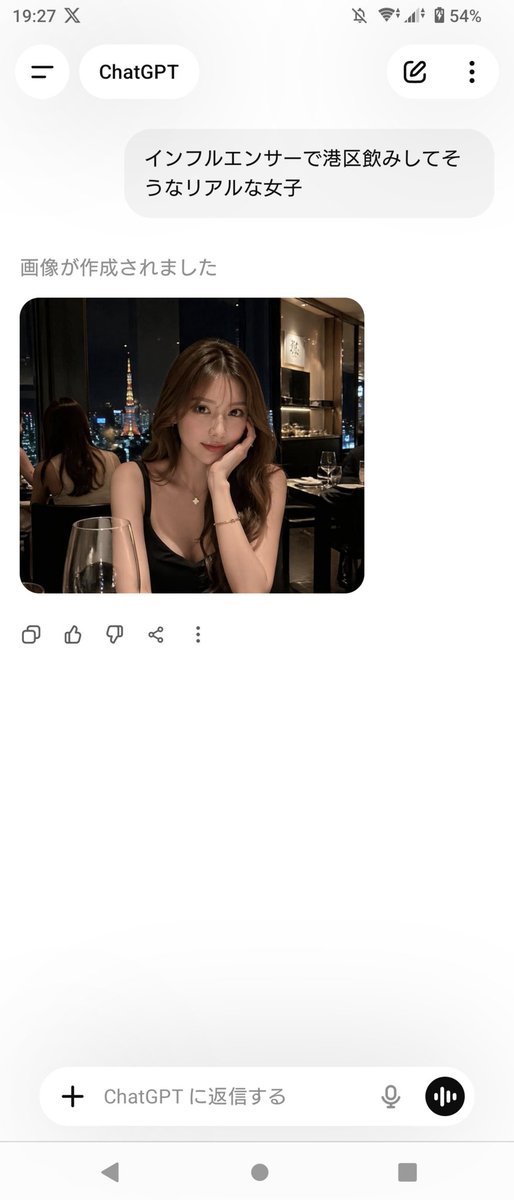
ChatGPT Uygulaması Ekran Görüntüsü (Oluşturulan Portre ile)
Bu komut, sosyal medya taslakları veya kullanıcı arayüzü gösterimleri için kullanışlı olan, fotogerçekçi bir gece hayatı portre görüntüsü sergileyen ChatGPT Japon mobil uygulamasının gerçekçi bir Android ekran görüntüsünü oluşturur.
Bu Diğer İlham Kaynakları için bir GPT Image 2 örnek senaryosudur. Benzer görseller oluşturmak için aşağıdaki hazır metni kullanın ve yeniden kullanmadan önce Awesome GPT Image 2 Prompts atıfını ve ticari kullanım haklarını inceleyin.
Tüm komut istemi setine mi ihtiyacınız var? Şunu kullanın: Diğer İlham Kaynakları Daha fazla ilgili örnek için konu merkezini ziyaret edin veya açın. GPT Image 2 istem kataloğu Tam örnek dizin, yeniden kullanılabilir yapılar ve kaynak atfı için.
Free 1K preview
Generate one preview image instantly, no sign-up required.
Free text preview doesn’t preserve reference-image consistency.
1591/4000
İpucu
Kopyalamaya hazır istemi
A realistic smartphone screenshot of the ChatGPT mobile app in Japanese on an Android device, shown full screen in portrait orientation with a clean light theme. The status bar at the top shows the time 19:27, network and battery icons, and 54% battery. The header has a back-style menu icon on the left, a rounded tab labeled ChatGPT, and 2 icons on the right: an edit pencil icon and a vertical three-dot menu. In the chat area, include 1 user message bubble in Japanese reading "インフルエンサーで港区飲みしてそうなリアルな女子". Below it, show the assistant status text "画像が作成されました" and then 1 generated image card with rounded corners. The generated image is a photorealistic night restaurant portrait of a glamorous young Japanese woman seated indoors by a window with Tokyo Tower visible outside, wearing a black spaghetti-strap dress, long wavy brown hair, a delicate necklace, and a bracelet, leaning her face on one hand at a candlelit dinner table with a wine glass in the foreground; the setting feels upscale, dimly lit, and influencer-like, with a mirror behind her reflecting the back of her head and the city view. Blur or mosaic the woman’s face for privacy. Beneath the image, show 5 action icons in a row: copy, thumbs up, thumbs down, share, and more. At the bottom, include the message input bar with a plus icon on the left, placeholder text "ChatGPT に返信する", a microphone icon, and a circular voice button on the right. Also show the Android navigation bar with 3 controls at the very bottom. Keep the overall composition exactly like a casual app screenshot, minimal, spacious, and authentic.
Best for
- - Diğer İlham Kaynakları visual exploration
- - Image generation and reference-image edits
- - Reusable briefs that keep source attribution visible
Change these parts
- - Subject, product, character, or scene
- - Aspect ratio, camera, lighting, and background
- - Brand, text, color, and output constraints
Recommended model and settings
- - Model: gpt-image-2
- - Input mode: Görselden görsele
- - Aspect ratio: source
- - Commercial status: review original source
How to use this prompt
- 1. Copy the prompt and preserve its structure for the first test.
- 2. Replace the subject, context, and publishing channel.
- 3. Change one camera, lighting, or style variable per iteration.
- 4. Inspect the output, source, text, and rights before reuse.
Limitations, source, and reuse cautions
- - Generated output is an editable draft, not factual, legal, or rights evidence.
- - Review the linked source, people, brands, logos, text, and third-party media before commercial use.
Awesome GPT Image 2 Prompts kaynağından içe aktarılmıştır. Kaynak belirtilmesi zorunludur. Ticari kullanım durumu allowed şeklindedir; ücretli kullanım öncesinde kaynak haklarını inceleyin.
Bu kategoride daha fazla vaka
Kategoriye, giriş modu uyumluluğuna, kaliteye ve düşük riske göre önceliklendirilmiştir.






Yeniden kullanım ve kaynak notları
Vaka önizlemesini yaptıktan sonra bu istemi güvenle kullanın.
- 1.Komut istemini kopyalayın veya oluşturma düğmesini kullanarak doğrudan Dovoo'da açın.
- 2.Değişkenleri, en boy oranını ve referans görselleri kendi kullanım durumunuza göre ayarlayın.
- 3.Yayınlamadan veya ücretli kullanımdan önce, kaynak haklarını, atıf gerekliliklerini ve marka veya benzerlik risklerini doğrulayın.