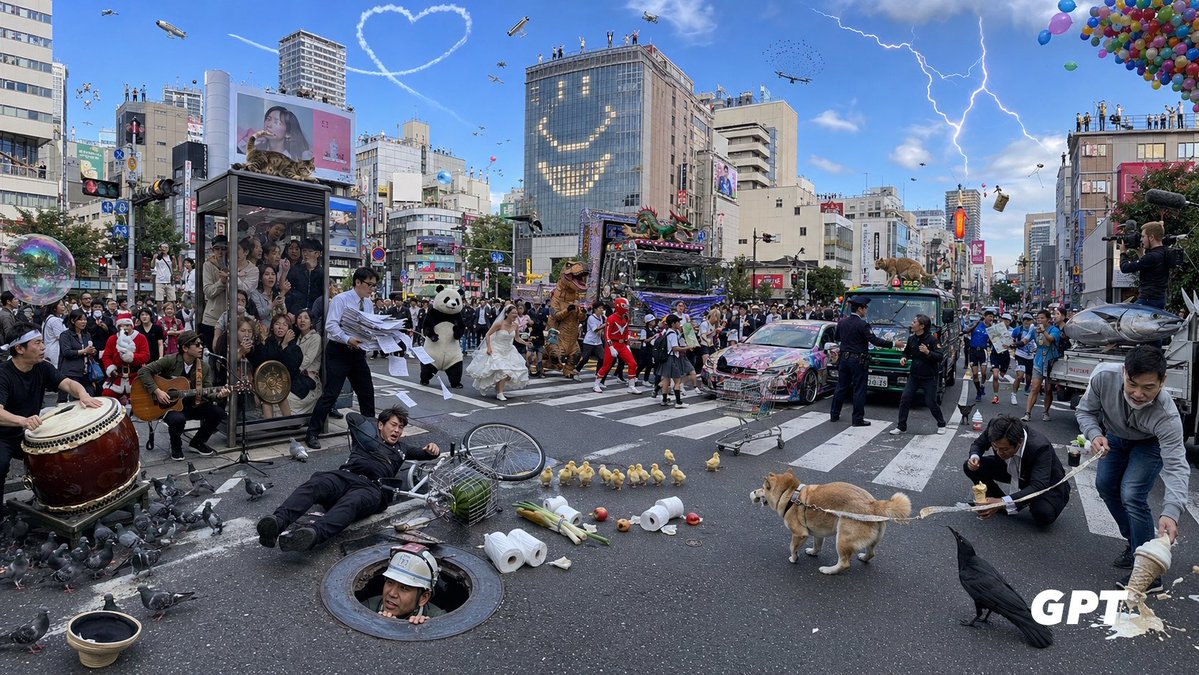
Chaotic Shibuya Scramble Crossing
A highly detailed photorealistic prompt for generating an absurdly crowded Tokyo scramble crossing full of surreal events and countable visual details.
Bu Manzara ve Doğa için bir GPT Image 2 örnek senaryosudur. Benzer görseller oluşturmak için aşağıdaki hazır metni kullanın ve yeniden kullanmadan önce Awesome GPT Image 2 Prompts atıfını ve ticari kullanım haklarını inceleyin.
Tüm komut istemi setine mi ihtiyacınız var? Şunu kullanın: Manzara ve Doğa Daha fazla ilgili örnek için konu merkezini ziyaret edin veya açın. GPT Image 2 istem kataloğu Tam örnek dizin, yeniden kullanılabilir yapılar ve kaynak atfı için.
Free 1K preview
Generate one preview image instantly, no sign-up required.
3515/4000
İpucu
Kopyalamaya hazır istemi
Goal: Create an ultra-dense, chaotic photorealistic wide-angle street scene at a huge Japanese scramble crossing, like Shibuya in Tokyo, packed with absurd events happening simultaneously. The image should feel like a single candid news photograph with extreme information density, realistic lighting, and many tiny details.

Canvas: Wide horizontal 16:9 image, street-level perspective, slightly fisheye wide-angle lens, daytime under a bright blue sky. Dense city buildings, billboards, traffic lights, crosswalk stripes, signs, and crowds fill the background. Add a small white “GPT” watermark in the bottom-right corner.

Setting and background: Use {argument name="location" default="a busy Shibuya-style Tokyo scramble crossing"}. Surround the crossing with mid-rise commercial buildings, digital billboards, rooftop spectators, traffic signals, and urban signage. In the sky include exactly 8 aerial features: 1 heart-shaped skywriting trail, 1 blimp, 1 small helicopter, 1 airplane, 1 drone, 1 flock of tiny birds, 1 lightning bolt striking from clouds on the right, and 1 large cluster of colorful balloons in the upper-right corner. On one tall glass building, make lit windows form a large smiling face.

Main crowd and vehicles: Fill the intersection with a dense crowd of pedestrians and performers. Include exactly 5 main vehicles: 1 elaborately decorated neon parade truck with a dragon on top, 1 colorful graffiti-covered sports car, 1 green taxi, 1 small bus or van, and 1 silver fish-shaped parade float or vehicle at the far right. Add photographers and camera operators on the right edge documenting the chaos.

Foreground incidents and objects: Show exactly 12 prominent foreground details: 1 large taiko drum player on the far left, 1 seated guitarist near the drum, 1 transparent phone-booth-like glass box packed with people, 1 businessman dropping loose papers, 1 man in a black suit fallen beside a bicycle, 1 construction worker emerging from a round manhole, 1 overturned birdcage with green contents, 1 scattered group of pigeons, 1 row of ducklings crossing the road, 1 tan Shiba Inu dog on a leash, 1 large black crow in the lower-right foreground, and 1 man spilling noodles or creamy food from a bowl on the far right.

Costumed characters and performers: Include exactly 7 standout characters among the crowd: 1 Santa Claus, 1 panda mascot, 1 bride in a white wedding dress running through the crossing, 1 brown dinosaur mascot, 1 red superhero or sentai character, 1 schoolgirl in uniform, and 1 police officer trying to manage the scene.

Additional surreal details: Add exactly 7 extra chaotic props or actions: 1 giant soap bubble floating on the left, 1 shopping cart abandoned in the middle road, 1 microphone stand and speakers for street performance, 1 traffic cone near the vehicles, 1 airborne suitcase or box on the right, 1 small animal or mascot peeking from a vehicle roof, and scattered toilet paper rolls, apples, bottles, and debris across the crosswalk.

Visual style: Photorealistic, high-resolution documentary photography, crisp detail everywhere, natural shadows, realistic Japanese city atmosphere, no anime styling. Use {argument name="time of day" default="bright afternoon"}, {argument name="weather mood" default="sunny blue sky with dramatic lightning"}, {argument name="crowd density" default="extremely crowded"}, and {argument name="chaos level" default="maximum but still readable"}. Keep the composition balanced so every counted object is visible.
İstem değişkenleri
Komut isteminde bulunan, düzenlenebilir argüman yer tutucuları ve varsayılan değerleri.
Değişken
location
Varsayılan
a busy Shibuya-style Tokyo scramble crossing
Değişken
time of day
Varsayılan
bright afternoon
Değişken
weather mood
Varsayılan
sunny blue sky with dramatic lightning
Değişken
crowd density
Varsayılan
extremely crowded
Değişken
chaos level
Varsayılan
maximum but still readable
Best for
- - Manzara ve Doğa visual exploration
- - Image generation and reference-image edits
- - Reusable briefs that keep source attribution visible
Change these parts
- - Subject, product, character, or scene
- - Aspect ratio, camera, lighting, and background
- - Brand, text, color, and output constraints
Recommended model and settings
- - Model: gpt-image-2
- - Input mode: Metinden görsele
- - Aspect ratio: source
- - Commercial status: review original source
How to use this prompt
- 1. Copy the prompt and preserve its structure for the first test.
- 2. Replace the subject, context, and publishing channel.
- 3. Change one camera, lighting, or style variable per iteration.
- 4. Inspect the output, source, text, and rights before reuse.
Limitations, source, and reuse cautions
- - Generated output is an editable draft, not factual, legal, or rights evidence.
- - Review the linked source, people, brands, logos, text, and third-party media before commercial use.
Awesome GPT Image 2 Prompts kaynağından içe aktarılmıştır. Kaynak belirtilmesi zorunludur. Ticari kullanım durumu allowed şeklindedir; ücretli kullanım öncesinde kaynak haklarını inceleyin.
Bu kategoride daha fazla vaka
Kategoriye, giriş modu uyumluluğuna, kaliteye ve düşük riske göre önceliklendirilmiştir.

GPT Image 2 Real-Life Character Street Snap
Metinden görsele

Street Selfie with Cat in Matching Cap
Metinden görsele

MotoGP POV Cornering Shot
Metinden görsele

Gray Denim Lace-Up Top Prompt for GPT Image 2
Metinden görsele

Orange Rooftop Fashion Photo Prompt
Metinden görsele

Hiker in Red Jacket
Metinden görsele
Yeniden kullanım ve kaynak notları
Vaka önizlemesini yaptıktan sonra bu istemi güvenle kullanın.
- 1.Komut istemini kopyalayın veya oluşturma düğmesini kullanarak doğrudan Dovoo'da açın.
- 2.Değişkenleri, en boy oranını ve referans görselleri kendi kullanım durumunuza göre ayarlayın.
- 3.Yayınlamadan veya ücretli kullanımdan önce, kaynak haklarını, atıf gerekliliklerini ve marka veya benzerlik risklerini doğrulayın.