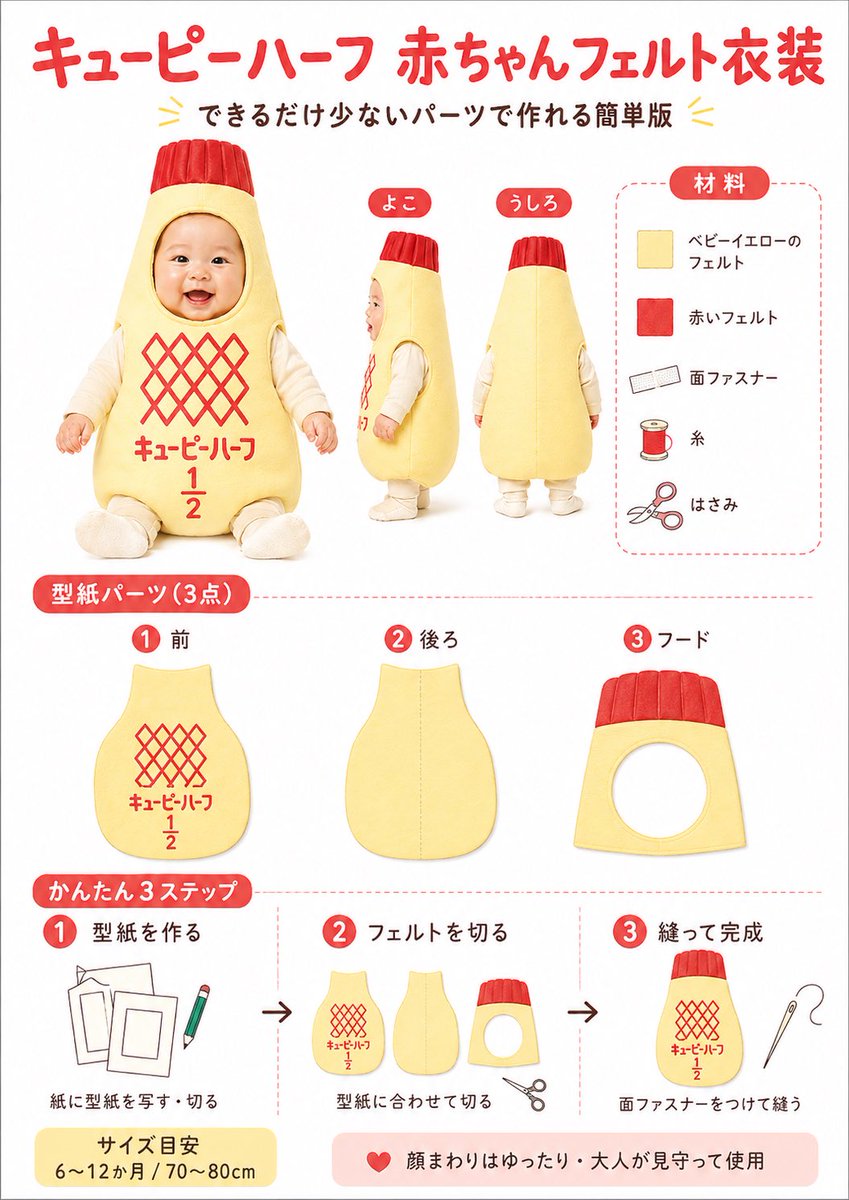
Japon Bebek Keçe Kostümü Kendin Yap Şablonu
Bu, Kewpie Half ambalajından esinlenerek yapılan sevimli bir Japon tarzı el işi bilgi grafiği oluşturuyor; bu grafikte malzemeler, kalıp parçaları ve üç basit adımda bebek keçe kostümü yapımı gösteriliyor.
Bu Grafik ve Poster için bir GPT Image 2 örnek senaryosudur. Benzer görseller oluşturmak için aşağıdaki hazır metni kullanın ve yeniden kullanmadan önce Awesome GPT Image 2 Prompts atıfını ve ticari kullanım haklarını inceleyin.
Tüm komut istemi setine mi ihtiyacınız var? Şunu kullanın: Grafik ve Poster Daha fazla ilgili örnek için konu merkezini ziyaret edin veya açın. GPT Image 2 istem kataloğu Tam örnek dizin, yeniden kullanılabilir yapılar ve kaynak atfı için.
Free 1K preview
Generate one preview image instantly, no sign-up required.
3524/4000
İpucu
Kopyalamaya hazır istemi
{
  "customization": {
    "accent_color": "{argument name=\"accent color\" default=\"bright red\"}",
    "main_color": "{argument name=\"main costume color\" default=\"pale baby yellow\"}",
    "product_theme": "{argument name=\"product theme\" default=\"Kewpie Half-style baby costume\"}",
    "size_note": "{argument name=\"size note\" default=\"6〜12か月 / 70〜80cm\"}"
  },
  "design_details": {
    "colors": {
      "accent_black": "dark brown-black text",
      "background": "white",
      "primary_red": "bright warm red",
      "primary_yellow": "soft baby-yellow"
    },
    "graphic_elements": "red numbered circles, rounded red section tabs, light red dashed divider lines, small decorative yellow chevrons around the subtitle",
    "typography": "rounded bold Japanese display font for headers, simple clean sans-serif Japanese text for labels"
  },
  "headline": {
    "main": "{argument name=\"headline text\" default=\"キューピーハーフ 赤ちゃんフェルト衣装\"}",
    "sub": "できるだけ少ないパーツで作れる簡単版"
  },
  "image_goal": "create a cute, easy-to-follow Japanese craft tutorial poster for a baby felt costume inspired by a mayonnaise bottle, suitable for social media sharing, blog thumbnails, or printable DIY instructions",
  "layout": {
    "footer_notes": [
      "サイズ目安 6〜12か月 / 70〜80cm",
      "顔まわりはゆったり・大人が見守って使用"
    ],
    "sections": [
      {
        "count": 3,
        "details": "a baby wearing a padded pale yellow bottle-shaped felt costume with a red ribbed cap-like hood top, Show every face clearly with natural, detailed facial features, cream long-sleeve inner clothing, seated front view plus standing side and back views; front has a red diamond lattice logo area and red Japanese text with a large 1 over 2 fraction",
        "labels": [
          "front",
          "side",
          "back"
        ],
        "position": "upper left to center",
        "title": "main costume views"
      },
      {
        "count": 5,
        "details": "vertical materials list inside a rounded dashed border, each item paired with a simple icon: pale yellow felt square, red felt square, hook-and-loop fastener strip, spool of thread, scissors",
        "labels": [
          "ベビーイエローのフェルト",
          "赤いフェルト",
          "面ファスナー",
          "Sewing thread",
          "はさみ"
        ],
        "position": "top-right",
        "title": "Materials"
      },
      {
        "count": 3,
        "details": "three pattern pieces shown separately: front body panel with red lattice and text print, back body panel plain with center seam guide, hood panel with circular face opening and red ribbed top band",
        "labels": [
          "1 Front piece",
          "2 後ろ",
          "3 フード"
        ],
        "position": "middle row",
        "title": "型紙パーツ (3点)"
      },
      {
        "count": 3,
        "details": "step 1 shows paper templates and a pencil, step 2 shows the three cut felt parts and scissors, step 3 shows the finished costume body with a sewing needle; black arrows between each step",
        "labels": [
          "1 型紙を作る",
          "2 フェルトを切る",
          "3 縫って完成"
        ],
        "position": "bottom row",
        "title": "かんたん3ステップ"
      }
    ]
  },
  "style": "clean infographic poster, bright white background, soft studio lighting, friendly handmade craft aesthetic, red and pale yellow color scheme, rounded Japanese labels, neat product-sheet layout",
  "subject": "DIY felt baby costume styled like Kewpie Half mayonnaise packaging",
  "type": "Japanese craft instruction poster"
}
İstem değişkenleri
Komut isteminde bulunan, düzenlenebilir argüman yer tutucuları ve varsayılan değerleri.
Değişken
headline text
Varsayılan
キューピーハーフ 赤ちゃんフェルト衣装
Değişken
product theme
Varsayılan
Kewpie Half-style baby costume
Değişken
main costume color
Varsayılan
pale baby yellow
Değişken
accent color
Varsayılan
bright red
Değişken
size note
Varsayılan
6〜12か月 / 70〜80cm
Best for
- - Grafik ve Poster visual exploration
- - Image generation and reference-image edits
- - Reusable briefs that keep source attribution visible
Change these parts
- - Subject, product, character, or scene
- - Aspect ratio, camera, lighting, and background
- - Brand, text, color, and output constraints
Recommended model and settings
- - Model: gpt-image-2
- - Input mode: Metinden görsele
- - Aspect ratio: source
- - Commercial status: review original source
How to use this prompt
- 1. Copy the prompt and preserve its structure for the first test.
- 2. Replace the subject, context, and publishing channel.
- 3. Change one camera, lighting, or style variable per iteration.
- 4. Inspect the output, source, text, and rights before reuse.
Limitations, source, and reuse cautions
- - Generated output is an editable draft, not factual, legal, or rights evidence.
- - Review the linked source, people, brands, logos, text, and third-party media before commercial use.
Awesome GPT Image 2 Prompts kaynağından içe aktarılmıştır. Kaynak belirtilmesi zorunludur. Ticari kullanım durumu allowed şeklindedir; ücretli kullanım öncesinde kaynak haklarını inceleyin.
Bu kategoride daha fazla vaka
Kategoriye, giriş modu uyumluluğuna, kaliteye ve düşük riske göre önceliklendirilmiştir.

Grumpy Rhino Storybook Illustration
Metinden görsele

Martial Arts Legend Character Bible Sheet
Metinden görsele

Surreal 3D Chess Match Artwork
Metinden görsele

Manga Desert Radio Telescope Road Trip
Metinden görsele

Android Quantum Lab Workstation
Metinden görsele

Y2K Style Photo Booth Collage
Metinden görsele
Yeniden kullanım ve kaynak notları
Vaka önizlemesini yaptıktan sonra bu istemi güvenle kullanın.
- 1.Komut istemini kopyalayın veya oluşturma düğmesini kullanarak doğrudan Dovoo'da açın.
- 2.Değişkenleri, en boy oranını ve referans görselleri kendi kullanım durumunuza göre ayarlayın.
- 3.Yayınlamadan veya ücretli kullanımdan önce, kaynak haklarını, atıf gerekliliklerini ve marka veya benzerlik risklerini doğrulayın.