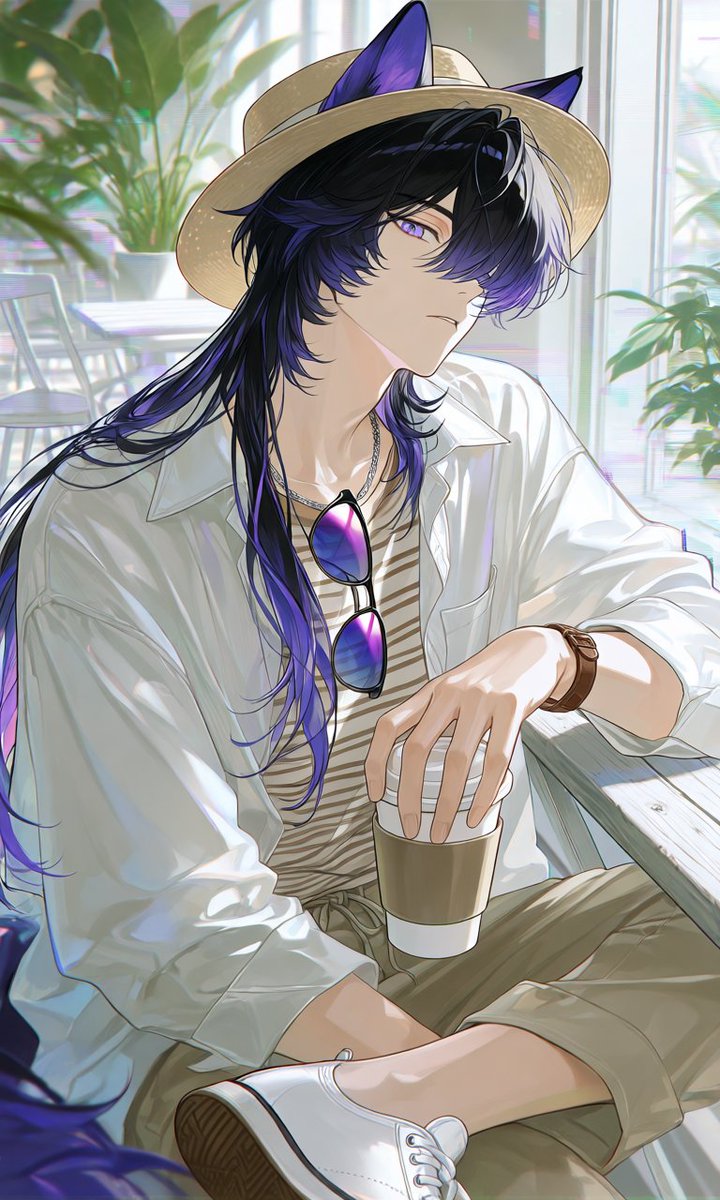
Summer Cafe Anime Wolf Boy
A vertical anime character illustration prompt for creating a stylish animal-eared young man in a relaxed summer cafe outfit.
Bu Anime ve Oyun için bir GPT Image 2 örnek senaryosudur. Benzer görseller oluşturmak için aşağıdaki hazır metni kullanın ve yeniden kullanmadan önce Awesome GPT Image 2 Prompts atıfını ve ticari kullanım haklarını inceleyin.
Tüm komut istemi setine mi ihtiyacınız var? Şunu kullanın: Anime ve Oyun Daha fazla ilgili örnek için konu merkezini ziyaret edin veya açın. GPT Image 2 istem kataloğu Tam örnek dizin, yeniden kullanılabilir yapılar ve kaynak atfı için.
Free 1K preview
Generate one preview image instantly, no sign-up required.
1405/4000
İpucu
Kopyalamaya hazır istemi
Create a polished vertical anime illustration of an androgynous young man with black wolf/cat ears and a calm, slightly aloof expression, seated in a bright summer cafe. He has long layered {argument name="hair color" default="glossy black hair with deep violet-purple streaks and a white front section"}, violet eyes, pale skin, and soft elegant facial features; his bangs partially cover one eye and his long hair flows over his shoulders. Dress him in a refreshing relaxed cafe outfit: a wide-brim natural straw hat placed over the animal ears, an oversized open white button-up shirt with rolled sleeves, a beige-and-cream striped inner shirt, loose olive khaki cropped pants, white low-top sneakers, a brown leather wristwatch, a thin silver necklace, and purple-blue gradient sunglasses hanging from his chest. Pose him sitting casually by a light wooden cafe table, one leg bent forward, one hand resting on or holding a takeaway coffee cup with a white sleeve, the other arm relaxed. Use a sunlit indoor cafe background with large windows, soft white furniture, leafy green plants, and bright diffused summer light with gentle bokeh. Style: high-quality modern Japanese anime, delicate linework, luminous skin shading, soft pastel highlights, airy atmosphere, subtle chromatic glow, detailed fabric folds, reflective sunglasses, clean composition, vertical portrait framing, no text, no watermark.İstem değişkenleri
Komut isteminde bulunan, düzenlenebilir argüman yer tutucuları ve varsayılan değerleri.
Değişken
hair color
Varsayılan
glossy black hair with deep violet-purple streaks and a white front section
Best for
- - Anime ve Oyun visual exploration
- - Image generation and reference-image edits
- - Reusable briefs that keep source attribution visible
Change these parts
- - Subject, product, character, or scene
- - Aspect ratio, camera, lighting, and background
- - Brand, text, color, and output constraints
Recommended model and settings
- - Model: gpt-image-2
- - Input mode: Metinden görsele
- - Aspect ratio: source
- - Commercial status: review original source
How to use this prompt
- 1. Copy the prompt and preserve its structure for the first test.
- 2. Replace the subject, context, and publishing channel.
- 3. Change one camera, lighting, or style variable per iteration.
- 4. Inspect the output, source, text, and rights before reuse.
Limitations, source, and reuse cautions
- - Generated output is an editable draft, not factual, legal, or rights evidence.
- - Review the linked source, people, brands, logos, text, and third-party media before commercial use.
Awesome GPT Image 2 Prompts kaynağından içe aktarılmıştır. Kaynak belirtilmesi zorunludur. Ticari kullanım durumu allowed şeklindedir; ücretli kullanım öncesinde kaynak haklarını inceleyin.
Bu kategoride daha fazla vaka
Kategoriye, giriş modu uyumluluğuna, kaliteye ve düşük riske göre önceliklendirilmiştir.

Anime Girl Heterochromia Portrait
Metinden görsele

Hell Hound Character Sheet Infographic
Metinden görsele

Boisterous Shrimpers Entering Pub
Metinden görsele

MotoGP POV Cornering Shot
Metinden görsele

Cute Speech Bubble Mascot Profile Icon
Metinden görsele

Tuxedo Cat Photo and Line Art Diptych
Metinden görsele
Yeniden kullanım ve kaynak notları
Vaka önizlemesini yaptıktan sonra bu istemi güvenle kullanın.
- 1.Komut istemini kopyalayın veya oluşturma düğmesini kullanarak doğrudan Dovoo'da açın.
- 2.Değişkenleri, en boy oranını ve referans görselleri kendi kullanım durumunuza göre ayarlayın.
- 3.Yayınlamadan veya ücretli kullanımdan önce, kaynak haklarını, atıf gerekliliklerini ve marka veya benzerlik risklerini doğrulayın.