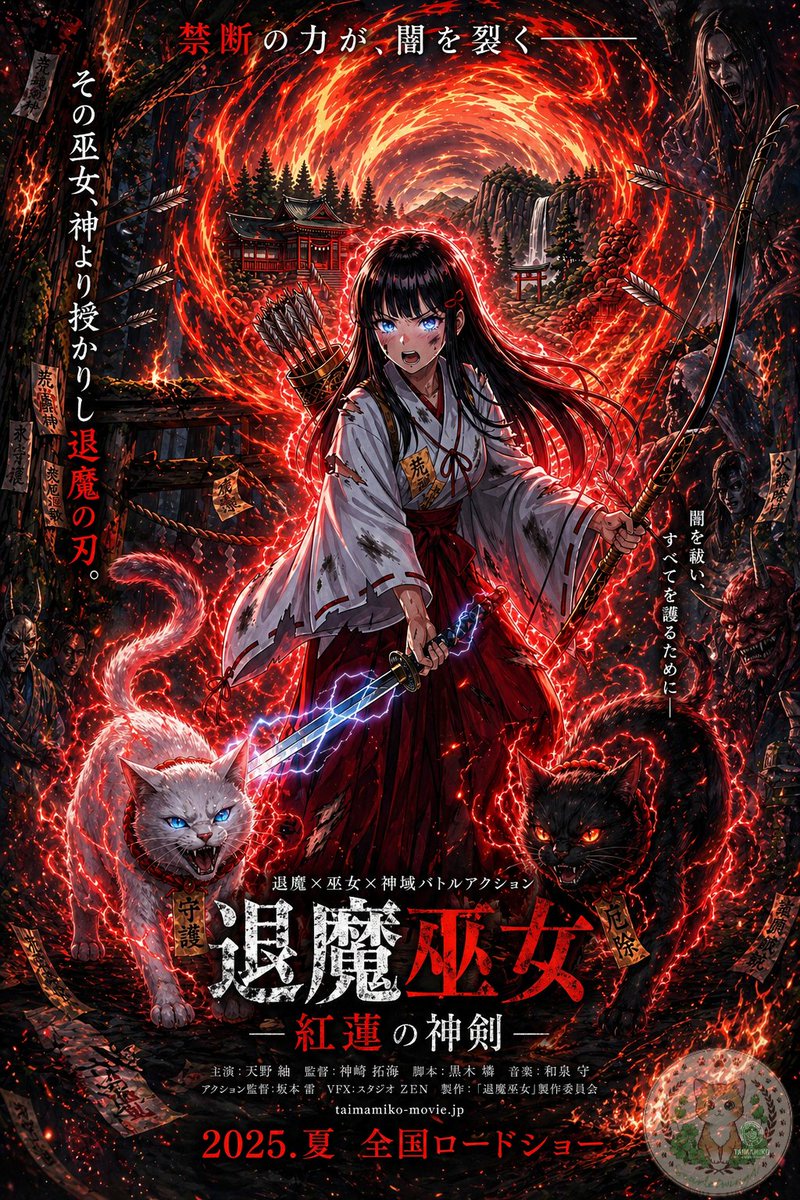
Anime Tapınak Rahibesi Film Posteri
Bu görev, bir fantastik karakter illüstrasyonunu, kurgusal bir doğaüstü aksiyon filmi için karanlık, metin ağırlıklı bir Japon sinema afişine dönüştürüyor.
Bu Grafik ve Poster için bir GPT Image 2 örnek senaryosudur. Benzer görseller oluşturmak için aşağıdaki hazır metni kullanın ve yeniden kullanmadan önce Awesome GPT Image 2 Prompts atıfını ve ticari kullanım haklarını inceleyin.
Tüm komut istemi setine mi ihtiyacınız var? Şunu kullanın: Grafik ve Poster Daha fazla ilgili örnek için konu merkezini ziyaret edin veya açın. GPT Image 2 istem kataloğu Tam örnek dizin, yeniden kullanılabilir yapılar ve kaynak atfı için.
Free 1K preview
Generate one preview image instantly, no sign-up required.
Free text preview doesn’t preserve reference-image consistency.
1642/4000
İpucu
Kopyalamaya hazır istemi
Using the provided reference image, turn it into a dramatic Japanese theatrical movie poster while keeping the same shrine maiden archer-swordswoman, fiery portal, bow, quiver, lightning sword, and shrine setting as the base. Push the image into a much darker, high-contrast, more detailed cinematic poster style with intense red-and-black grading, denser embers, stronger rim lighting, and a more ominous supernatural atmosphere. Add 2 demonic guardian cats in the foreground at the character’s feet: 1 white cat on the left with blue glowing eyes and an open snarling mouth, and 1 black cat on the right with red glowing eyes and an open snarling mouth, both wrapped in crackling red energy. Add shadowy monster and oni faces emerging from the dark forest edges on both sides. Increase the number of flying arrows, talismans, sparks, and glowing red energy trails around the character. Preserve the central heroic composition, but format the whole image as a full Japanese film poster with layered typography. Add the top tagline in Japanese: "禁断の力が、闇を裂く—". Add 2 vertical side taglines: left side "その巫女神より授かりし退魔の刃。" and right side "闇を祓い、すべてを護るために—". Add a small genre line above the title: "退魔×巫女×神域バトルアクション". Add the main title near the bottom center in large distressed kanji: "退魔巫女", with the subtitle beneath it: "—紅蓮の神剣—". Add a credits block in small Japanese text below the title, then add the website "taimamiko-movie.jp" and the release line at the very bottom: "2025.夏 全国ロードショー". Include a small dark rectangular logo block in the top-right corner. Make it look like a polished fantasy-horror action poster for a fictional movie.
Best for
- - Grafik ve Poster visual exploration
- - Image generation and reference-image edits
- - Reusable briefs that keep source attribution visible
Change these parts
- - Subject, product, character, or scene
- - Aspect ratio, camera, lighting, and background
- - Brand, text, color, and output constraints
Recommended model and settings
- - Model: gpt-image-2
- - Input mode: Görselden görsele
- - Aspect ratio: source
- - Commercial status: review original source
How to use this prompt
- 1. Copy the prompt and preserve its structure for the first test.
- 2. Replace the subject, context, and publishing channel.
- 3. Change one camera, lighting, or style variable per iteration.
- 4. Inspect the output, source, text, and rights before reuse.
Limitations, source, and reuse cautions
- - Generated output is an editable draft, not factual, legal, or rights evidence.
- - Review the linked source, people, brands, logos, text, and third-party media before commercial use.
Awesome GPT Image 2 Prompts kaynağından içe aktarılmıştır. Kaynak belirtilmesi zorunludur. Ticari kullanım durumu allowed şeklindedir; ücretli kullanım öncesinde kaynak haklarını inceleyin.
Bu kategoride daha fazla vaka
Kategoriye, giriş modu uyumluluğuna, kaliteye ve düşük riske göre önceliklendirilmiştir.

Split Face Horror Transformation
Görselden görsele

Dax Cinematic Character Bible Sheet
Görselden görsele

Vintage Digital Camera Mirror Selfie
Görselden görsele

Manga Desert Radio Telescope Road Trip
Metinden görsele

Multi-Pose Wavy Dark Hair Portrait
Görselden görsele

Surreal Macro Fashion Illusion
Görselden görsele
Yeniden kullanım ve kaynak notları
Vaka önizlemesini yaptıktan sonra bu istemi güvenle kullanın.
- 1.Komut istemini kopyalayın veya oluşturma düğmesini kullanarak doğrudan Dovoo'da açın.
- 2.Değişkenleri, en boy oranını ve referans görselleri kendi kullanım durumunuza göre ayarlayın.
- 3.Yayınlamadan veya ücretli kullanımdan önce, kaynak haklarını, atıf gerekliliklerini ve marka veya benzerlik risklerini doğrulayın.