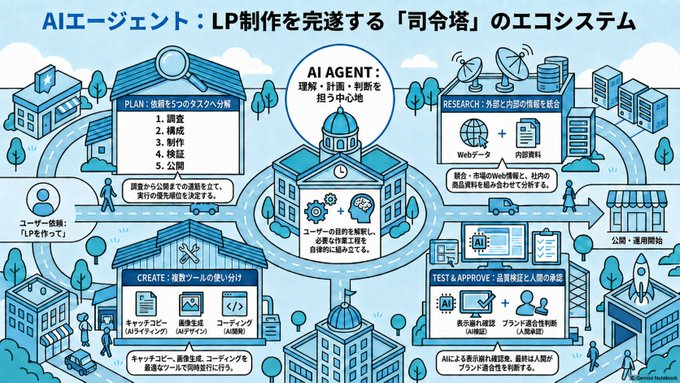
AI Agent LP Ecosystem Infographic
A wide Japanese isometric workflow infographic showing how an AI agent coordinates planning, research, creation, review, and publication for landing page production.
Bu Grafik ve Poster için bir GPT Image 2 örnek senaryosudur. Benzer görseller oluşturmak için aşağıdaki hazır metni kullanın ve yeniden kullanmadan önce Awesome GPT Image 2 Prompts atıfını ve ticari kullanım haklarını inceleyin.
Tüm komut istemi setine mi ihtiyacınız var? Şunu kullanın: Grafik ve Poster Daha fazla ilgili örnek için konu merkezini ziyaret edin veya açın. GPT Image 2 istem kataloğu Tam örnek dizin, yeniden kullanılabilir yapılar ve kaynak atfı için.
Free 1K preview
Generate one preview image instantly, no sign-up required.
3639/4000
İpucu
Kopyalamaya hazır istemi
Goal: Create a wide 16:9 Japanese isometric infographic explaining an AI-agent ecosystem that completes landing page production through a “command tower” model, with the headline {argument name="headline text" default="AIエージェント:LP制作を完遂する「司令塔」のエコシステム"} across the top.

Canvas: Horizontal slide, light sky-blue background with soft clouds, simple city-map roads, tiny trees, pedestrians, cars, and technology buildings. Use a clean blue, cyan, white, and black palette with thick rounded vector outlines, friendly SaaS/tech illustration style, crisp readable labels, and subtle halftone texture. No photorealism.

Layout: Center a large circular roundabout containing the main AI Agent command-center building, with a domed roof, clock, gears, and brain icon. Around it place exactly 4 main workflow buildings/cards connected by roads and directional arrows: 1) PLAN at upper left, 2) RESEARCH at upper right, 3) CREATE at lower left, 4) TEST & APPROVE at lower right. Add a final publication destination on the far right: a storefront labeled as the publishing/operation start point with a rocket launch building nearby. Include supporting city objects: exactly 3 satellite dishes on the research building roof area, exactly 3 database/server stack icons near the upper right, exactly 2 tall office towers at the far right, exactly 1 small bank/store building at far upper left, exactly 1 office block at bottom left, and exactly 1 foreground dome building at bottom center.

Text content: Use Japanese text throughout. Top title must read {argument name="headline text" default="AIエージェント:LP制作を完遂する「司令塔」のエコシステム"}. Central circle label: “AI AGENT:理解・計画・判断を担う中心地”. Inside the central building, add a small panel saying the agent understands user goals and automatically assembles necessary tasks. Left side user note: “ユーザー依頼:LPを作って!”

Sections: Show exactly 4 labeled production modules with these visible labels and contents. PLAN module: title “PLAN:依頼を5つのタスクへ分解”; list exactly 5 numbered items: 1 調査, 2 構成, 3 制作, 4 検証, 5 公開; add a caption saying the request is decomposed into five tasks and execution priority is determined. RESEARCH module: title “RESEARCH:外部と内部の情報を統合”; show exactly 2 content icons labeled “Webデータ” and “内部資料”; caption about integrating competitor, market, and internal product information. CREATE module: title “CREATE:複数ツールの使い分け”; show exactly 3 tool icons labeled “キャッチコピー AIライティング”, “画像生成 AIデザイン”, and “コーディング AI開発”; caption saying copy, images, and coding are produced using appropriate specialized tools. TEST & APPROVE module: title “TEST & APPROVE:品質検証と人間の承認”; show exactly 3 verification icons: an AI chip, a checked monitor, and people/approval; include labels for display check, quality check, and brand/person-in-charge approval; caption saying AI handles display and quality checks and the final human approval begins publication.

Subject details: Roads should visually connect every module to the central AI Agent hub, emphasizing relationships rather than a strict linear flow. Place the publish destination on the right with an arrow leading to a striped storefront labeled “公開・運用開始”. Add small decorative tech details such as antennas, document icons, code brackets, magnifying glass, gears, cloud shapes, and tiny people walking between buildings, but keep them secondary.

Style constraints: Isometric 2.5D diagram, flat vector illustration, blue monochrome emphasis, black outlines, clean infographic composition, high legibility, no watermark except a tiny unobtrusive “Gemini Notebook” style credit in the bottom right if needed. Keep all labels compact and aligned inside white rounded panels.
İstem değişkenleri
Komut isteminde bulunan, düzenlenebilir argüman yer tutucuları ve varsayılan değerleri.
Değişken
headline text
Varsayılan
AIエージェント:LP制作を完遂する「司令塔」のエコシステム
Best for
- - Grafik ve Poster visual exploration
- - Image generation and reference-image edits
- - Reusable briefs that keep source attribution visible
Change these parts
- - Subject, product, character, or scene
- - Aspect ratio, camera, lighting, and background
- - Brand, text, color, and output constraints
Recommended model and settings
- - Model: gpt-image-2
- - Input mode: Metinden görsele
- - Aspect ratio: source
- - Commercial status: review original source
How to use this prompt
- 1. Copy the prompt and preserve its structure for the first test.
- 2. Replace the subject, context, and publishing channel.
- 3. Change one camera, lighting, or style variable per iteration.
- 4. Inspect the output, source, text, and rights before reuse.
Limitations, source, and reuse cautions
- - Generated output is an editable draft, not factual, legal, or rights evidence.
- - Review the linked source, people, brands, logos, text, and third-party media before commercial use.
Awesome GPT Image 2 Prompts kaynağından içe aktarılmıştır. Kaynak belirtilmesi zorunludur. Ticari kullanım durumu allowed şeklindedir; ücretli kullanım öncesinde kaynak haklarını inceleyin.
Bu kategoride daha fazla vaka
Kategoriye, giriş modu uyumluluğuna, kaliteye ve düşük riske göre önceliklendirilmiştir.

Grumpy Rhino Storybook Illustration
Metinden görsele

Martial Arts Legend Character Bible Sheet
Metinden görsele

Surreal 3D Chess Match Artwork
Metinden görsele

Pink Hijab Mirror Selfie Portrait
Metinden görsele

Manga Desert Radio Telescope Road Trip
Metinden görsele

Female Clown Cyborg Portrait
Metinden görsele
Yeniden kullanım ve kaynak notları
Vaka önizlemesini yaptıktan sonra bu istemi güvenle kullanın.
- 1.Komut istemini kopyalayın veya oluşturma düğmesini kullanarak doğrudan Dovoo'da açın.
- 2.Değişkenleri, en boy oranını ve referans görselleri kendi kullanım durumunuza göre ayarlayın.
- 3.Yayınlamadan veya ücretli kullanımdan önce, kaynak haklarını, atıf gerekliliklerini ve marka veya benzerlik risklerini doğrulayın.