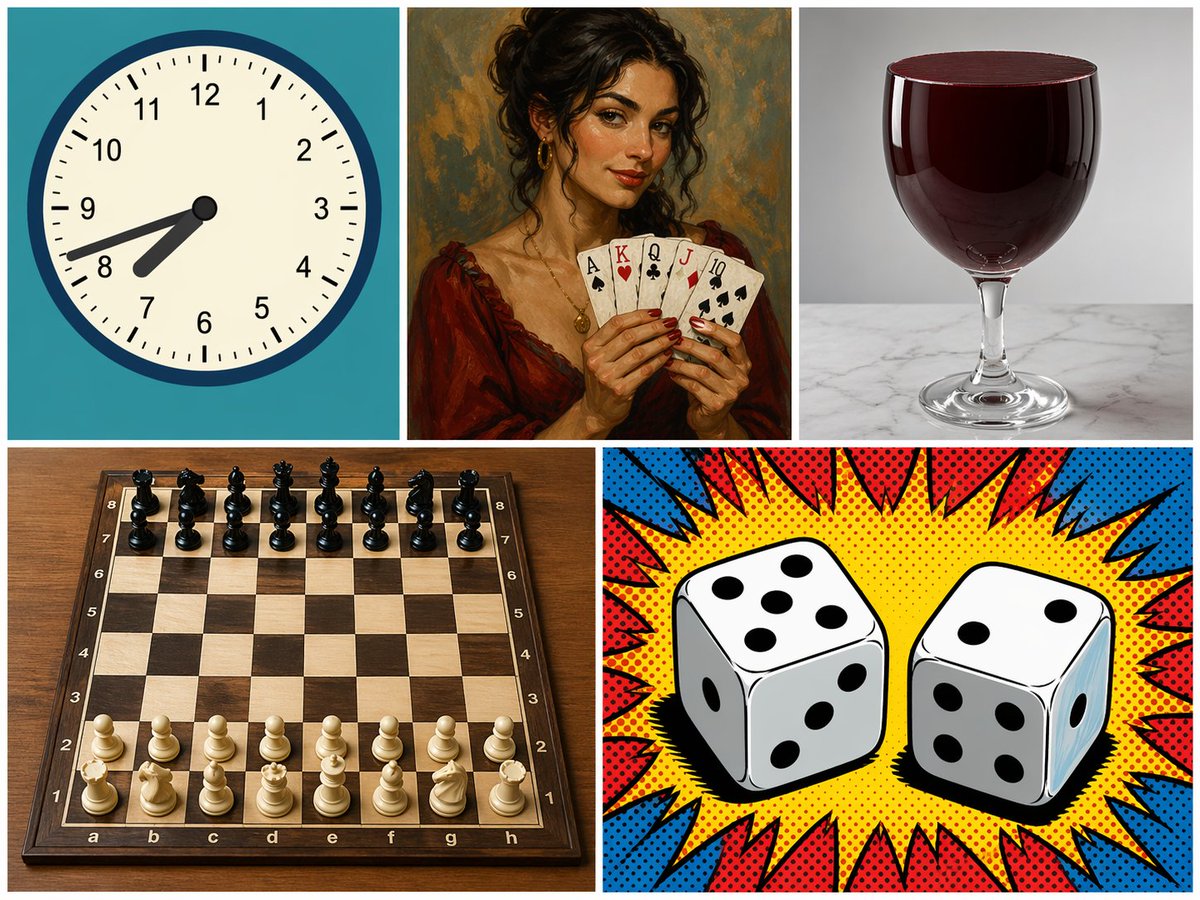
5 Panelli Karışık Stil Kolaj
Farklı konuları ve sanat stillerini içeren 5 panelli bir ızgara oluşturur; modelin çok yönlülüğünü ve kompozisyonunu test etmek için kullanışlıdır.
Bu Diğer İlham Kaynakları için bir GPT Image 2 örnek senaryosudur. Benzer görseller oluşturmak için aşağıdaki hazır metni kullanın ve yeniden kullanmadan önce Awesome GPT Image 2 Prompts atıfını ve ticari kullanım haklarını inceleyin.
Tüm komut istemi setine mi ihtiyacınız var? Şunu kullanın: Diğer İlham Kaynakları Daha fazla ilgili örnek için konu merkezini ziyaret edin veya açın. GPT Image 2 istem kataloğu Tam örnek dizin, yeniden kullanılabilir yapılar ve kaynak atfı için.
Free 1K preview
Generate one preview image instantly, no sign-up required.
1394/4000
İpucu
Kopyalamaya hazır istemi
{
  "type": "5-panel collage",
  "layout": "grid with 3 top panels and 2 bottom panels",
  "panels": [
    {
      "position": "top-left",
      "subject": "analog clock",
      "details": "teal background, time showing {argument name=\"clock time\" default=\"7:42\"}",
      "style": "flat vector illustration"
    },
    {
      "position": "top-middle",
      "subject": "woman holding playing cards",
      "details": "holding 5 cards: {argument name=\"card hand\" default=\"Ace of Spades, King of Hearts, Queen of Clubs, Jack of Diamonds, 10 of Spades\"}",
      "style": "classic oil painting portrait"
    },
    {
      "position": "top-right",
      "subject": "glass of red liquid",
      "details": "{argument name=\"glass type\" default=\"wine glass\"} filled to the brim with dark red liquid, marble surface",
      "style": "photorealistic studio photography"
    },
    {
      "position": "bottom-left",
      "subject": "chessboard",
      "details": "wooden board with 32 pieces in standard starting position",
      "style": "photorealistic high-angle shot"
    },
    {
      "position": "bottom-right",
      "subject": "two dice",
      "details": "left die shows {argument name=\"left die top\" default=\"5\"} on top, right die shows {argument name=\"right die top\" default=\"2\"} on top",
      "style": "pop art comic book halftone with red and blue burst"
    }
  ]
}
İstem değişkenleri
Komut isteminde bulunan, düzenlenebilir argüman yer tutucuları ve varsayılan değerleri.
Değişken
clock time
Varsayılan
7:42
Değişken
card hand
Varsayılan
Ace of Spades, King of Hearts, Queen of Clubs, Jack of Diamonds, 10 of Spades
Değişken
glass type
Varsayılan
wine glass
Değişken
left die top
Varsayılan
5
Değişken
right die top
Varsayılan
2
Best for
- - Diğer İlham Kaynakları visual exploration
- - Image generation and reference-image edits
- - Reusable briefs that keep source attribution visible
Change these parts
- - Subject, product, character, or scene
- - Aspect ratio, camera, lighting, and background
- - Brand, text, color, and output constraints
Recommended model and settings
- - Model: gpt-image-2
- - Input mode: Metinden görsele
- - Aspect ratio: source
- - Commercial status: review original source
How to use this prompt
- 1. Copy the prompt and preserve its structure for the first test.
- 2. Replace the subject, context, and publishing channel.
- 3. Change one camera, lighting, or style variable per iteration.
- 4. Inspect the output, source, text, and rights before reuse.
Limitations, source, and reuse cautions
- - Generated output is an editable draft, not factual, legal, or rights evidence.
- - Review the linked source, people, brands, logos, text, and third-party media before commercial use.
Awesome GPT Image 2 Prompts kaynağından içe aktarılmıştır. Kaynak belirtilmesi zorunludur. Ticari kullanım durumu allowed şeklindedir; ücretli kullanım öncesinde kaynak haklarını inceleyin.
Bu kategoride daha fazla vaka
Kategoriye, giriş modu uyumluluğuna, kaliteye ve düşük riske göre önceliklendirilmiştir.

MotoGP POV Cornering Shot
Metinden görsele

Tuxedo Cat Photo and Line Art Diptych
Metinden görsele

Cute Focus Desk Flat Lay and Kawaii Illustration
Metinden görsele

Boisterous Shrimpers Entering Pub
Metinden görsele

Luxury Travel Fashion Portrait Prompt
Metinden görsele

Autumn Cozy Casual Outfit Prompt
Metinden görsele
Yeniden kullanım ve kaynak notları
Vaka önizlemesini yaptıktan sonra bu istemi güvenle kullanın.
- 1.Komut istemini kopyalayın veya oluşturma düğmesini kullanarak doğrudan Dovoo'da açın.
- 2.Değişkenleri, en boy oranını ve referans görselleri kendi kullanım durumunuza göre ayarlayın.
- 3.Yayınlamadan veya ücretli kullanımdan önce, kaynak haklarını, atıf gerekliliklerini ve marka veya benzerlik risklerini doğrulayın.