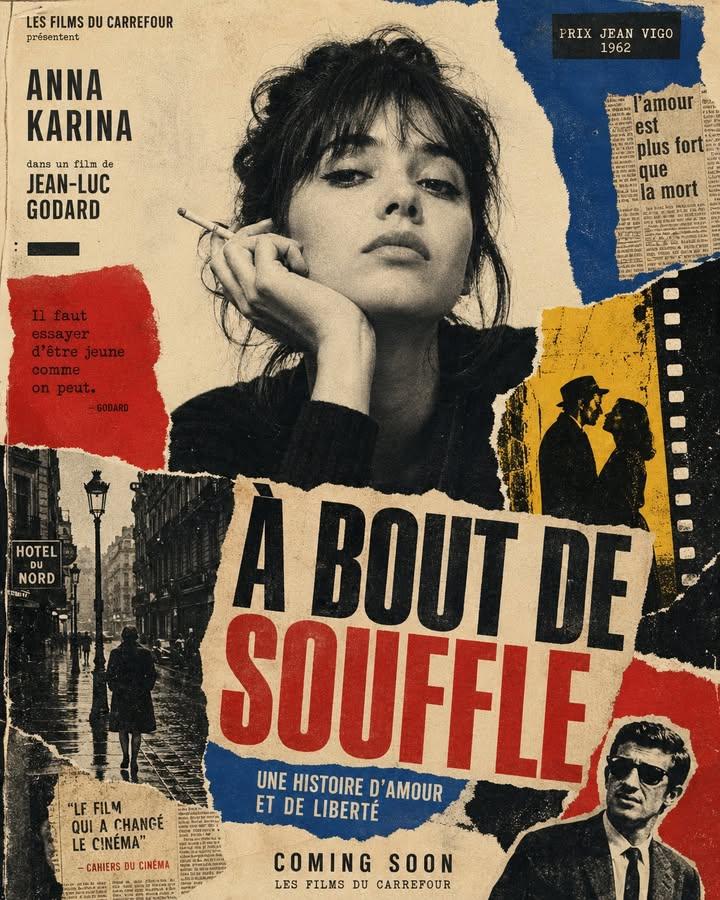
1960'lar Sanat Filmi Posteri
Kolaj öğeleri, cesur tipografi ve ham, dokunsal bir estetik içeren, vintage tarzda 1960'lar Avrupa sanat filmi afişi oluşturmak için detaylı bir yönerge.
Bu Grafik ve Poster için bir GPT Image 2 örnek senaryosudur. Benzer görseller oluşturmak için aşağıdaki hazır metni kullanın ve yeniden kullanmadan önce Awesome GPT Image 2 Prompts atıfını ve ticari kullanım haklarını inceleyin.
Tüm komut istemi setine mi ihtiyacınız var? Şunu kullanın: Grafik ve Poster Daha fazla ilgili örnek için konu merkezini ziyaret edin veya açın. GPT Image 2 istem kataloğu Tam örnek dizin, yeniden kullanılabilir yapılar ve kaynak atfı için.
Free 1K preview
Generate one preview image instantly, no sign-up required.
1282/4000
İpucu
Kopyalamaya hazır istemi
Create a vertical poster composition on aged cream paper with a handmade analog feel. Use rough ripped paper edges, layered magazine cutouts, photocopy grain, halftone texture, ink bleed, and slightly imperfect screen-print registration. Keep the subject as the main black-and-white photographic portrait, placed prominently in the center or upper center.

Surround the subject with graphic blocks of deep red, cobalt blue, warm yellow, black, and ivory. Add supporting collage fragments such as a rainy European street, film-strip borders, newspaper clippings, urban silhouettes, and cinematic details, arranged like a handmade 1960s art-house movie poster.

Use bold condensed typography with a strong visual hierarchy. Add large headline text: “{argument name="main title" default="[MAIN TITLE]"}”. Add smaller subtitle text: “{argument name="subtitle" default="[SUBTITLE]"}”. Add bottom text: “{argument name="event details" default="[BRAND NAME / EVENT NAME / COMING SOON / DATE]"}”. If needed, include a small top line reading “[TAGLINE]”.

The final result should feel cinematic, intellectual, rebellious, and editorial — like a lost 1960s European film poster with a strong point of view. Keep it raw, tactile, printed, imperfect, and handmade. Avoid a glossy modern finish.
İstem değişkenleri
Komut isteminde bulunan, düzenlenebilir argüman yer tutucuları ve varsayılan değerleri.
Değişken
main title
Varsayılan
[MAIN TITLE]
Değişken
subtitle
Varsayılan
[SUBTITLE]
Değişken
event details
Varsayılan
[BRAND NAME / EVENT NAME / COMING SOON / DATE]
Best for
- - Grafik ve Poster visual exploration
- - Image generation and reference-image edits
- - Reusable briefs that keep source attribution visible
Change these parts
- - Subject, product, character, or scene
- - Aspect ratio, camera, lighting, and background
- - Brand, text, color, and output constraints
Recommended model and settings
- - Model: gpt-image-2
- - Input mode: Metinden görsele
- - Aspect ratio: source
- - Commercial status: review original source
How to use this prompt
- 1. Copy the prompt and preserve its structure for the first test.
- 2. Replace the subject, context, and publishing channel.
- 3. Change one camera, lighting, or style variable per iteration.
- 4. Inspect the output, source, text, and rights before reuse.
Limitations, source, and reuse cautions
- - Generated output is an editable draft, not factual, legal, or rights evidence.
- - Review the linked source, people, brands, logos, text, and third-party media before commercial use.
Awesome GPT Image 2 Prompts kaynağından içe aktarılmıştır. Kaynak belirtilmesi zorunludur. Ticari kullanım durumu allowed şeklindedir; ücretli kullanım öncesinde kaynak haklarını inceleyin.
Bu kategoride daha fazla vaka
Kategoriye, giriş modu uyumluluğuna, kaliteye ve düşük riske göre önceliklendirilmiştir.

Grumpy Rhino Storybook Illustration
Metinden görsele

Martial Arts Legend Character Bible Sheet
Metinden görsele

Manga Desert Radio Telescope Road Trip
Metinden görsele

Fashion Studio Portrait with Blue Rim Lighting
Metinden görsele

Spring Editorial Fashion Collage
Metinden görsele

New Chinese-Style Editorial Portrait
Metinden görsele
Yeniden kullanım ve kaynak notları
Vaka önizlemesini yaptıktan sonra bu istemi güvenle kullanın.
- 1.Komut istemini kopyalayın veya oluşturma düğmesini kullanarak doğrudan Dovoo'da açın.
- 2.Değişkenleri, en boy oranını ve referans görselleri kendi kullanım durumunuza göre ayarlayın.
- 3.Yayınlamadan veya ücretli kullanımdan önce, kaynak haklarını, atıf gerekliliklerini ve marka veya benzerlik risklerini doğrulayın.