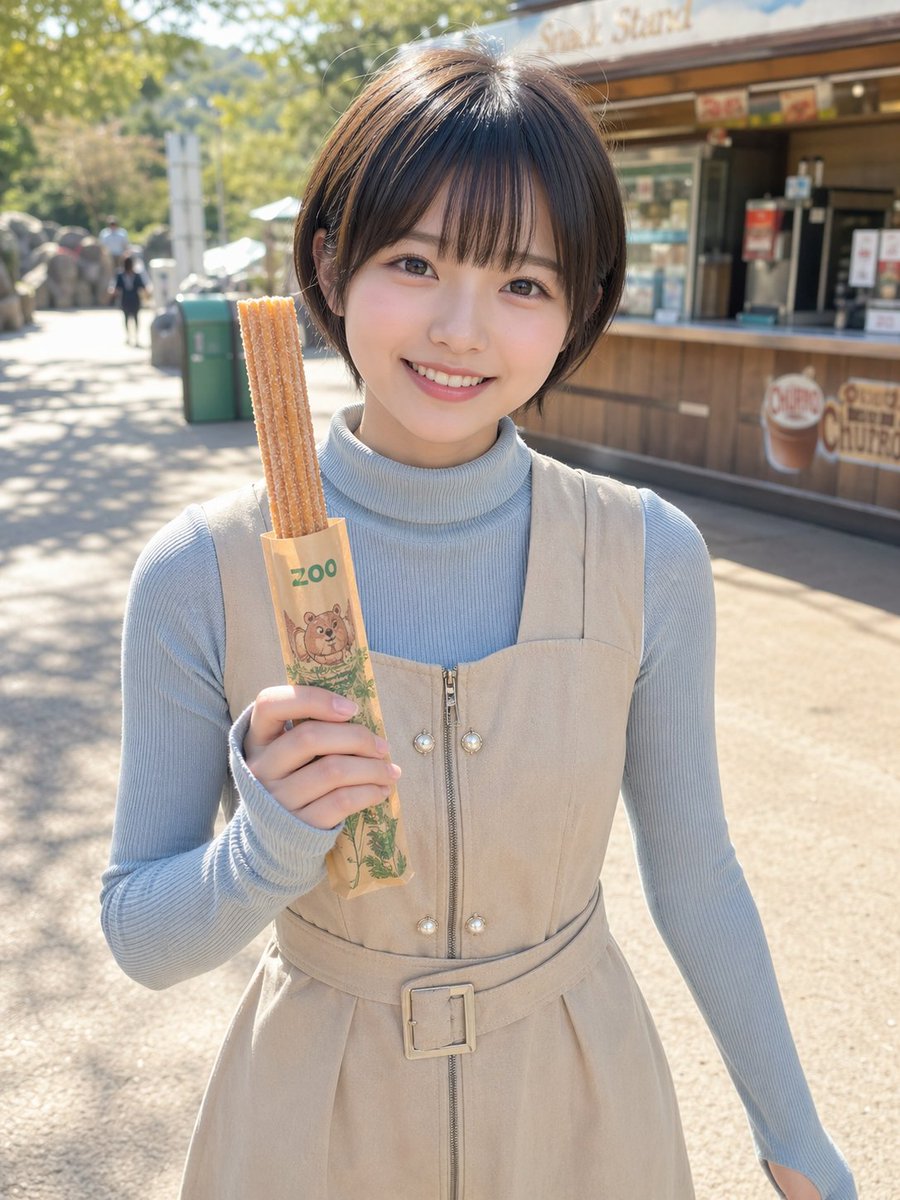
ภาพถ่ายบุคคลของ Zoo Churro
ภาพถ่ายไลฟ์สไตล์แนวตั้งที่สมจริงของหญิงสาวคนหนึ่งในสวนสัตว์กำลังถือขนมชูโรส เหมาะสำหรับใช้โพสต์โซเชียลมีเดีย การท่องเที่ยว หรือภาพการออกไปทานอาหาร
นี่คือตัวอย่างข้อความแจ้งเตือน GPT Image 2 สำหรับ ภาพเหมือนและตัวละคร ใช้ข้อความแจ้งเตือนที่พร้อมใช้งานด้านล่างเพื่อสร้างภาพที่คล้ายกัน และตรวจสอบการอ้างอิง Awesome GPT Image 2 Prompts รวมถึงสิทธิ์ในการใช้งานเชิงพาณิชย์ก่อนนำไปใช้ซ้ำ
ต้องการชุดข้อความแจ้งเตือนทั้งหมดหรือไม่? ใช้... ภาพเหมือนและตัวละคร ศูนย์รวมหัวข้อสำหรับตัวอย่างที่เกี่ยวข้องเพิ่มเติม หรือเปิดดูได้เลย GPT Image 2 แคตตาล็อกพร้อมท์ สำหรับดัชนีตัวอย่างฉบับเต็ม โครงสร้างที่นำกลับมาใช้ใหม่ได้ และการอ้างอิงแหล่งที่มา
Free 1K preview
Generate one preview image instantly, no sign-up required.
1380/4000
พรอมป์
ข้อความแจ้งเตือนพร้อมสำหรับการคัดลอก
A realistic outdoor portrait photo of a young woman standing at a zoo snack stand on a sunny day, framed from about mid-thigh upward, centered in the image, holding 3 long churros upright in her left hand. The churros are inside a light brown paper sleeve printed with green text reading “zoo” and a cute illustrated animal face near the bottom. Show every face clearly with natural, detailed facial features, but the rest of the image is crisp and photorealistic. She has a short neat bob haircut in {argument name="hair color" default="dark brown"} with a slight side part and natural shine. She wears a pale powder-blue ribbed turtleneck knit top under a sleeveless {argument name="dress color" default="beige"} zip-front dress with a square neckline, decorative pearl-like buttons near the zipper, and a matching belt with a square buckle at the waist. Warm natural sunlight creates soft shadows and bright highlights, with shallow depth of field and creamy background bokeh. In the background, place a wooden snack kiosk with signage suggesting a churro stand, a paved zoo walkway, a green trash bin, a few tiny distant visitors, trees, and sunlit foliage. The mood is casual, cute, and candid, like a lifestyle snapshot taken at a Japanese zoo. Use a vertical smartphone-photo composition, realistic skin and fabric textures, clean neutral tones, and slightly airy exposure.ตัวแปรพร้อมท์
ตัวอย่างค่าอาร์กิวเมนต์ที่แก้ไขได้ซึ่งพบในข้อความแจ้งเตือน พร้อมค่าเริ่มต้น
ตัวแปร
hair color
ค่าเริ่มต้น
dark brown
ตัวแปร
dress color
ค่าเริ่มต้น
beige
Best for
- - ภาพเหมือนและตัวละคร visual exploration
- - Image generation and reference-image edits
- - Reusable briefs that keep source attribution visible
Change these parts
- - Subject, product, character, or scene
- - Aspect ratio, camera, lighting, and background
- - Brand, text, color, and output constraints
Recommended model and settings
- - Model: gpt-image-2
- - Input mode: ข้อความเป็นรูปภาพ
- - Aspect ratio: source
- - Commercial status: review original source
How to use this prompt
- 1. Copy the prompt and preserve its structure for the first test.
- 2. Replace the subject, context, and publishing channel.
- 3. Change one camera, lighting, or style variable per iteration.
- 4. Inspect the output, source, text, and rights before reuse.
Limitations, source, and reuse cautions
- - Generated output is an editable draft, not factual, legal, or rights evidence.
- - Review the linked source, people, brands, logos, text, and third-party media before commercial use.
นำเข้าจาก Awesome GPT Image 2 Prompts จำเป็นต้องระบุแหล่งที่มา สถานะการใช้งานเชิงพาณิชย์คือ allowed โปรดตรวจสอบสิทธิ์แหล่งที่มาก่อนใช้งานแบบเสียค่าใช้จ่าย
กรณีเพิ่มเติมในหมวดหมู่นี้
จัดลำดับความสำคัญตามหมวดหมู่ ความเข้ากันได้กับโหมดการป้อนข้อมูล คุณภาพ และความเสี่ยงที่ต่ำกว่า

Female Clown Cyborg Portrait
ข้อความเป็นรูปภาพ

Greyscale Puzzle Portrait with Color Accent
ข้อความเป็นรูปภาพ

Transparent Earbuds on Stone Pedestal
ข้อความเป็นรูปภาพ

Pink Hijab Mirror Selfie Portrait
ข้อความเป็นรูปภาพ

Manga Desert Radio Telescope Road Trip
ข้อความเป็นรูปภาพ

Glitch Aesthetic Surreal Portrait
ข้อความเป็นรูปภาพ
หมายเหตุเกี่ยวกับการนำกลับมาใช้ใหม่และแหล่งที่มา
ใช้ข้อความแจ้งเตือนนี้อย่างปลอดภัยหลังจากดูตัวอย่างกรณีแล้ว
- 1.คัดลอกข้อความแจ้งเตือน หรือเปิดโดยตรงใน Dovoo โดยใช้ปุ่มสร้างข้อความ
- 2.ปรับตัวแปร อัตราส่วนภาพ และภาพอ้างอิงให้เหมาะสมกับกรณีการใช้งานของคุณ
- 3.ก่อนเผยแพร่หรือใช้งานโดยเสียค่าใช้จ่าย โปรดตรวจสอบสิทธิ์ในแหล่งที่มา ข้อกำหนดการอ้างอิง และความเสี่ยงด้านแบรนด์หรือภาพลักษณ์