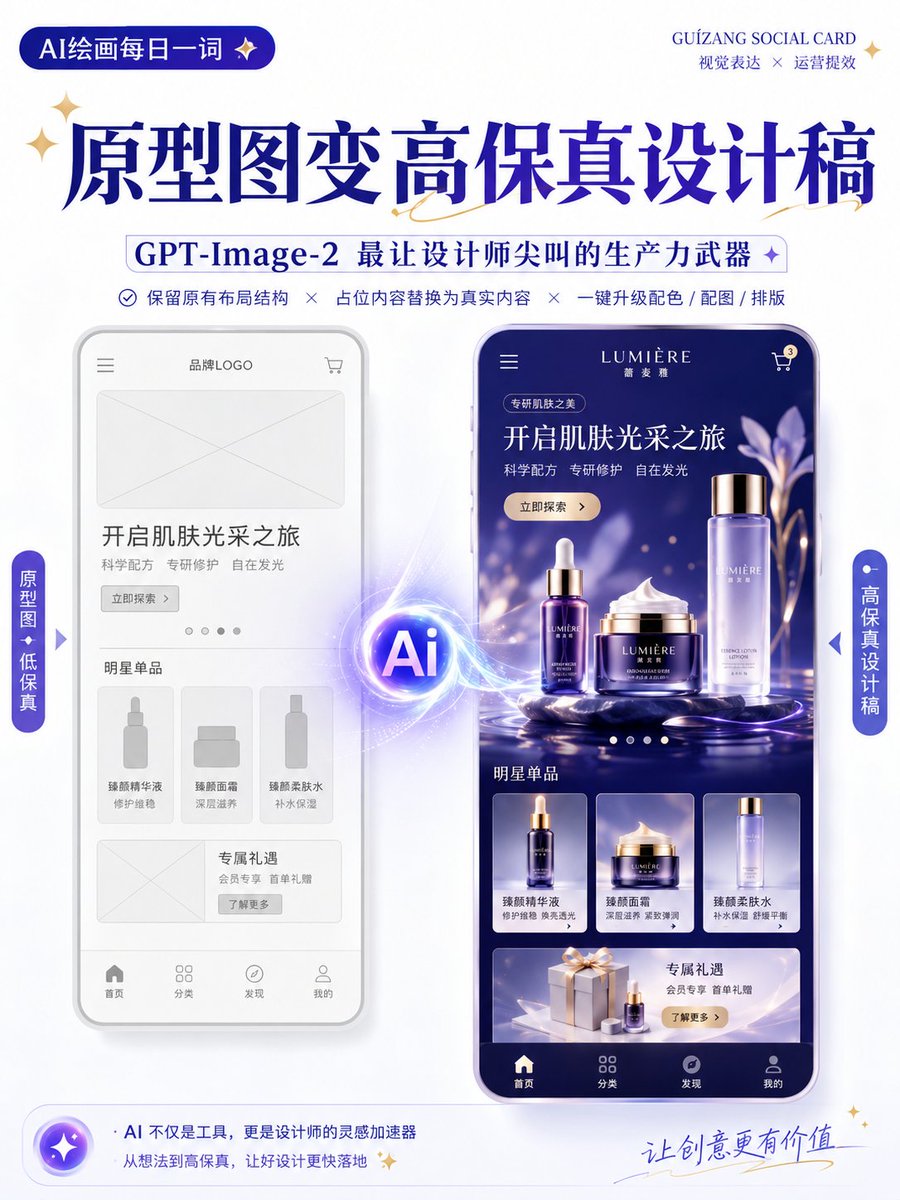
Wireframe to High-Fidelity UI Design
A specialized prompt for GPT-Image-2 that transforms low-fidelity wireframes or prototypes into high-fidelity, presentation-ready design mockups while maintaining the original layout and structure.
นี่คือตัวอย่างข้อความแจ้งเตือน GPT Image 2 สำหรับ กราฟิกและโปสเตอร์ ใช้ข้อความแจ้งเตือนที่พร้อมใช้งานด้านล่างเพื่อสร้างภาพที่คล้ายกัน และตรวจสอบการอ้างอิง Awesome GPT Image 2 Prompts รวมถึงสิทธิ์ในการใช้งานเชิงพาณิชย์ก่อนนำไปใช้ซ้ำ
Free 1K preview
Generate one preview image instantly, no sign-up required.
Free text preview doesn’t preserve reference-image consistency.
พรอมป์
ข้อความแจ้งเตือนพร้อมสำหรับการคัดลอก
Generate a high-fidelity design draft based on the uploaded wireframe/prototype as a reference.

Design Type: {argument name="design type" default="Promotion Page / App Interface / H5 Page / E-commerce Detail Page / Official Website / Infographic"}

Requirements:
1. Retain the original layout structure, information hierarchy, and module division of the page.
2. Replace placeholders in the wireframe with actual content.
3. Automatically add color schemes, images, icons, and typography details.
4. Enhance the visual hierarchy, white space, alignment, and module relationships of the page.
5. Output as a complete, high-fidelity design draft.

Visual Style: {argument name="visual style" default="Minimalist Modern / Tech / Skeuomorphic / Fresh / Brand Identity / Premium"}
Primary Color: {argument name="primary color" default="blue"}
Secondary Color: [Enter color]
Aspect Ratio: [e.g., 9:16 / 4:3 / 16:9]

Note:
Keep the original structure and do not disrupt the order of modules.
Focus on optimizing visual presentation and realistic content to make it look like a complete design draft ready for proposal presentations.

Keep the original information architecture of the wireframe unchanged, only enhancing visual completeness and realism.
ตัวแปรพร้อมท์
ตัวอย่างค่าอาร์กิวเมนต์ที่แก้ไขได้ซึ่งพบในข้อความแจ้งเตือน พร้อมค่าเริ่มต้น
Best for
- - กราฟิกและโปสเตอร์ visual exploration
- - Image generation and reference-image edits
- - Reusable briefs that keep source attribution visible
Change these parts
- - Subject, product, character, or scene
- - Aspect ratio, camera, lighting, and background
- - Brand, text, color, and output constraints
Recommended model and settings
- - Model: gpt-image-2
- - Input mode: รูปภาพเป็นรูปภาพ
- - Aspect ratio: source
- - Commercial status: review original source
How to use this prompt
- 1. Copy the prompt and preserve its structure for the first test.
- 2. Replace the subject, context, and publishing channel.
- 3. Change one camera, lighting, or style variable per iteration.
- 4. Inspect the output, source, text, and rights before reuse.
Limitations, source, and reuse cautions
- - Generated output is an editable draft, not factual, legal, or rights evidence.
- - Review the linked source, people, brands, logos, text, and third-party media before commercial use.
กรณีเพิ่มเติมในหมวดหมู่นี้
จัดลำดับความสำคัญตามหมวดหมู่ ความเข้ากันได้กับโหมดการป้อนข้อมูล คุณภาพ และความเสี่ยงที่ต่ำกว่า






หมายเหตุเกี่ยวกับการนำกลับมาใช้ใหม่และแหล่งที่มา
ใช้ข้อความแจ้งเตือนนี้อย่างปลอดภัยหลังจากดูตัวอย่างกรณีแล้ว
- 1.คัดลอกข้อความแจ้งเตือน หรือเปิดโดยตรงใน Dovoo โดยใช้ปุ่มสร้างข้อความ
- 2.ปรับตัวแปร อัตราส่วนภาพ และภาพอ้างอิงให้เหมาะสมกับกรณีการใช้งานของคุณ
- 3.ก่อนเผยแพร่หรือใช้งานโดยเสียค่าใช้จ่าย โปรดตรวจสอบสิทธิ์ในแหล่งที่มา ข้อกำหนดการอ้างอิง และความเสี่ยงด้านแบรนด์หรือภาพลักษณ์