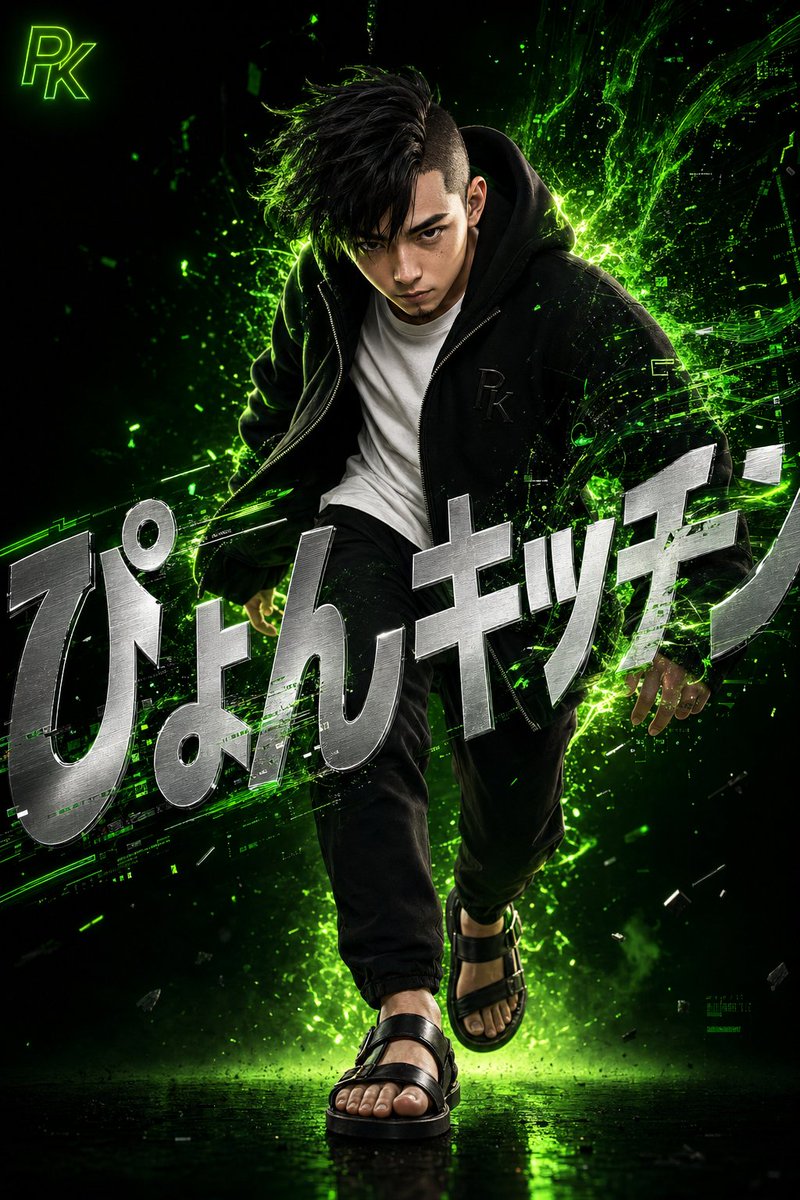
โปสเตอร์สไตล์เทคโนโลยีญี่ปุ่นเหนือจริง
ภาพประกอบดิจิทัล 3 มิติที่ละเอียดประณีต นำเสนอภาพชายชาวญี่ปุ่นผู้มีสไตล์ พร้อมเอฟเฟกต์พลังงานดิจิทัลสีเขียวนีออน และการจัดวางตัวอักษรอย่างลงตัว
นี่คือตัวอย่างข้อความแจ้งเตือน GPT Image 2 สำหรับ กราฟิกและโปสเตอร์ ใช้ข้อความแจ้งเตือนที่พร้อมใช้งานด้านล่างเพื่อสร้างภาพที่คล้ายกัน และตรวจสอบการอ้างอิง Awesome GPT Image 2 Prompts รวมถึงสิทธิ์ในการใช้งานเชิงพาณิชย์ก่อนนำไปใช้ซ้ำ
ต้องการชุดข้อความแจ้งเตือนทั้งหมดหรือไม่? ใช้... กราฟิกและโปสเตอร์ ศูนย์รวมหัวข้อสำหรับตัวอย่างที่เกี่ยวข้องเพิ่มเติม หรือเปิดดูได้เลย GPT Image 2 แคตตาล็อกพร้อมท์ สำหรับดัชนีตัวอย่างฉบับเต็ม โครงสร้างที่นำกลับมาใช้ใหม่ได้ และการอ้างอิงแหล่งที่มา
Free 1K preview
Generate one preview image instantly, no sign-up required.
1407/4000
พรอมป์
ข้อความแจ้งเตือนพร้อมสำหรับการคัดลอก
A highly detailed 3D digital artwork in a surreal and dynamic style. Capturing the moment a young Japanese man with black hair in an asymmetrical undercut and a sharp, intensely focused expression steps forward, leaning slightly forward as if quiet confidence and energy are exploding from within. Precise and realistic 3D rendering, depicting skin texture, pores, and individual hairs. He wears a loose black zip-up hoodie with a subtle embossed '{argument name="monogram" default="PK"}' monogram on the chest, over a clean white crew-neck T-shirt. Below are tapered black pants and leather sandals on his feet. Vibrant neon green digital energy and light particles erupt dramatically from behind him, swirling and blending into glitch-like data stream shapes, interacting with his clothes and hair to represent the fusion of technology and humanity. The background is a deep, moody gradient from deep black to glowing neon green, emphasizing a minimal yet striking composition. Large, bold metallic silver text '{argument name="title" default="Pyon Kitchen"}' in a sharp modern sans-serif font is overlaid across the screen, distorted and tilted for design while remaining readable, partially integrated and hidden by the energy effects and the figure to feel like an organic part of the scene. In the upper left corner, place a small '{argument name="logo" default="PK"}' logo mark in glowing neon green.ตัวแปรพร้อมท์
ตัวอย่างค่าอาร์กิวเมนต์ที่แก้ไขได้ซึ่งพบในข้อความแจ้งเตือน พร้อมค่าเริ่มต้น
ตัวแปร
monogram
ค่าเริ่มต้น
PK
ตัวแปร
title
ค่าเริ่มต้น
Pyon Kitchen
ตัวแปร
logo
ค่าเริ่มต้น
PK
Best for
- - กราฟิกและโปสเตอร์ visual exploration
- - Image generation and reference-image edits
- - Reusable briefs that keep source attribution visible
Change these parts
- - Subject, product, character, or scene
- - Aspect ratio, camera, lighting, and background
- - Brand, text, color, and output constraints
Recommended model and settings
- - Model: gpt-image-2
- - Input mode: ข้อความเป็นรูปภาพ
- - Aspect ratio: source
- - Commercial status: review original source
How to use this prompt
- 1. Copy the prompt and preserve its structure for the first test.
- 2. Replace the subject, context, and publishing channel.
- 3. Change one camera, lighting, or style variable per iteration.
- 4. Inspect the output, source, text, and rights before reuse.
Limitations, source, and reuse cautions
- - Generated output is an editable draft, not factual, legal, or rights evidence.
- - Review the linked source, people, brands, logos, text, and third-party media before commercial use.
นำเข้าจาก Awesome GPT Image 2 Prompts จำเป็นต้องระบุแหล่งที่มา สถานะการใช้งานเชิงพาณิชย์คือ allowed โปรดตรวจสอบสิทธิ์แหล่งที่มาก่อนใช้งานแบบเสียค่าใช้จ่าย
กรณีเพิ่มเติมในหมวดหมู่นี้
จัดลำดับความสำคัญตามหมวดหมู่ ความเข้ากันได้กับโหมดการป้อนข้อมูล คุณภาพ และความเสี่ยงที่ต่ำกว่า

Transparent Earbuds on Stone Pedestal
ข้อความเป็นรูปภาพ

Manga Desert Radio Telescope Road Trip
ข้อความเป็นรูปภาพ

Female Clown Cyborg Portrait
ข้อความเป็นรูปภาพ

Imperial Research Bunker on Volcanic Planet
ข้อความเป็นรูปภาพ

Greyscale Puzzle Portrait with Color Accent
ข้อความเป็นรูปภาพ

Surreal 3D Chess Match Artwork
ข้อความเป็นรูปภาพ
หมายเหตุเกี่ยวกับการนำกลับมาใช้ใหม่และแหล่งที่มา
ใช้ข้อความแจ้งเตือนนี้อย่างปลอดภัยหลังจากดูตัวอย่างกรณีแล้ว
- 1.คัดลอกข้อความแจ้งเตือน หรือเปิดโดยตรงใน Dovoo โดยใช้ปุ่มสร้างข้อความ
- 2.ปรับตัวแปร อัตราส่วนภาพ และภาพอ้างอิงให้เหมาะสมกับกรณีการใช้งานของคุณ
- 3.ก่อนเผยแพร่หรือใช้งานโดยเสียค่าใช้จ่าย โปรดตรวจสอบสิทธิ์ในแหล่งที่มา ข้อกำหนดการอ้างอิง และความเสี่ยงด้านแบรนด์หรือภาพลักษณ์