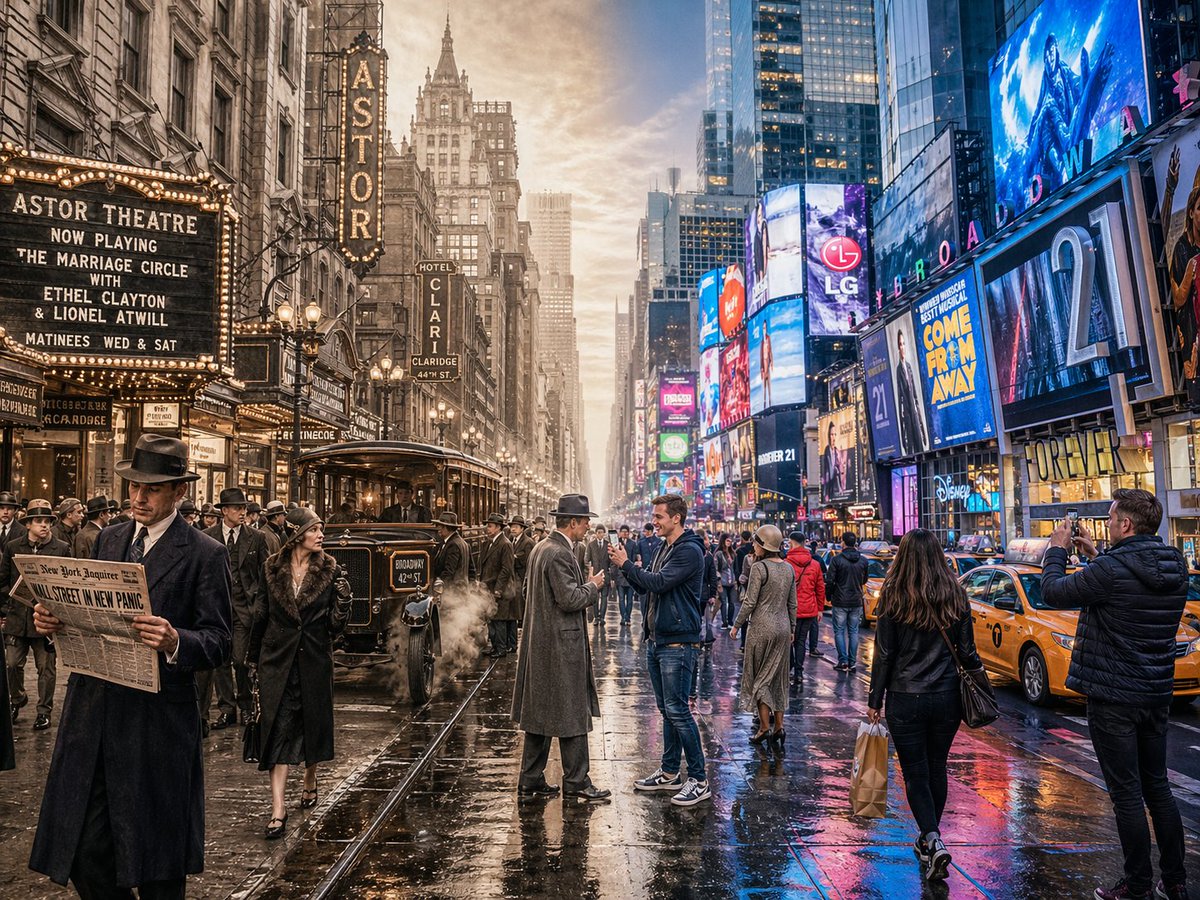
ฉากการเดินทางข้ามเวลาแบบแบ่งหน้าจอ
คำสั่งที่ซับซ้อนซึ่งออกแบบมาเพื่อสร้างภาพแบ่งหน้าจอแนวนอนที่ไร้รอยต่อ โดยผสมผสานยุคสมัยในอดีตและปัจจุบันเข้าไว้ในฉากเดียวกัน
นี่คือตัวอย่างข้อความแจ้งเตือน GPT Image 2 สำหรับ แรงบันดาลใจอื่นๆ ใช้ข้อความแจ้งเตือนที่พร้อมใช้งานด้านล่างเพื่อสร้างภาพที่คล้ายกัน และตรวจสอบการอ้างอิง Awesome GPT Image 2 Prompts รวมถึงสิทธิ์ในการใช้งานเชิงพาณิชย์ก่อนนำไปใช้ซ้ำ
ต้องการชุดข้อความแจ้งเตือนทั้งหมดหรือไม่? ใช้... แรงบันดาลใจอื่นๆ ศูนย์รวมหัวข้อสำหรับตัวอย่างที่เกี่ยวข้องเพิ่มเติม หรือเปิดดูได้เลย GPT Image 2 แคตตาล็อกพร้อมท์ สำหรับดัชนีตัวอย่างฉบับเต็ม โครงสร้างที่นำกลับมาใช้ใหม่ได้ และการอ้างอิงแหล่งที่มา
Free 1K preview
Generate one preview image instantly, no sign-up required.
1544/4000
พรอมป์
ข้อความแจ้งเตือนพร้อมสำหรับการคัดลอก
A horizontal split-screen cinematic shot of {argument name="scene" default="Times Square, New York"}, seamlessly blending two different eras: {argument name="first era" default="1920s"} on the left and {argument name="second era" default="present day"} on the right (default: about 100 years ago vs. present day). On the left side: show era-appropriate architecture, interior or environment design, materials, vehicles, and props that clearly belong to that historical period. People wear authentic clothing from the era, including hairstyles, accessories, and typical items in their hands. The overall mood feels nostalgic and historically accurate. On the right side: show the same scene in the modern era, with updated architecture or renovated structures, contemporary materials (glass, steel, LED screens, modern furniture), modern vehicles or equipment, and current technology. People wear contemporary fashion that matches today’s style in this setting. In the center: the two eras merge and overlap organically, without a hard dividing line. Elements from both eras visually interact: people from different times look at each other, walk through each other’s space, or seem surprised by the other era’s technology and objects. Architecture and environment smoothly morph from old to new. Make sure the scene is not just a simple left/right comparison but a dynamic time-travel interaction. Photorealistic, 8k resolution, cinematic lighting, wide angle, highly detailed textures, rich sense of time-travel storytelling. Aspect Ratio: 4:3ตัวแปรพร้อมท์
ตัวอย่างค่าอาร์กิวเมนต์ที่แก้ไขได้ซึ่งพบในข้อความแจ้งเตือน พร้อมค่าเริ่มต้น
ตัวแปร
scene
ค่าเริ่มต้น
Times Square, New York
ตัวแปร
first era
ค่าเริ่มต้น
1920s
ตัวแปร
second era
ค่าเริ่มต้น
present day
Best for
- - แรงบันดาลใจอื่นๆ visual exploration
- - Image generation and reference-image edits
- - Reusable briefs that keep source attribution visible
Change these parts
- - Subject, product, character, or scene
- - Aspect ratio, camera, lighting, and background
- - Brand, text, color, and output constraints
Recommended model and settings
- - Model: gpt-image-2
- - Input mode: ข้อความเป็นรูปภาพ
- - Aspect ratio: source
- - Commercial status: review original source
How to use this prompt
- 1. Copy the prompt and preserve its structure for the first test.
- 2. Replace the subject, context, and publishing channel.
- 3. Change one camera, lighting, or style variable per iteration.
- 4. Inspect the output, source, text, and rights before reuse.
Limitations, source, and reuse cautions
- - Generated output is an editable draft, not factual, legal, or rights evidence.
- - Review the linked source, people, brands, logos, text, and third-party media before commercial use.
นำเข้าจาก Awesome GPT Image 2 Prompts จำเป็นต้องระบุแหล่งที่มา สถานะการใช้งานเชิงพาณิชย์คือ allowed โปรดตรวจสอบสิทธิ์แหล่งที่มาก่อนใช้งานแบบเสียค่าใช้จ่าย
กรณีเพิ่มเติมในหมวดหมู่นี้
จัดลำดับความสำคัญตามหมวดหมู่ ความเข้ากันได้กับโหมดการป้อนข้อมูล คุณภาพ และความเสี่ยงที่ต่ำกว่า

Transparent Earbuds on Stone Pedestal
ข้อความเป็นรูปภาพ

Manga Desert Radio Telescope Road Trip
ข้อความเป็นรูปภาพ

Female Clown Cyborg Portrait
ข้อความเป็นรูปภาพ

Imperial Research Bunker on Volcanic Planet
ข้อความเป็นรูปภาพ

Greyscale Puzzle Portrait with Color Accent
ข้อความเป็นรูปภาพ

Pink Hijab Mirror Selfie Portrait
ข้อความเป็นรูปภาพ
หมายเหตุเกี่ยวกับการนำกลับมาใช้ใหม่และแหล่งที่มา
ใช้ข้อความแจ้งเตือนนี้อย่างปลอดภัยหลังจากดูตัวอย่างกรณีแล้ว
- 1.คัดลอกข้อความแจ้งเตือน หรือเปิดโดยตรงใน Dovoo โดยใช้ปุ่มสร้างข้อความ
- 2.ปรับตัวแปร อัตราส่วนภาพ และภาพอ้างอิงให้เหมาะสมกับกรณีการใช้งานของคุณ
- 3.ก่อนเผยแพร่หรือใช้งานโดยเสียค่าใช้จ่าย โปรดตรวจสอบสิทธิ์ในแหล่งที่มา ข้อกำหนดการอ้างอิง และความเสี่ยงด้านแบรนด์หรือภาพลักษณ์