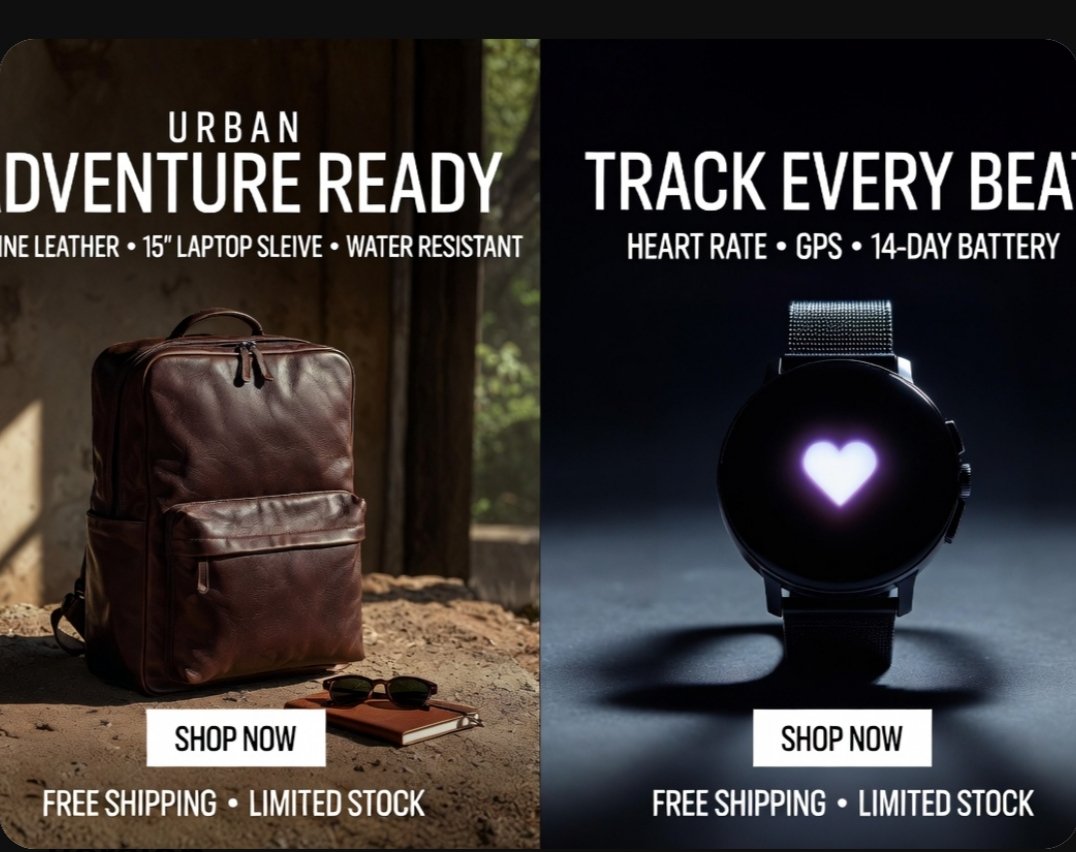
โปสเตอร์โฆษณาผลิตภัณฑ์แบบแบ่งหน้าจอ
โฆษณาอีคอมเมิร์ซแบบสองแผงภาพสมจริง แสดงกระเป๋าเป้หนังและสมาร์ทวอทช์ เหมาะสำหรับโปรโมชั่นบนโซเชียลมีเดีย แบนเนอร์ในตลาดออนไลน์ และการตลาดร้านค้าออนไลน์
นี่คือตัวอย่างข้อความแจ้งเตือน GPT Image 2 สำหรับ ผลิตภัณฑ์และเชิงพาณิชย์ ใช้ข้อความแจ้งเตือนที่พร้อมใช้งานด้านล่างเพื่อสร้างภาพที่คล้ายกัน และตรวจสอบการอ้างอิง Awesome GPT Image 2 Prompts รวมถึงสิทธิ์ในการใช้งานเชิงพาณิชย์ก่อนนำไปใช้ซ้ำ
ต้องการชุดข้อความแจ้งเตือนทั้งหมดหรือไม่? ใช้... ผลิตภัณฑ์และเชิงพาณิชย์ ศูนย์รวมหัวข้อสำหรับตัวอย่างที่เกี่ยวข้องเพิ่มเติม หรือเปิดดูได้เลย GPT Image 2 แคตตาล็อกพร้อมท์ สำหรับดัชนีตัวอย่างฉบับเต็ม โครงสร้างที่นำกลับมาใช้ใหม่ได้ และการอ้างอิงแหล่งที่มา
Free 1K preview
Generate one preview image instantly, no sign-up required.
3779/4000
พรอมป์
ข้อความแจ้งเตือนพร้อมสำหรับการคัดลอก
{
  "type": "split-screen e-commerce advertisement poster",
  "style": "premium photorealistic retail marketing graphic, high contrast, polished commercial lighting, clean bold typography, modern direct-response ad design",
  "canvas": {
    "aspect_ratio": "4:3",
    "background": "black outer border with rounded-corner poster"
  },
  "layout": {
    "orientation": "vertical split",
    "sections": [
      {
        "title": "left product ad",
        "position": "left half",
        "count": 1,
        "product": "backpack",
        "headline_lines_count": 2,
        "cta_count": 1,
        "footer_count": 1
      },
      {
        "title": "right product ad",
        "position": "right half",
        "count": 1,
        "product": "smartwatch",
        "headline_lines_count": 2,
        "cta_count": 1,
        "footer_count": 1
      }
    ],
    "divider": "hard vertical split down the center"
  },
  "text": {
    "left": {
      "eyebrow": "{argument name=\"left eyebrow text\" default=\"URBAN\"}",
      "headline": "{argument name=\"left headline text\" default=\"ADVENTURE READY\"}",
      "features": "GENUINE LEATHER • 15\" LAPTOP SLEEVE • WATER RESISTANT",
      "button": "SHOP NOW",
      "footer": "FREE SHIPPING • LIMITED STOCK"
    },
    "right": {
      "headline": "{argument name=\"right headline text\" default=\"TRACK EVERY BEAT\"}",
      "features": "HEART RATE • GPS • 14-DAY BATTERY",
      "button": "SHOP NOW",
      "footer": "FREE SHIPPING • LIMITED STOCK"
    }
  },
  "left_panel": {
    "scene": "rustic indoor setting with warm natural sunlight entering from the side",
    "background_details_count": 3,
    "background_details": [
      "aged wall or wooden interior surface",
      "window opening with soft greenery visible outside",
      "dusty textured ground floor"
    ],
    "product": {
      "type": "{argument name=\"left product\" default=\"brown leather backpack\"}",
      "position": "lower left-center standing upright on the ground",
      "material": "rich polished leather",
      "color": "deep brown",
      "details_count": 5,
      "details": [
        "top carry handle",
        "double zipper top opening",
        "large front zip pocket",
        "side pocket visible on the left",
        "structured rectangular silhouette"
      ]
    },
    "supporting_props_count": 2,
    "supporting_props": [
      "a pair of dark sunglasses",
      "a small brown notebook placed near the backpack"
    ],
    "lighting": "warm cinematic sunlight from upper left creating soft highlights and earthy shadows",
    "button_style": "white rectangular button centered near lower middle of the left panel with black uppercase text"
  },
  "right_panel": {
    "scene": "dark studio product shot with cool moody spotlight",
    "background": "deep navy-to-black gradient",
    "product": {
      "type": "round black smartwatch",
      "position": "centered vertically and horizontally in right half",
      "details_count": 5,
      "details": [
        "circular black face",
        "glowing white-purple heart icon in the center of the screen",
        "dark metal case",
        "two side buttons visible on the right edge",
        "fine mesh metal strap"
      ]
    },
    "surface": "smooth studio floor with a soft circular shadow beneath the watch",
    "lighting": "cool spotlight from above and slightly behind, creating rim light and dramatic shadow",
    "button_style": "white rectangular button centered near lower middle of the right panel with black uppercase text"
  },
  "typography": {
    "font": "bold condensed sans-serif uppercase",
    "color": "white",
    "alignment": "centered within each panel",
    "feature_line_style": "smaller uppercase subheadline with bullet separators"
  }
}
ตัวแปรพร้อมท์
ตัวอย่างค่าอาร์กิวเมนต์ที่แก้ไขได้ซึ่งพบในข้อความแจ้งเตือน พร้อมค่าเริ่มต้น
ตัวแปร
left eyebrow text
ค่าเริ่มต้น
URBAN
ตัวแปร
left headline text
ค่าเริ่มต้น
ADVENTURE READY
ตัวแปร
right headline text
ค่าเริ่มต้น
TRACK EVERY BEAT
ตัวแปร
left product
ค่าเริ่มต้น
brown leather backpack
Best for
- - ผลิตภัณฑ์และเชิงพาณิชย์ visual exploration
- - Image generation and reference-image edits
- - Reusable briefs that keep source attribution visible
Change these parts
- - Subject, product, character, or scene
- - Aspect ratio, camera, lighting, and background
- - Brand, text, color, and output constraints
Recommended model and settings
- - Model: gpt-image-2
- - Input mode: ข้อความเป็นรูปภาพ
- - Aspect ratio: source
- - Commercial status: review original source
How to use this prompt
- 1. Copy the prompt and preserve its structure for the first test.
- 2. Replace the subject, context, and publishing channel.
- 3. Change one camera, lighting, or style variable per iteration.
- 4. Inspect the output, source, text, and rights before reuse.
Limitations, source, and reuse cautions
- - Generated output is an editable draft, not factual, legal, or rights evidence.
- - Review the linked source, people, brands, logos, text, and third-party media before commercial use.
นำเข้าจาก Awesome GPT Image 2 Prompts จำเป็นต้องระบุแหล่งที่มา สถานะการใช้งานเชิงพาณิชย์คือ allowed โปรดตรวจสอบสิทธิ์แหล่งที่มาก่อนใช้งานแบบเสียค่าใช้จ่าย
กรณีเพิ่มเติมในหมวดหมู่นี้
จัดลำดับความสำคัญตามหมวดหมู่ ความเข้ากันได้กับโหมดการป้อนข้อมูล คุณภาพ และความเสี่ยงที่ต่ำกว่า

Transparent Earbuds on Stone Pedestal
ข้อความเป็นรูปภาพ

Manga Desert Radio Telescope Road Trip
ข้อความเป็นรูปภาพ

Female Clown Cyborg Portrait
ข้อความเป็นรูปภาพ

Wet Transparent Earbud Macro
ข้อความเป็นรูปภาพ

Imperial Research Bunker on Volcanic Planet
ข้อความเป็นรูปภาพ

Overhead Pepperoni Pizza Photo
ข้อความเป็นรูปภาพ
หมายเหตุเกี่ยวกับการนำกลับมาใช้ใหม่และแหล่งที่มา
ใช้ข้อความแจ้งเตือนนี้อย่างปลอดภัยหลังจากดูตัวอย่างกรณีแล้ว
- 1.คัดลอกข้อความแจ้งเตือน หรือเปิดโดยตรงใน Dovoo โดยใช้ปุ่มสร้างข้อความ
- 2.ปรับตัวแปร อัตราส่วนภาพ และภาพอ้างอิงให้เหมาะสมกับกรณีการใช้งานของคุณ
- 3.ก่อนเผยแพร่หรือใช้งานโดยเสียค่าใช้จ่าย โปรดตรวจสอบสิทธิ์ในแหล่งที่มา ข้อกำหนดการอ้างอิง และความเสี่ยงด้านแบรนด์หรือภาพลักษณ์