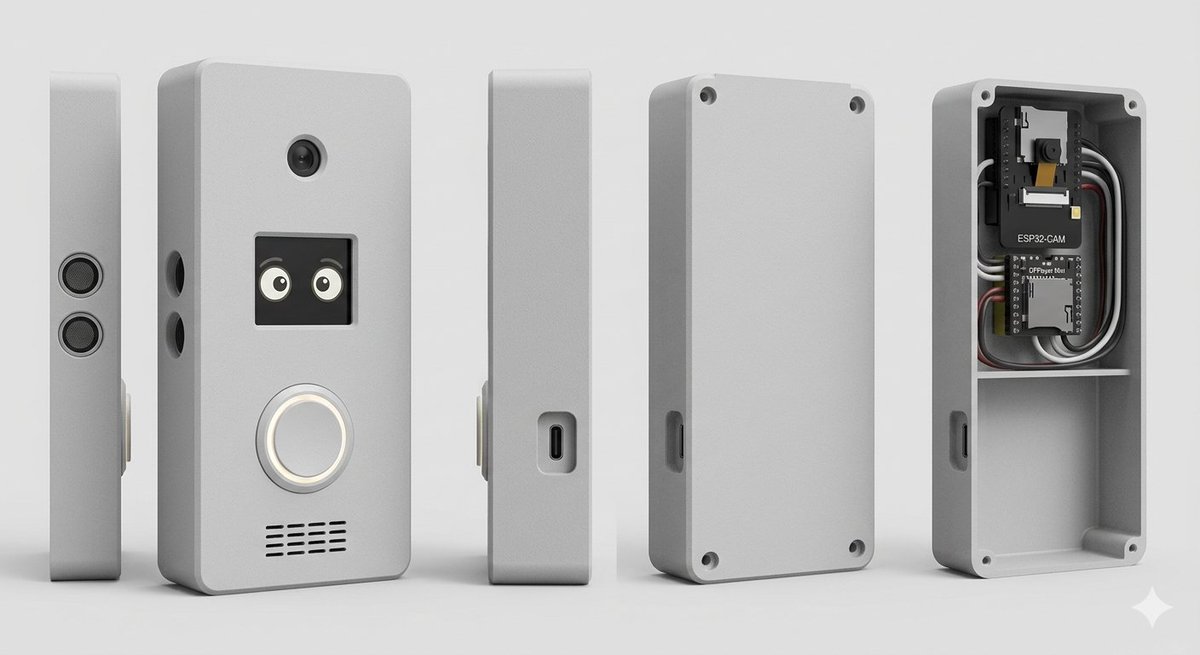
ภาพเรนเดอร์ผลิตภัณฑ์ตู้ครอบกริ่งประตูอัจฉริยะ
คำสั่งที่มีโครงสร้างสำหรับการสร้างภาพเรนเดอร์แบบ CAD หลายมุมมองที่สมจริงของกล่องครอบกริ่งประตูอัจฉริยะแบบ DIY ที่มีอุปกรณ์อิเล็กทรอนิกส์ภายในที่มองเห็นได้
นี่คือตัวอย่างข้อความแจ้งเตือน GPT Image 2 สำหรับ ผลิตภัณฑ์และเชิงพาณิชย์ ใช้ข้อความแจ้งเตือนที่พร้อมใช้งานด้านล่างเพื่อสร้างภาพที่คล้ายกัน และตรวจสอบการอ้างอิง Awesome GPT Image 2 Prompts รวมถึงสิทธิ์ในการใช้งานเชิงพาณิชย์ก่อนนำไปใช้ซ้ำ
ต้องการชุดข้อความแจ้งเตือนทั้งหมดหรือไม่? ใช้... ผลิตภัณฑ์และเชิงพาณิชย์ ศูนย์รวมหัวข้อสำหรับตัวอย่างที่เกี่ยวข้องเพิ่มเติม หรือเปิดดูได้เลย GPT Image 2 แคตตาล็อกพร้อมท์ สำหรับดัชนีตัวอย่างฉบับเต็ม โครงสร้างที่นำกลับมาใช้ใหม่ได้ และการอ้างอิงแหล่งที่มา
Free 1K preview
Generate one preview image instantly, no sign-up required.
2523/4000
พรอมป์
ข้อความแจ้งเตือนพร้อมสำหรับการคัดลอก
Goal: Create a clean studio product render of a custom DIY smart doorbell / intercom enclosure, shown as an exploded multi-view product lineup.

Canvas: Wide horizontal 16:9 composition on a light gray seamless studio background, soft floor shadow, orthographic product-render look, no people, no branding watermark.

Subject: A compact rectangular electronics enclosure with rounded corners, matte {argument name="enclosure color" default="light gray"} plastic, slightly beveled edges, realistic 3D CAD rendering, subtle rough texture.

Layout: Show exactly 5 discrete enclosure views arranged left to right with even spacing: 1) a very thin left side profile standing upright with two stacked circular speaker or sensor grilles; 2) the main front face standing upright, slightly angled, with visible functional details; 3) a narrow side profile with a recessed USB-C port; 4) the rear cover plate standing upright with four corner screw holes and a side cutout; 5) the open back housing/case interior showing electronics installed in the top compartment and an empty lower compartment.

Front face details: On the main front view, include exactly 4 visible feature groups: a small round camera lens near the top center; a square black display/window below it showing two cute cartoon eyes; a large circular illuminated doorbell button below the display with a white glowing ring; and a horizontal speaker grille near the bottom made of short black slits in multiple rows. Add two small round side holes on the left edge of the main body.

Interior electronics: In the open back housing, include exactly 2 circuit boards and visible wiring: the top board is labeled {argument name="camera module label" default="ESP32-CAM"} with a small camera module, and the lower board is labeled {argument name="controller board label" default="DFPlayer Mini"}. Add neatly routed black, white, gray, and red wires around the boards. The interior should have a horizontal divider shelf separating the electronics bay from a larger empty lower cavity. Add four corner screw posts/holes inside the open case.

Style: Photorealistic 3D product visualization, high-detail industrial design concept, soft studio lighting from upper left, gentle ambient occlusion, crisp edges, realistic plastic material, neutral gray palette, shallow but clear shadows, centered composition.

Constraints: Use exactly 5 product views, keep all objects upright, no hands, no extra text beyond the two board labels, no logos, no decorative background objects.
ตัวแปรพร้อมท์
ตัวอย่างค่าอาร์กิวเมนต์ที่แก้ไขได้ซึ่งพบในข้อความแจ้งเตือน พร้อมค่าเริ่มต้น
ตัวแปร
enclosure color
ค่าเริ่มต้น
light gray
ตัวแปร
camera module label
ค่าเริ่มต้น
ESP32-CAM
ตัวแปร
controller board label
ค่าเริ่มต้น
DFPlayer Mini
Best for
- - ผลิตภัณฑ์และเชิงพาณิชย์ visual exploration
- - Image generation and reference-image edits
- - Reusable briefs that keep source attribution visible
Change these parts
- - Subject, product, character, or scene
- - Aspect ratio, camera, lighting, and background
- - Brand, text, color, and output constraints
Recommended model and settings
- - Model: gpt-image-2
- - Input mode: ข้อความเป็นรูปภาพ
- - Aspect ratio: source
- - Commercial status: review original source
How to use this prompt
- 1. Copy the prompt and preserve its structure for the first test.
- 2. Replace the subject, context, and publishing channel.
- 3. Change one camera, lighting, or style variable per iteration.
- 4. Inspect the output, source, text, and rights before reuse.
Limitations, source, and reuse cautions
- - Generated output is an editable draft, not factual, legal, or rights evidence.
- - Review the linked source, people, brands, logos, text, and third-party media before commercial use.
นำเข้าจาก Awesome GPT Image 2 Prompts จำเป็นต้องระบุแหล่งที่มา สถานะการใช้งานเชิงพาณิชย์คือ allowed โปรดตรวจสอบสิทธิ์แหล่งที่มาก่อนใช้งานแบบเสียค่าใช้จ่าย
กรณีเพิ่มเติมในหมวดหมู่นี้
จัดลำดับความสำคัญตามหมวดหมู่ ความเข้ากันได้กับโหมดการป้อนข้อมูล คุณภาพ และความเสี่ยงที่ต่ำกว่า

Matte Black B.AI Keyboard Keycap
ข้อความเป็นรูปภาพ

GPT Image 2 Real-Life Character Street Snap
ข้อความเป็นรูปภาพ

MotoGP POV Cornering Shot
ข้อความเป็นรูปภาพ

Orange Rooftop Fashion Photo Prompt
ข้อความเป็นรูปภาพ

Luxury Travel Fashion Portrait Prompt
ข้อความเป็นรูปภาพ

Cute Focus Desk Flat Lay and Kawaii Illustration
ข้อความเป็นรูปภาพ
หมายเหตุเกี่ยวกับการนำกลับมาใช้ใหม่และแหล่งที่มา
ใช้ข้อความแจ้งเตือนนี้อย่างปลอดภัยหลังจากดูตัวอย่างกรณีแล้ว
- 1.คัดลอกข้อความแจ้งเตือน หรือเปิดโดยตรงใน Dovoo โดยใช้ปุ่มสร้างข้อความ
- 2.ปรับตัวแปร อัตราส่วนภาพ และภาพอ้างอิงให้เหมาะสมกับกรณีการใช้งานของคุณ
- 3.ก่อนเผยแพร่หรือใช้งานโดยเสียค่าใช้จ่าย โปรดตรวจสอบสิทธิ์ในแหล่งที่มา ข้อกำหนดการอ้างอิง และความเสี่ยงด้านแบรนด์หรือภาพลักษณ์