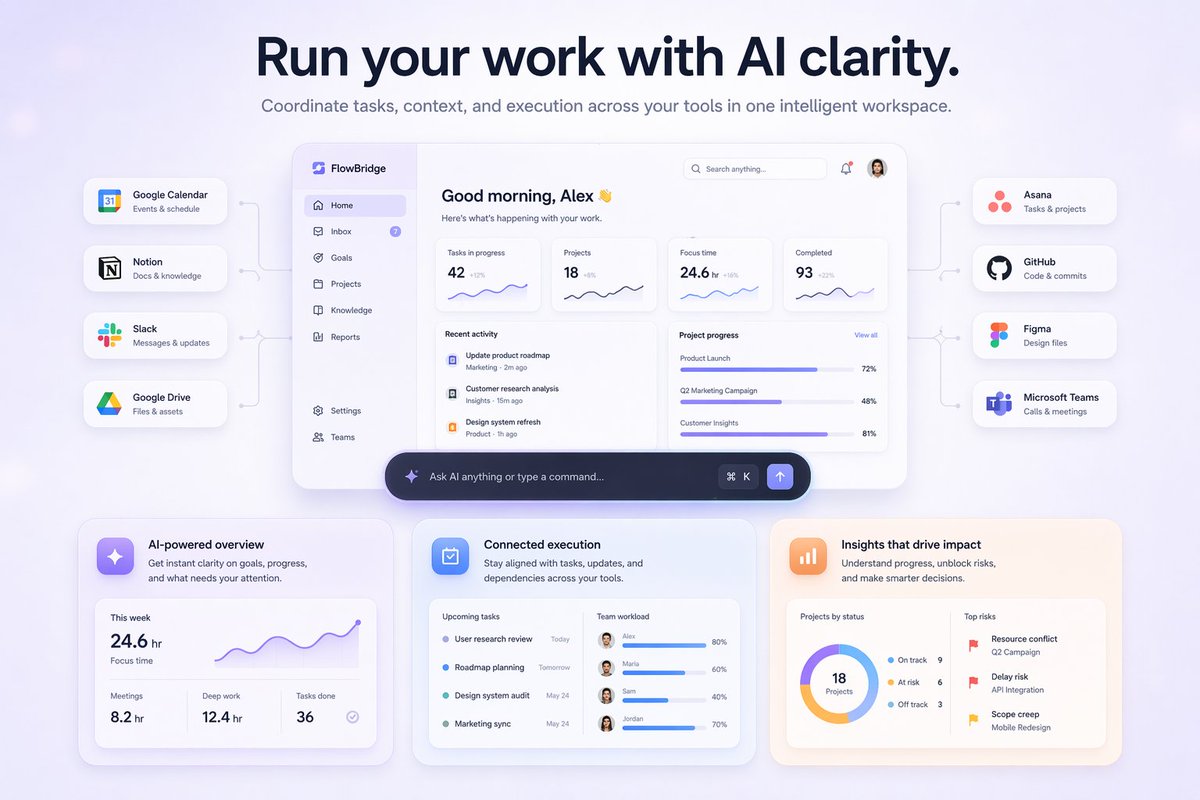
หน้า Landing Page ของแดชบอร์ด AI สำหรับ SaaS
สร้างแบบจำลองหน้า Landing Page สำหรับ SaaS ที่ทันสมัย โดยมีแดชบอร์ด AI ส่วนกลางที่เชื่อมต่อกับเครื่องมือต่างๆ และการ์ดแสดงรายละเอียดคุณสมบัติเด่น
นี่คือตัวอย่างข้อความแจ้งเตือน GPT Image 2 สำหรับ แรงบันดาลใจอื่นๆ ใช้ข้อความแจ้งเตือนที่พร้อมใช้งานด้านล่างเพื่อสร้างภาพที่คล้ายกัน และตรวจสอบการอ้างอิง Awesome GPT Image 2 Prompts รวมถึงสิทธิ์ในการใช้งานเชิงพาณิชย์ก่อนนำไปใช้ซ้ำ
ต้องการชุดข้อความแจ้งเตือนทั้งหมดหรือไม่? ใช้... แรงบันดาลใจอื่นๆ ศูนย์รวมหัวข้อสำหรับตัวอย่างที่เกี่ยวข้องเพิ่มเติม หรือเปิดดูได้เลย GPT Image 2 แคตตาล็อกพร้อมท์ สำหรับดัชนีตัวอย่างฉบับเต็ม โครงสร้างที่นำกลับมาใช้ใหม่ได้ และการอ้างอิงแหล่งที่มา
Free 1K preview
Generate one preview image instantly, no sign-up required.
2447/4000
พรอมป์
ข้อความแจ้งเตือนพร้อมสำหรับการคัดลอก
{
  "type": "SaaS landing page hero graphic",
  "style": "Modern UI/UX, light theme, soft shadows, glassmorphism, {argument name=\"primary theme color\" default=\"purple and blue gradients\"}",
  "header": {
    "headline": "{argument name=\"main headline\" default=\"Run your work with AI clarity.\"}",
    "subheadline": "Coordinate tasks, context, and execution across your tools in one intelligent workspace."
  },
  "layout": {
    "center_dashboard": {
      "app_name": "{argument name=\"app name\" default=\"FlowBridge\"}",
      "greeting": "{argument name=\"user greeting\" default=\"Good morning, Alex 👋\"}",
      "sidebar_links": 8,
      "top_metrics_cards": 4,
      "recent_activity_items": 3,
      "project_progress_bars": 3,
      "floating_action_bar": "{argument name=\"floating bar text\" default=\"Ask AI anything or type a command...\"}"
    },
    "left_integrations": {
      "count": 4,
      "style": "pill-shaped cards connected by thin lines to the center dashboard",
      "labels": [
        "Google Calendar: Events & schedule",
        "Notion: Docs & knowledge",
        "Slack: Messages & updates",
        "Google Drive: Files & assets"
      ]
    },
    "right_integrations": {
      "count": 4,
      "style": "pill-shaped cards connected by thin lines to the center dashboard",
      "labels": [
        "Asana: Tasks & projects",
        "GitHub: Code & commits",
        "Figma: Design files",
        "Microsoft Teams: Calls & meetings"
      ]
    },
    "bottom_feature_cards": {
      "count": 3,
      "style": "rectangular cards with soft shadows",
      "cards": [
        {
          "title": "AI-powered overview",
          "description": "Get instant clarity on goals, progress, and what needs your attention.",
          "visuals": "Line chart showing 24.6 hr focus time, and 3 bottom metrics (Meetings, Deep work, Tasks done)"
        },
        {
          "title": "Connected execution",
          "description": "Stay aligned with tasks, updates, and dependencies across your tools.",
          "visuals": "List of 4 upcoming tasks and 4 team workload progress bars with user avatars"
        },
        {
          "title": "Insights that drive impact",
          "description": "Understand progress, unblock risks, and make smarter decisions.",
          "visuals": "Donut chart showing 18 projects by status, and a list of 3 top risks with red flag icons"
        }
      ]
    }
  }
}
ตัวแปรพร้อมท์
ตัวอย่างค่าอาร์กิวเมนต์ที่แก้ไขได้ซึ่งพบในข้อความแจ้งเตือน พร้อมค่าเริ่มต้น
ตัวแปร
primary theme color
ค่าเริ่มต้น
purple and blue gradients
ตัวแปร
main headline
ค่าเริ่มต้น
Run your work with AI clarity.
ตัวแปร
app name
ค่าเริ่มต้น
FlowBridge
ตัวแปร
user greeting
ค่าเริ่มต้น
Good morning, Alex 👋
ตัวแปร
floating bar text
ค่าเริ่มต้น
Ask AI anything or type a command...
Best for
- - แรงบันดาลใจอื่นๆ visual exploration
- - Image generation and reference-image edits
- - Reusable briefs that keep source attribution visible
Change these parts
- - Subject, product, character, or scene
- - Aspect ratio, camera, lighting, and background
- - Brand, text, color, and output constraints
Recommended model and settings
- - Model: gpt-image-2
- - Input mode: ข้อความเป็นรูปภาพ
- - Aspect ratio: source
- - Commercial status: review original source
How to use this prompt
- 1. Copy the prompt and preserve its structure for the first test.
- 2. Replace the subject, context, and publishing channel.
- 3. Change one camera, lighting, or style variable per iteration.
- 4. Inspect the output, source, text, and rights before reuse.
Limitations, source, and reuse cautions
- - Generated output is an editable draft, not factual, legal, or rights evidence.
- - Review the linked source, people, brands, logos, text, and third-party media before commercial use.
นำเข้าจาก Awesome GPT Image 2 Prompts จำเป็นต้องระบุแหล่งที่มา สถานะการใช้งานเชิงพาณิชย์คือ allowed โปรดตรวจสอบสิทธิ์แหล่งที่มาก่อนใช้งานแบบเสียค่าใช้จ่าย
กรณีเพิ่มเติมในหมวดหมู่นี้
จัดลำดับความสำคัญตามหมวดหมู่ ความเข้ากันได้กับโหมดการป้อนข้อมูล คุณภาพ และความเสี่ยงที่ต่ำกว่า

MotoGP POV Cornering Shot
ข้อความเป็นรูปภาพ

GPT Image 2 Real-Life Character Street Snap
ข้อความเป็นรูปภาพ

Matte Black B.AI Keyboard Keycap
ข้อความเป็นรูปภาพ

Orange Rooftop Fashion Photo Prompt
ข้อความเป็นรูปภาพ

Luxury Travel Fashion Portrait Prompt
ข้อความเป็นรูปภาพ

Cute Focus Desk Flat Lay and Kawaii Illustration
ข้อความเป็นรูปภาพ
หมายเหตุเกี่ยวกับการนำกลับมาใช้ใหม่และแหล่งที่มา
ใช้ข้อความแจ้งเตือนนี้อย่างปลอดภัยหลังจากดูตัวอย่างกรณีแล้ว
- 1.คัดลอกข้อความแจ้งเตือน หรือเปิดโดยตรงใน Dovoo โดยใช้ปุ่มสร้างข้อความ
- 2.ปรับตัวแปร อัตราส่วนภาพ และภาพอ้างอิงให้เหมาะสมกับกรณีการใช้งานของคุณ
- 3.ก่อนเผยแพร่หรือใช้งานโดยเสียค่าใช้จ่าย โปรดตรวจสอบสิทธิ์ในแหล่งที่มา ข้อกำหนดการอ้างอิง และความเสี่ยงด้านแบรนด์หรือภาพลักษณ์