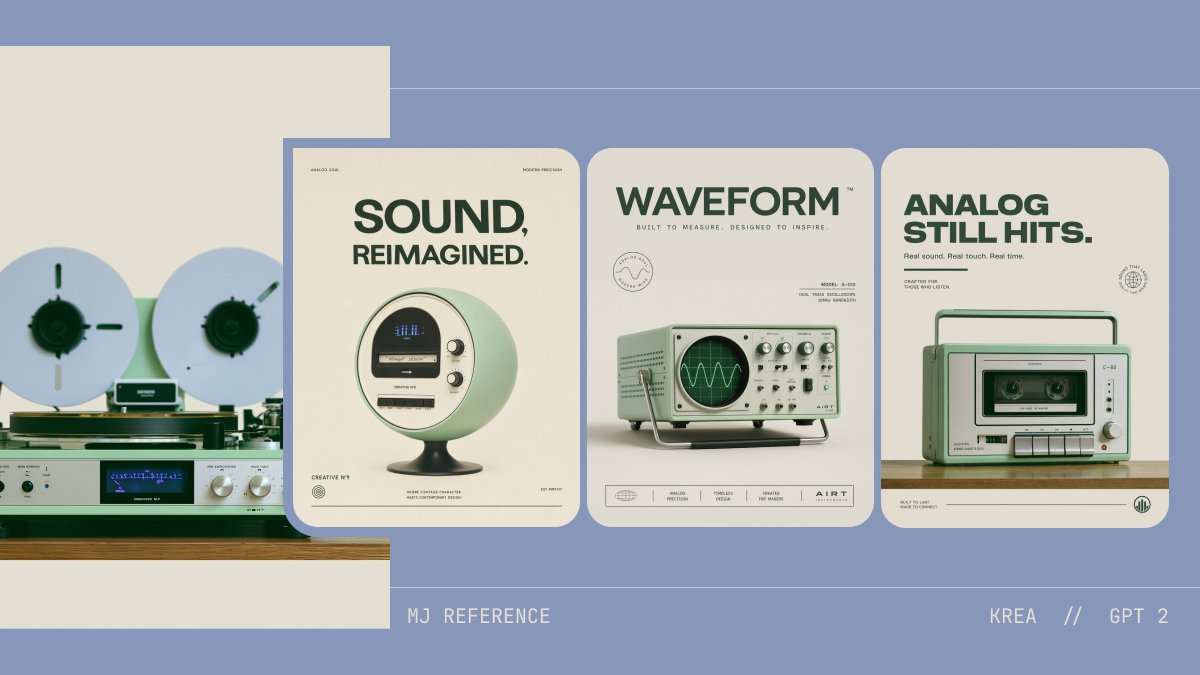
โปสเตอร์แนวคิดเครื่องเสียงเรโทร
โจทย์นี้จะสร้างบอร์ดออกแบบที่มีสไตล์ โดยผสมผสานภาพถ่ายอ้างอิงแบบอนาล็อกหนึ่งภาพเข้ากับโปสเตอร์ผลิตภัณฑ์เทคโนโลยีย้อนยุคที่เข้าชุดกันสามแบบ เพื่อใช้ในการนำเสนอแนวคิดและสำรวจความสวยงามของแบรนด์
นี่คือตัวอย่างข้อความแจ้งเตือน GPT Image 2 สำหรับ กราฟิกและโปสเตอร์ ใช้ข้อความแจ้งเตือนที่พร้อมใช้งานด้านล่างเพื่อสร้างภาพที่คล้ายกัน และตรวจสอบการอ้างอิง Awesome GPT Image 2 Prompts รวมถึงสิทธิ์ในการใช้งานเชิงพาณิชย์ก่อนนำไปใช้ซ้ำ
Free 1K preview
Generate one preview image instantly, no sign-up required.
Free text preview doesn’t preserve reference-image consistency.
พรอมป์
ข้อความแจ้งเตือนพร้อมสำหรับการคัดลอก
A clean retro-futurist presentation board on a muted periwinkle-blue background with a minimalist editorial layout, showing 4 analog-inspired audio product concept visuals arranged horizontally. On the far left, a partially cropped reference image of a vintage reel-to-reel tape deck and silver stereo receiver on a wooden shelf against a warm off-white wall; two large white reels with dark green centers, brushed metal knobs, a blue-lit display, and pale mint and silver hardware. To the right, 3 tall rounded-corner poster cards evenly spaced, all using the same cream paper tone, dark forest-green typography, mint-green product styling, and soft studio shadows. First poster: a spherical retro speaker/radio on a pedestal base, pale mint body with a circular front face, small display, and two side knobs, centered under a large bold uppercase headline reading {argument name="headline text 1" default="SOUND, REIMAGINED."}. Second poster: a mint-green vintage oscilloscope-like device with a CRT screen displaying a waveform, silver knobs and switches, and a metal tilt stand, centered under a bold uppercase headline reading {argument name="headline text 2" default="WAVEFORM"}. Third poster: a compact mint-green portable cassette recorder/boombox with handle, front cassette window, buttons, speaker grille, and silver knobs, centered under a bold uppercase headline reading {argument name="headline text 3" default="ANALOG STILL HITS."}. Each poster includes tiny microtype, fake brand marks, and footer icons in a refined Swiss-modern advertising style. Use a restrained palette of dusty blue, cream, sage mint, forest green, silver, black, and warm wood. Add thin horizontal guide lines across the background and small footer text at the bottom reading {argument name="left footer text" default="MJ REFERENCE"} on the left and {argument name="right footer text" default="KREA // GPT 2"} on the right. Overall look: premium concept design board, consistent aesthetic translation from analog hi-fi inspiration into three polished product posters, soft lighting, high-end graphic design, minimal clutter, crisp typography, and subtle nostalgic realism.ตัวแปรพร้อมท์
ตัวอย่างค่าอาร์กิวเมนต์ที่แก้ไขได้ซึ่งพบในข้อความแจ้งเตือน พร้อมค่าเริ่มต้น
Best for
- - กราฟิกและโปสเตอร์ visual exploration
- - Image generation and reference-image edits
- - Reusable briefs that keep source attribution visible
Change these parts
- - Subject, product, character, or scene
- - Aspect ratio, camera, lighting, and background
- - Brand, text, color, and output constraints
Recommended model and settings
- - Model: gpt-image-2
- - Input mode: รูปภาพเป็นรูปภาพ
- - Aspect ratio: source
- - Commercial status: review original source
How to use this prompt
- 1. Copy the prompt and preserve its structure for the first test.
- 2. Replace the subject, context, and publishing channel.
- 3. Change one camera, lighting, or style variable per iteration.
- 4. Inspect the output, source, text, and rights before reuse.
Limitations, source, and reuse cautions
- - Generated output is an editable draft, not factual, legal, or rights evidence.
- - Review the linked source, people, brands, logos, text, and third-party media before commercial use.
กรณีเพิ่มเติมในหมวดหมู่นี้
จัดลำดับความสำคัญตามหมวดหมู่ ความเข้ากันได้กับโหมดการป้อนข้อมูล คุณภาพ และความเสี่ยงที่ต่ำกว่า






หมายเหตุเกี่ยวกับการนำกลับมาใช้ใหม่และแหล่งที่มา
ใช้ข้อความแจ้งเตือนนี้อย่างปลอดภัยหลังจากดูตัวอย่างกรณีแล้ว
- 1.คัดลอกข้อความแจ้งเตือน หรือเปิดโดยตรงใน Dovoo โดยใช้ปุ่มสร้างข้อความ
- 2.ปรับตัวแปร อัตราส่วนภาพ และภาพอ้างอิงให้เหมาะสมกับกรณีการใช้งานของคุณ
- 3.ก่อนเผยแพร่หรือใช้งานโดยเสียค่าใช้จ่าย โปรดตรวจสอบสิทธิ์ในแหล่งที่มา ข้อกำหนดการอ้างอิง และความเสี่ยงด้านแบรนด์หรือภาพลักษณ์