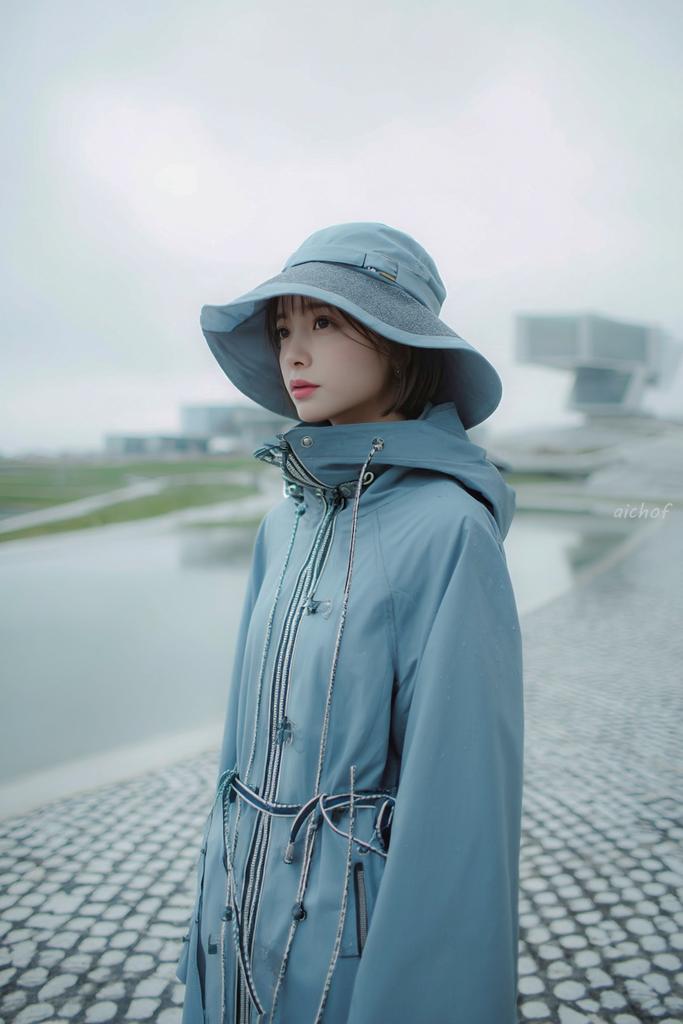
ภาพถ่ายบรรณาธิการสีน้ำเงินเข้ม
คำสั่งนี้สร้างภาพถ่ายแฟชั่นที่เรียบง่ายและอ่อนโยนของหญิงสาวในชุดกันฝนสีเดียว เหมาะสำหรับงานถ่ายแบบนิตยสาร งานแคตตาล็อก หรือภาพสตรีทแวร์ที่มีบรรยากาศ
นี่คือตัวอย่างข้อความแจ้งเตือน GPT Image 2 สำหรับ แฟชั่นและความงาม ใช้ข้อความแจ้งเตือนที่พร้อมใช้งานด้านล่างเพื่อสร้างภาพที่คล้ายกัน และตรวจสอบการอ้างอิง Awesome GPT Image 2 Prompts รวมถึงสิทธิ์ในการใช้งานเชิงพาณิชย์ก่อนนำไปใช้ซ้ำ
ต้องการชุดข้อความแจ้งเตือนทั้งหมดหรือไม่? ใช้... แฟชั่นและความงาม ศูนย์รวมหัวข้อสำหรับตัวอย่างที่เกี่ยวข้องเพิ่มเติม หรือเปิดดูได้เลย GPT Image 2 แคตตาล็อกพร้อมท์ สำหรับดัชนีตัวอย่างฉบับเต็ม โครงสร้างที่นำกลับมาใช้ใหม่ได้ และการอ้างอิงแหล่งที่มา
Free 1K preview
Generate one preview image instantly, no sign-up required.
1446/4000
พรอมป์
ข้อความแจ้งเตือนพร้อมสำหรับการคัดลอก
A dreamy fashion editorial portrait of a young woman standing outdoors on a rainy, overcast day beside a shallow reflecting pool and a pebled stone walkway, shown from about mid-thigh up in a vertical composition. She wears a monochrome pale powder-blue rain outfit consisting of a wide-brim waterproof sun hat and a high-collared technical raincoat with a hood, shiny silver front zippers, multiple drawstrings, toggles, and cord details around the waist and chest. The coat is zipped high so the collar covers part of the lower face, giving a cocooned, utilitarian look. Her short dark bob hair peeks out from under the hat. Pose her turned slightly to the side, body angled right, head facing the camera, with a calm, quiet, introspective mood. Use soft diffused light, muted cool tones, misty atmosphere, and very shallow depth of field so the modern architectural structures in the background are blurred and minimal. The setting should feel futuristic and serene, with wet surfaces, faint raindrops, pale gray sky, gentle reflections in the water, and a clean minimalist color palette dominated by {argument name="outfit color" default="pale powder blue"}. Make the image look like high-end contemporary streetwear photography, slightly cinematic, airy, soft focus, delicate contrast, and subtle film-like texture. Add a small handwritten-style watermark reading {argument name="watermark text" default="aichof"} near the right-center edge.ตัวแปรพร้อมท์
ตัวอย่างค่าอาร์กิวเมนต์ที่แก้ไขได้ซึ่งพบในข้อความแจ้งเตือน พร้อมค่าเริ่มต้น
ตัวแปร
outfit color
ค่าเริ่มต้น
pale powder blue
ตัวแปร
watermark text
ค่าเริ่มต้น
aichof
Best for
- - แฟชั่นและความงาม visual exploration
- - Image generation and reference-image edits
- - Reusable briefs that keep source attribution visible
Change these parts
- - Subject, product, character, or scene
- - Aspect ratio, camera, lighting, and background
- - Brand, text, color, and output constraints
Recommended model and settings
- - Model: gpt-image-2
- - Input mode: ข้อความเป็นรูปภาพ
- - Aspect ratio: source
- - Commercial status: review original source
How to use this prompt
- 1. Copy the prompt and preserve its structure for the first test.
- 2. Replace the subject, context, and publishing channel.
- 3. Change one camera, lighting, or style variable per iteration.
- 4. Inspect the output, source, text, and rights before reuse.
Limitations, source, and reuse cautions
- - Generated output is an editable draft, not factual, legal, or rights evidence.
- - Review the linked source, people, brands, logos, text, and third-party media before commercial use.
นำเข้าจาก Awesome GPT Image 2 Prompts จำเป็นต้องระบุแหล่งที่มา สถานะการใช้งานเชิงพาณิชย์คือ allowed โปรดตรวจสอบสิทธิ์แหล่งที่มาก่อนใช้งานแบบเสียค่าใช้จ่าย
กรณีเพิ่มเติมในหมวดหมู่นี้
จัดลำดับความสำคัญตามหมวดหมู่ ความเข้ากันได้กับโหมดการป้อนข้อมูล คุณภาพ และความเสี่ยงที่ต่ำกว่า

Transparent Earbuds on Stone Pedestal
ข้อความเป็นรูปภาพ

Manga Desert Radio Telescope Road Trip
ข้อความเป็นรูปภาพ

Female Clown Cyborg Portrait
ข้อความเป็นรูปภาพ

Fashion Studio Portrait with Blue Rim Lighting
ข้อความเป็นรูปภาพ

Spring Editorial Fashion Collage
ข้อความเป็นรูปภาพ

Imperial Research Bunker on Volcanic Planet
ข้อความเป็นรูปภาพ
หมายเหตุเกี่ยวกับการนำกลับมาใช้ใหม่และแหล่งที่มา
ใช้ข้อความแจ้งเตือนนี้อย่างปลอดภัยหลังจากดูตัวอย่างกรณีแล้ว
- 1.คัดลอกข้อความแจ้งเตือน หรือเปิดโดยตรงใน Dovoo โดยใช้ปุ่มสร้างข้อความ
- 2.ปรับตัวแปร อัตราส่วนภาพ และภาพอ้างอิงให้เหมาะสมกับกรณีการใช้งานของคุณ
- 3.ก่อนเผยแพร่หรือใช้งานโดยเสียค่าใช้จ่าย โปรดตรวจสอบสิทธิ์ในแหล่งที่มา ข้อกำหนดการอ้างอิง และความเสี่ยงด้านแบรนด์หรือภาพลักษณ์