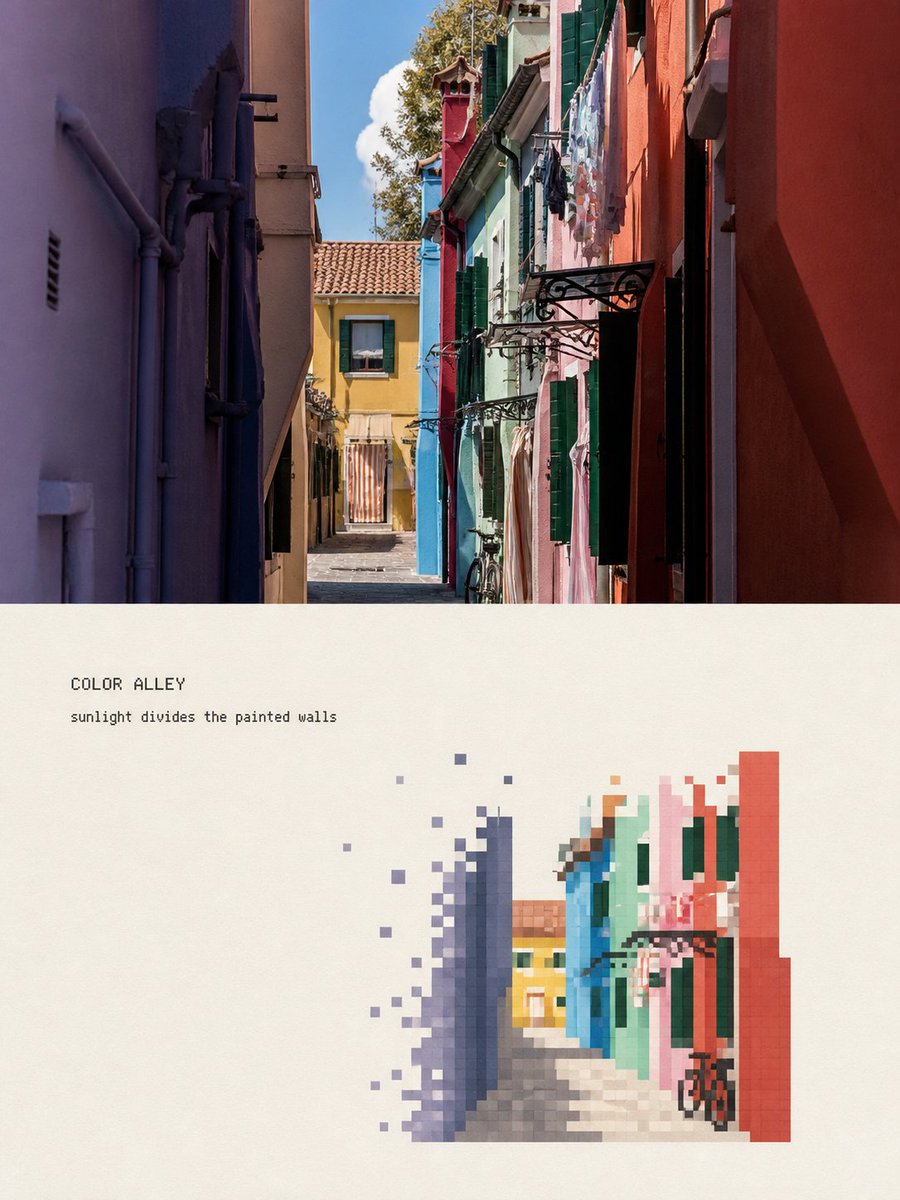
Pixelated Landscape Editorial Poster
An advanced prompt for creating editorial posters that contrast high-fidelity travel photography with a stylized pixelated 'fading' landscape interpretation.
นี่คือตัวอย่างข้อความแจ้งเตือน GPT Image 2 สำหรับ กราฟิกและโปสเตอร์ ใช้ข้อความแจ้งเตือนที่พร้อมใช้งานด้านล่างเพื่อสร้างภาพที่คล้ายกัน และตรวจสอบการอ้างอิง Awesome GPT Image 2 Prompts รวมถึงสิทธิ์ในการใช้งานเชิงพาณิชย์ก่อนนำไปใช้ซ้ำ
ต้องการชุดข้อความแจ้งเตือนทั้งหมดหรือไม่? ใช้... กราฟิกและโปสเตอร์ ศูนย์รวมหัวข้อสำหรับตัวอย่างที่เกี่ยวข้องเพิ่มเติม หรือเปิดดูได้เลย GPT Image 2 แคตตาล็อกพร้อมท์ สำหรับดัชนีตัวอย่างฉบับเต็ม โครงสร้างที่นำกลับมาใช้ใหม่ได้ และการอ้างอิงแหล่งที่มา
Free 1K preview
Generate one preview image instantly, no sign-up required.
Free text preview doesn’t preserve reference-image consistency.
4000/4000
พรอมป์
ข้อความแจ้งเตือนพร้อมสำหรับการคัดลอก
Please turn each of the travel photos I upload into an independent high-end editorial poster, with no multi-image splicing, each photo output individually. The overall layout uses a 3:4 vertical top-bottom contrast composition, with the upper and lower areas approximately 1:1, separated by a straight, clear, and clean horizontal boundary. Do not feather, permeate, or layer; do not shrink the original image into an icon, rounded card, or floating thumbnail. The upper half must retain the high-fidelity original photo. Accurately maintain the identity and quantity of subjects, architectural outlines, roof and window/door proportions, human poses, vehicles, bridges, boats, road directions, foreground/background occlusions, observation angles, real materials, natural light and shadow, and the original color atmosphere. Apply only slight, restrained color grading at the level of travel magazines, art publications, or photography exhibitions, and add a very thin film grain. Do not turn photos into illustrations; do not move, replace, add/delete, or distort subjects; do not change architectural and street perspectives. The lower half, on a warm off-white or light ivory paper surface, reorganizes the same scene into an 'artificial pixel vanishing landscape' with a large amount of white space. This is not a photo mosaic filter, nor is it lowering the resolution of the entire photo. First, select the most recognizable visual anchor from the photo, such as a bridge, a section of colored facade, a dome, a motorcycle, a bicycle, a boat, a gatehouse, or a group of clear roofs, then retain only the minimum elements that can illustrate the location and spatial relationship. Adopt a reduced and refined secondary composition: the subject usually occupies only about 30%–50% of the width and about 30%–50% of the height of the re-rendering area, concentrated in the middle-lower part, slightly to the left or right, and naturally arranged according to the direction of the original photo. Keep at least 50%–65% of the complete off-white paper surface blank on all sides. Do not completely fill the lower area with the original street scene. Only two or three layers of sparse pixel hints are kept in the background. Remove repeating window panes, fine tile lines, small signboard text, tourist shadows, dense pipelines, foliage, and photographic noise, but do not delete the eaves, bridge arches, domes, vehicle outlines, human poses, or road directions that determine the identity of the subject. Rebuild the body using discrete pixel blocks with clear edges, square or near-square: - Build the main outline, volume, light/shadow, and main color surfaces of the subject with medium-sized pixel blocks. - Use smaller, denser pixel blocks at key identification points such as eaves, spires, dome edges, window/door proportions, bridge arches, human poses, wheels, and prows. - Gradually reduce pixel density at the outer edges of buildings, vegetation, road surfaces, water surfaces, reflections, and distant views, causing squares to disconnect, dislocate, scatter, and disappear onto the paper surface. - The interior of the subject is relatively complete, and the periphery forms a clear pixel vanishing zone. - Vanishing must come from the decrease in the number and density of independent squares; do not use soft focus, feathering, smoke, transparent gradients, or pixel stretching. - A small number of discrete blocks can leave the subject along eaves, road perspective, water flow, terrain, or movement direction, but must not become random digital glitches. The color scheme is completely extracted from the current photo and compressed into about 6–12 main color steps. Retain the subject's 1–3 most recognizable colors, and then use adjacent light and dark colors to establish volume. Environmental colors are reduced in saturation and unified to natural gray, slate gray, gray-blue, gray-green, wood brown, or the photo's own architectural colors. A small area of high-saturation color that actually exists in the photo can be used as a visual focal point, such as tail lights, doors and windows, or clothing colors. The off-white paper surface must be the largest color in the re-rendering area...
Best for
- - กราฟิกและโปสเตอร์ visual exploration
- - Image generation and reference-image edits
- - Reusable briefs that keep source attribution visible
Change these parts
- - Subject, product, character, or scene
- - Aspect ratio, camera, lighting, and background
- - Brand, text, color, and output constraints
Recommended model and settings
- - Model: gpt-image-2
- - Input mode: รูปภาพเป็นรูปภาพ
- - Aspect ratio: source
- - Commercial status: review original source
How to use this prompt
- 1. Copy the prompt and preserve its structure for the first test.
- 2. Replace the subject, context, and publishing channel.
- 3. Change one camera, lighting, or style variable per iteration.
- 4. Inspect the output, source, text, and rights before reuse.
Limitations, source, and reuse cautions
- - Generated output is an editable draft, not factual, legal, or rights evidence.
- - Review the linked source, people, brands, logos, text, and third-party media before commercial use.
นำเข้าจาก Awesome GPT Image 2 Prompts จำเป็นต้องระบุแหล่งที่มา สถานะการใช้งานเชิงพาณิชย์คือ allowed โปรดตรวจสอบสิทธิ์แหล่งที่มาก่อนใช้งานแบบเสียค่าใช้จ่าย
กรณีเพิ่มเติมในหมวดหมู่นี้
จัดลำดับความสำคัญตามหมวดหมู่ ความเข้ากันได้กับโหมดการป้อนข้อมูล คุณภาพ และความเสี่ยงที่ต่ำกว่า






หมายเหตุเกี่ยวกับการนำกลับมาใช้ใหม่และแหล่งที่มา
ใช้ข้อความแจ้งเตือนนี้อย่างปลอดภัยหลังจากดูตัวอย่างกรณีแล้ว
- 1.คัดลอกข้อความแจ้งเตือน หรือเปิดโดยตรงใน Dovoo โดยใช้ปุ่มสร้างข้อความ
- 2.ปรับตัวแปร อัตราส่วนภาพ และภาพอ้างอิงให้เหมาะสมกับกรณีการใช้งานของคุณ
- 3.ก่อนเผยแพร่หรือใช้งานโดยเสียค่าใช้จ่าย โปรดตรวจสอบสิทธิ์ในแหล่งที่มา ข้อกำหนดการอ้างอิง และความเสี่ยงด้านแบรนด์หรือภาพลักษณ์