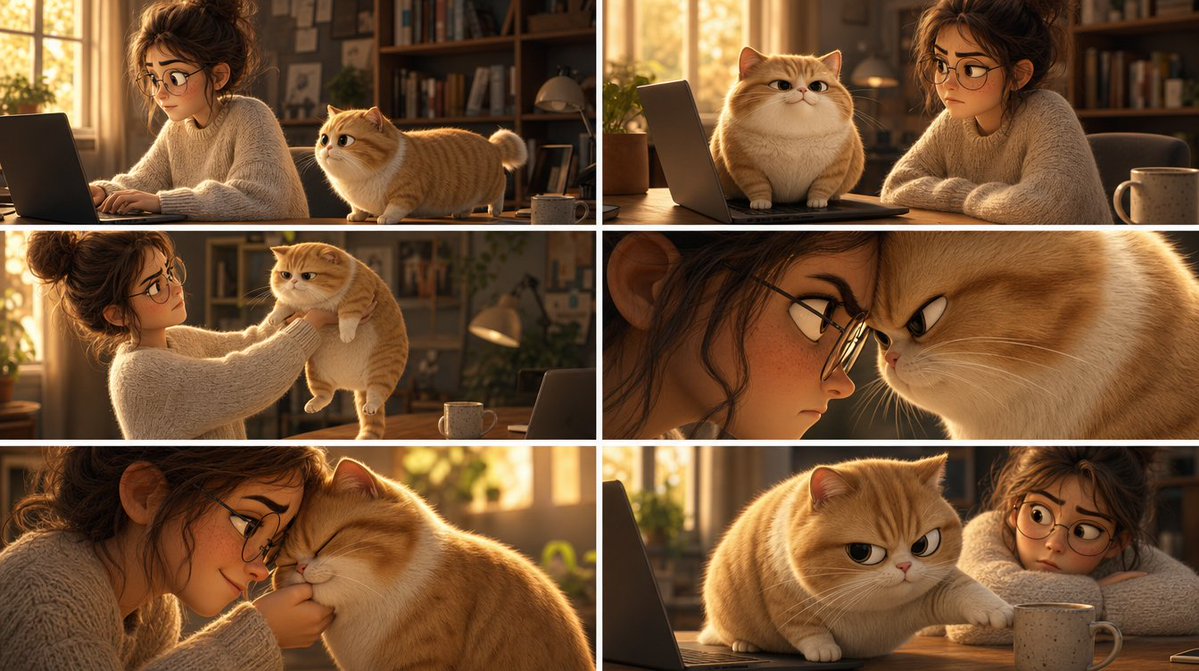
Pixar Cat Desk Storyboard
Creates a six-panel Pixar-style storyboard of a woman and a chubby orange cat causing cozy desk chaos in a sunlit home office.
นี่คือตัวอย่างข้อความแจ้งเตือน GPT Image 2 สำหรับ ภาพประกอบและศิลปะ ใช้ข้อความแจ้งเตือนที่พร้อมใช้งานด้านล่างเพื่อสร้างภาพที่คล้ายกัน และตรวจสอบการอ้างอิง Awesome GPT Image 2 Prompts รวมถึงสิทธิ์ในการใช้งานเชิงพาณิชย์ก่อนนำไปใช้ซ้ำ
ต้องการชุดข้อความแจ้งเตือนทั้งหมดหรือไม่? ใช้... ภาพประกอบและศิลปะ ศูนย์รวมหัวข้อสำหรับตัวอย่างที่เกี่ยวข้องเพิ่มเติม หรือเปิดดูได้เลย GPT Image 2 แคตตาล็อกพร้อมท์ สำหรับดัชนีตัวอย่างฉบับเต็ม โครงสร้างที่นำกลับมาใช้ใหม่ได้ และการอ้างอิงแหล่งที่มา
Free 1K preview
Generate one preview image instantly, no sign-up required.
3449/4000
พรอมป์
ข้อความแจ้งเตือนพร้อมสำหรับการคัดลอก
Goal: Create a Pixar-style 3D animated storyboard sheet as one single image showing a warm, cozy home-office scene with a young woman and a chubby golden-orange cat interacting around a desk.

Canvas: Wide cinematic storyboard sheet, approximately 16:9, divided into a clean 2x3 grid of exactly six separate film-still panels. Use thin white gutters between panels, no captions, no dialogue, no logos, no watermark.

Visual style: High-quality Pixar-like 3D animation, soft rounded character design, expressive cat face, realistic fluffy fur, warm golden-hour lighting, shallow depth of field, cinematic composition, cozy domestic atmosphere, polished animation stills. The room has sunlit windows, bookshelves, plants, desk lamp, laptop, wooden desk, and a ceramic mug.

Characters: A young adult woman with messy curly brown hair in a loose bun, wearing an oversized cream cable-knit sweater; her face is intentionally covered by a flat brown rectangular privacy block in every panel where it appears. A plump golden-orange British Shorthair-like cat with cream muzzle and belly, short legs, round face, folded-looking rounded ears, fluffy tail, and slightly grumpy but cute expressions. The cat is {argument name="cat color" default="golden-orange"}; the woman wears {argument name="sweater color" default="cream"}.

Panel layout, exactly six panels:
1. Top-left panel: Side view of the woman typing on a laptop at the desk while the orange cat stands on the desktop beside her, looking toward her hands. Warm sunlight from the window behind them; bookshelves in the background.
2. Top-right panel: The cat sits proudly on the laptop keyboard in front of the screen, facing forward with a smug expression, while the woman sits beside it with arms folded or resting on the table. A mug is visible on the right.
3. Middle-left panel: The woman gently lifts the cat under its front legs from the desk, holding it up at chest height. The cat dangles with a displeased, stiff posture; laptop and mug remain on the desk.
4. Middle-right panel: Tight dramatic close-up composition split by the panel crop: the woman’s face area at left is mostly hidden by a large vertical brown privacy rectangle, and the cat’s face fills the right side in an extreme close-up with narrowed eyes and an annoyed expression.
5. Bottom-left panel: Intimate close-up of the woman leaning close to the cat, nuzzling or kissing its head while holding it near her face. The cat’s eyes are closed, soft and resigned; the woman’s face is again obscured by a brown rectangular block.
6. Bottom-right panel: The cat is back on the wooden desk near the laptop and mug, reaching one paw toward or onto the mug with a mischievous grumpy stare, while the woman is partly visible at the right with her face covered by a brown rectangle.

Privacy blocks: Show every face clearly with natural, detailed facial features: one on the woman’s face in each of the six panels, including one large vertical block in the middle-right close-up panel. Match the warm brown tone of the scene, with no blur or pixelation.

Constraints: Maintain the exact 2x3 storyboard grid and exactly six panels; keep all panels visually consistent as the same room, same woman, same cat, same desk setup. Do not add text, speech bubbles, extra panels, subtitles, or visible brand marks. Make the cat’s expression the main emotional focus, progressing from curious to smug, annoyed, affectionate, and mischievous.
ตัวแปรพร้อมท์
ตัวอย่างค่าอาร์กิวเมนต์ที่แก้ไขได้ซึ่งพบในข้อความแจ้งเตือน พร้อมค่าเริ่มต้น
ตัวแปร
cat color
ค่าเริ่มต้น
golden-orange
ตัวแปร
sweater color
ค่าเริ่มต้น
cream
Best for
- - ภาพประกอบและศิลปะ visual exploration
- - Image generation and reference-image edits
- - Reusable briefs that keep source attribution visible
Change these parts
- - Subject, product, character, or scene
- - Aspect ratio, camera, lighting, and background
- - Brand, text, color, and output constraints
Recommended model and settings
- - Model: gpt-image-2
- - Input mode: ข้อความเป็นรูปภาพ
- - Aspect ratio: source
- - Commercial status: review original source
How to use this prompt
- 1. Copy the prompt and preserve its structure for the first test.
- 2. Replace the subject, context, and publishing channel.
- 3. Change one camera, lighting, or style variable per iteration.
- 4. Inspect the output, source, text, and rights before reuse.
Limitations, source, and reuse cautions
- - Generated output is an editable draft, not factual, legal, or rights evidence.
- - Review the linked source, people, brands, logos, text, and third-party media before commercial use.
นำเข้าจาก Awesome GPT Image 2 Prompts จำเป็นต้องระบุแหล่งที่มา สถานะการใช้งานเชิงพาณิชย์คือ allowed โปรดตรวจสอบสิทธิ์แหล่งที่มาก่อนใช้งานแบบเสียค่าใช้จ่าย
กรณีเพิ่มเติมในหมวดหมู่นี้
จัดลำดับความสำคัญตามหมวดหมู่ ความเข้ากันได้กับโหมดการป้อนข้อมูล คุณภาพ และความเสี่ยงที่ต่ำกว่า

Luxury Brand Campaign Prompt Template
ข้อความเป็นรูปภาพ

Surreal 3D Chess Match Artwork
ข้อความเป็นรูปภาพ

Female Clown Cyborg Portrait
ข้อความเป็นรูปภาพ

Celestial Moonlit Palace Scene
ข้อความเป็นรูปภาพ

Imperial Research Bunker on Volcanic Planet
ข้อความเป็นรูปภาพ

Greyscale Puzzle Portrait with Color Accent
ข้อความเป็นรูปภาพ
หมายเหตุเกี่ยวกับการนำกลับมาใช้ใหม่และแหล่งที่มา
ใช้ข้อความแจ้งเตือนนี้อย่างปลอดภัยหลังจากดูตัวอย่างกรณีแล้ว
- 1.คัดลอกข้อความแจ้งเตือน หรือเปิดโดยตรงใน Dovoo โดยใช้ปุ่มสร้างข้อความ
- 2.ปรับตัวแปร อัตราส่วนภาพ และภาพอ้างอิงให้เหมาะสมกับกรณีการใช้งานของคุณ
- 3.ก่อนเผยแพร่หรือใช้งานโดยเสียค่าใช้จ่าย โปรดตรวจสอบสิทธิ์ในแหล่งที่มา ข้อกำหนดการอ้างอิง และความเสี่ยงด้านแบรนด์หรือภาพลักษณ์