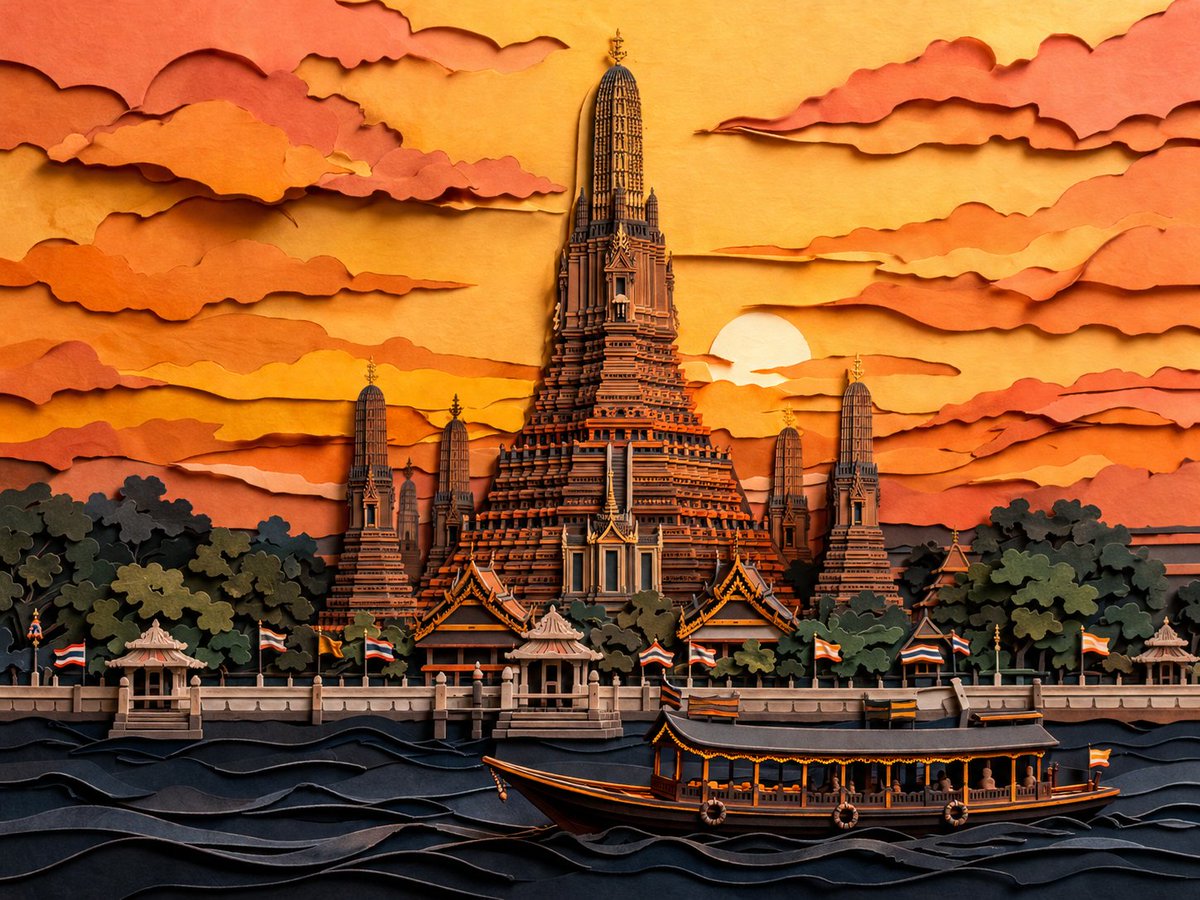
กระดาษตัด สิ่งที่อรุณทำในยามพระอาทิตย์ตก
โจทย์นี้สร้างภาพประกอบสไตล์ตัดกระดาษที่ซ้อนทับกันอย่างประณีตของวัดอรุณยามพลบค่ำ เหมาะสำหรับใช้เป็นงานศิลปะตกแต่งสำหรับการท่องเที่ยว โปสเตอร์ หรือภาพทิวทัศน์ทางวัฒนธรรมในรูปแบบต่างๆ
นี่คือตัวอย่างข้อความแจ้งเตือน GPT Image 2 สำหรับ ภาพประกอบและศิลปะ ใช้ข้อความแจ้งเตือนที่พร้อมใช้งานด้านล่างเพื่อสร้างภาพที่คล้ายกัน และตรวจสอบการอ้างอิง Awesome GPT Image 2 Prompts รวมถึงสิทธิ์ในการใช้งานเชิงพาณิชย์ก่อนนำไปใช้ซ้ำ
ต้องการชุดข้อความแจ้งเตือนทั้งหมดหรือไม่? ใช้... ภาพประกอบและศิลปะ ศูนย์รวมหัวข้อสำหรับตัวอย่างที่เกี่ยวข้องเพิ่มเติม หรือเปิดดูได้เลย GPT Image 2 แคตตาล็อกพร้อมท์ สำหรับดัชนีตัวอย่างฉบับเต็ม โครงสร้างที่นำกลับมาใช้ใหม่ได้ และการอ้างอิงแหล่งที่มา
Free 1K preview
Generate one preview image instantly, no sign-up required.
1390/4000
พรอมป์
ข้อความแจ้งเตือนพร้อมสำหรับการคัดลอก
A highly detailed layered papercut artwork of {argument name="scene" default="Wat Arun in Bangkok, Thailand at dusk"}, viewed from across the river in a centered, symmetrical composition. The image should look like handcrafted 3D paper sculpture and kirigami, with stacked cut-paper layers, visible paper edges, soft relief depth, delicate shadows between layers, and crisp ornamental architectural detail. Place the grand central prang of the temple rising dramatically in the middle, surrounded by 4 smaller prangs, dense dark green-black tree masses at the base, a riverside promenade with small pavilions, and multiple Thai flags lining the waterfront. In the foreground, show the Chao Phraya River as stylized rolling paper waves in deep navy and charcoal, with 1 long traditional river boat crossing from left to right near the bottom center. The sky is filled with many horizontally stretched layered clouds cut from paper, framing a low setting sun partially hidden behind the temple on the right side of center. Use a warm sunset palette of {argument name="color palette" default="golden yellow, amber, burnt orange, peach, terracotta, coral, and deep blue-black"}. Keep the style elegant, intricate, cinematic, and richly textured, with a handcrafted paper diorama feel, high contrast between glowing sky and dark foreground, and an overall refined Asian decorative art aesthetic.ตัวแปรพร้อมท์
ตัวอย่างค่าอาร์กิวเมนต์ที่แก้ไขได้ซึ่งพบในข้อความแจ้งเตือน พร้อมค่าเริ่มต้น
ตัวแปร
scene
ค่าเริ่มต้น
Wat Arun in Bangkok, Thailand at dusk
ตัวแปร
color palette
ค่าเริ่มต้น
golden yellow, amber, burnt orange, peach, terracotta, coral, and deep blue-black
Best for
- - ภาพประกอบและศิลปะ visual exploration
- - Image generation and reference-image edits
- - Reusable briefs that keep source attribution visible
Change these parts
- - Subject, product, character, or scene
- - Aspect ratio, camera, lighting, and background
- - Brand, text, color, and output constraints
Recommended model and settings
- - Model: gpt-image-2
- - Input mode: ข้อความเป็นรูปภาพ
- - Aspect ratio: source
- - Commercial status: review original source
How to use this prompt
- 1. Copy the prompt and preserve its structure for the first test.
- 2. Replace the subject, context, and publishing channel.
- 3. Change one camera, lighting, or style variable per iteration.
- 4. Inspect the output, source, text, and rights before reuse.
Limitations, source, and reuse cautions
- - Generated output is an editable draft, not factual, legal, or rights evidence.
- - Review the linked source, people, brands, logos, text, and third-party media before commercial use.
นำเข้าจาก Awesome GPT Image 2 Prompts จำเป็นต้องระบุแหล่งที่มา สถานะการใช้งานเชิงพาณิชย์คือ allowed โปรดตรวจสอบสิทธิ์แหล่งที่มาก่อนใช้งานแบบเสียค่าใช้จ่าย
กรณีเพิ่มเติมในหมวดหมู่นี้
จัดลำดับความสำคัญตามหมวดหมู่ ความเข้ากันได้กับโหมดการป้อนข้อมูล คุณภาพ และความเสี่ยงที่ต่ำกว่า

Transparent Earbuds on Stone Pedestal
ข้อความเป็นรูปภาพ

Manga Desert Radio Telescope Road Trip
ข้อความเป็นรูปภาพ

Female Clown Cyborg Portrait
ข้อความเป็นรูปภาพ

Grumpy Rhino Storybook Illustration
ข้อความเป็นรูปภาพ

Surreal 3D Chess Match Artwork
ข้อความเป็นรูปภาพ

Imperial Research Bunker on Volcanic Planet
ข้อความเป็นรูปภาพ
หมายเหตุเกี่ยวกับการนำกลับมาใช้ใหม่และแหล่งที่มา
ใช้ข้อความแจ้งเตือนนี้อย่างปลอดภัยหลังจากดูตัวอย่างกรณีแล้ว
- 1.คัดลอกข้อความแจ้งเตือน หรือเปิดโดยตรงใน Dovoo โดยใช้ปุ่มสร้างข้อความ
- 2.ปรับตัวแปร อัตราส่วนภาพ และภาพอ้างอิงให้เหมาะสมกับกรณีการใช้งานของคุณ
- 3.ก่อนเผยแพร่หรือใช้งานโดยเสียค่าใช้จ่าย โปรดตรวจสอบสิทธิ์ในแหล่งที่มา ข้อกำหนดการอ้างอิง และความเสี่ยงด้านแบรนด์หรือภาพลักษณ์