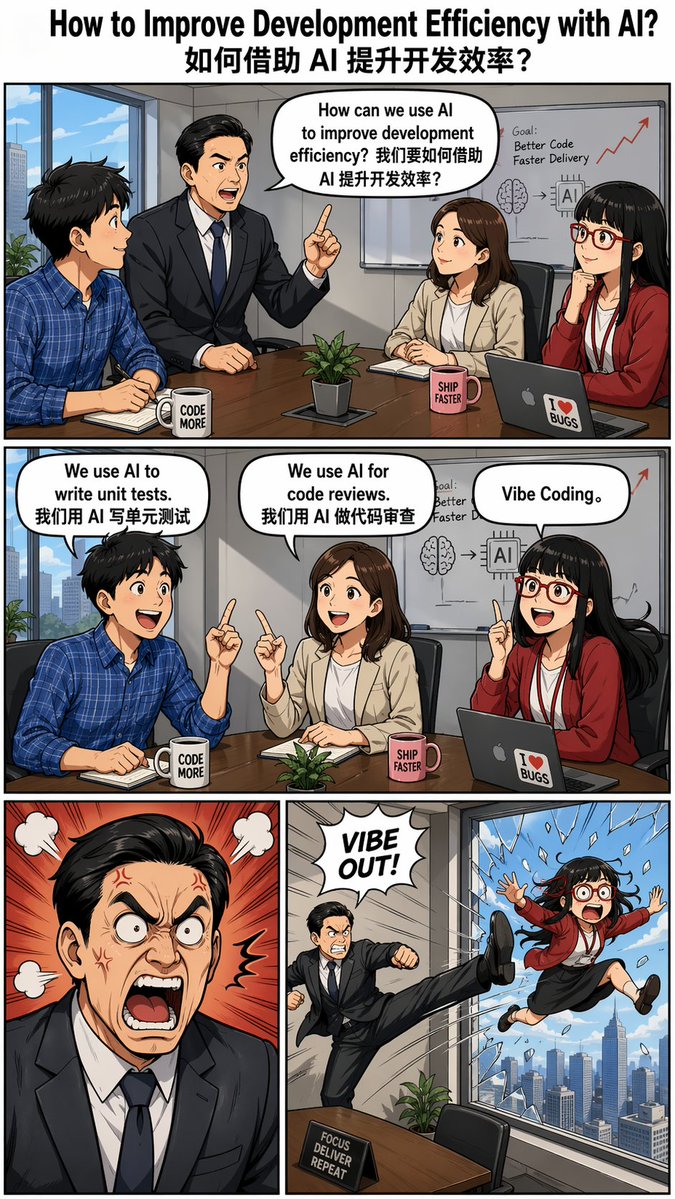
โจทย์การ์ตูนมีม "มองออกไปนอกหน้าต่าง"
คำแนะนำโดยละเอียดสำหรับการสร้างการ์ตูนสี่ช่องในสไตล์มีม 'Out the Window' รวมถึงคำอธิบายตัวละครและเนื้อหาของแต่ละช่อง
นี่คือตัวอย่างข้อความแจ้งเตือน GPT Image 2 สำหรับ ภาพประกอบและศิลปะ ใช้ข้อความแจ้งเตือนที่พร้อมใช้งานด้านล่างเพื่อสร้างภาพที่คล้ายกัน และตรวจสอบการอ้างอิง Awesome GPT Image 2 Prompts รวมถึงสิทธิ์ในการใช้งานเชิงพาณิชย์ก่อนนำไปใช้ซ้ำ
ต้องการชุดข้อความแจ้งเตือนทั้งหมดหรือไม่? ใช้... ภาพประกอบและศิลปะ ศูนย์รวมหัวข้อสำหรับตัวอย่างที่เกี่ยวข้องเพิ่มเติม หรือเปิดดูได้เลย GPT Image 2 แคตตาล็อกพร้อมท์ สำหรับดัชนีตัวอย่างฉบับเต็ม โครงสร้างที่นำกลับมาใช้ใหม่ได้ และการอ้างอิงแหล่งที่มา
Free 1K preview
Generate one preview image instantly, no sign-up required.
1041/4000
พรอมป์
ข้อความแจ้งเตือนพร้อมสำหรับการคัดลอก
Create a four-panel meme-style comic with the title "{argument name="title" default="How to Improve Development Efficiency with AI? 如何借助 AI 提升开发效率?"}", featuring dialogue bubbles, based on "{argument name="meme style" default="Out the Window"}".

--ar 9:16

Characters:

- Boss: Asian male, wearing a suit, neatly groomed.
- Employee Xiaoming: Male, wearing a blue plaid shirt.
- Employee Xiaohong: Female.
- Employee Xiaohu: Female, Asian, bangs, wearing red-framed glasses.

Scene Descriptions:

- First Panel (Single wide screen):
  The boss asks in a meeting: "How can we use AI to improve development efficiency? 我们要如何借助 AI 提升开发效率?"

  Three employees are sitting and listening.

- Second Panel (Single wide screen):
  Each employee answers:

  - Xiaoming: "We use AI to write unit tests. 我们用 AI 写单元测试"
  - Xiaohong: "We use AI for code reviews. 我们用 AI 做代码审查"
  - Xiaohu: "Vibe Coding."

- Third Row (Two panels):
  - Left Panel: The boss looks very angry.
  - Right Panel: Employee Xiaohu is comically kicked out of a high-rise window.
ตัวแปรพร้อมท์
ตัวอย่างค่าอาร์กิวเมนต์ที่แก้ไขได้ซึ่งพบในข้อความแจ้งเตือน พร้อมค่าเริ่มต้น
ตัวแปร
meme style
ค่าเริ่มต้น
Out the Window
ตัวแปร
title
ค่าเริ่มต้น
How to Improve Development Efficiency with AI? 如何借助 AI 提升开发效率?
Best for
- - ภาพประกอบและศิลปะ visual exploration
- - Image generation and reference-image edits
- - Reusable briefs that keep source attribution visible
Change these parts
- - Subject, product, character, or scene
- - Aspect ratio, camera, lighting, and background
- - Brand, text, color, and output constraints
Recommended model and settings
- - Model: gpt-image-2
- - Input mode: ข้อความเป็นรูปภาพ
- - Aspect ratio: source
- - Commercial status: review original source
How to use this prompt
- 1. Copy the prompt and preserve its structure for the first test.
- 2. Replace the subject, context, and publishing channel.
- 3. Change one camera, lighting, or style variable per iteration.
- 4. Inspect the output, source, text, and rights before reuse.
Limitations, source, and reuse cautions
- - Generated output is an editable draft, not factual, legal, or rights evidence.
- - Review the linked source, people, brands, logos, text, and third-party media before commercial use.
นำเข้าจาก Awesome GPT Image 2 Prompts จำเป็นต้องระบุแหล่งที่มา สถานะการใช้งานเชิงพาณิชย์คือ allowed โปรดตรวจสอบสิทธิ์แหล่งที่มาก่อนใช้งานแบบเสียค่าใช้จ่าย
กรณีเพิ่มเติมในหมวดหมู่นี้
จัดลำดับความสำคัญตามหมวดหมู่ ความเข้ากันได้กับโหมดการป้อนข้อมูล คุณภาพ และความเสี่ยงที่ต่ำกว่า

Transparent Earbuds on Stone Pedestal
ข้อความเป็นรูปภาพ

Manga Desert Radio Telescope Road Trip
ข้อความเป็นรูปภาพ

Female Clown Cyborg Portrait
ข้อความเป็นรูปภาพ

Grumpy Rhino Storybook Illustration
ข้อความเป็นรูปภาพ

Surreal 3D Chess Match Artwork
ข้อความเป็นรูปภาพ

Imperial Research Bunker on Volcanic Planet
ข้อความเป็นรูปภาพ
หมายเหตุเกี่ยวกับการนำกลับมาใช้ใหม่และแหล่งที่มา
ใช้ข้อความแจ้งเตือนนี้อย่างปลอดภัยหลังจากดูตัวอย่างกรณีแล้ว
- 1.คัดลอกข้อความแจ้งเตือน หรือเปิดโดยตรงใน Dovoo โดยใช้ปุ่มสร้างข้อความ
- 2.ปรับตัวแปร อัตราส่วนภาพ และภาพอ้างอิงให้เหมาะสมกับกรณีการใช้งานของคุณ
- 3.ก่อนเผยแพร่หรือใช้งานโดยเสียค่าใช้จ่าย โปรดตรวจสอบสิทธิ์ในแหล่งที่มา ข้อกำหนดการอ้างอิง และความเสี่ยงด้านแบรนด์หรือภาพลักษณ์